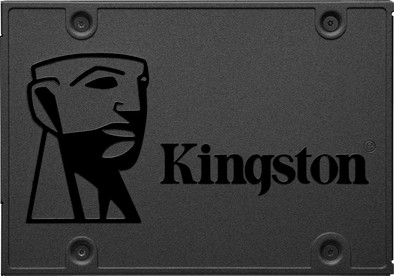
Kingston A400 SSD 960GB
Never available again
View alternatives in the sidebar
View alternatives in the sidebar
Product number | 808873 | |
|---|---|---|
Manufacturer code | SA400S37/960G | |
Brand | Kingston | |
Processing of your defect | Via Coolblue | |
Old product returned for free |
Total storage capacity | 960 GB | |
|---|---|---|
Type of SSD | 2.5-inch SATA | |
SSD-controller | Proprietary | |
Memory type (SSD) | Triple Level Cell (TLC) |
Compatible with product type | Consoles, Desktop, Laptop | |
|---|---|---|
Compatible with console model | PlayStation 4 | |
With heatsink |
Depth | 100 mm | |
|---|---|---|
Height | 7 mm | |
Width | 69,9 mm | |
Color | Black |
Speed class 2.5-inch SSD | Basic | |
|---|---|---|
Cache memory | 0 MB | |
Maximum read speed | 500 MB/s | |
Maximum write speed | 450 MB/s | |
Mean Time Between Failure (MTBF) | 1000000 hours |
Energy-efficient | ||
|---|---|---|
Durability class | Basic |
Total storage capacity | 960 GB | |
|---|---|---|
Type of SSD | 2.5-inch SATA | |
Maximum read speed | 500 MB/s | |
Maximum write speed | 450 MB/s | |
With heatsink | ||
Compatible with console model | PlayStation 4 |
According to our solid state drive (SSD) expert
With this SSD, your PC boots within 15 seconds.
This 2.5-inch internal SSD is suitable for laptops and desktops.
You get a 3-year warranty on this SSD.
A mounting plate to install the SSD in a desktop isn't included.
Note: this 2.5-inch SSD has a SATA interface and only works if your system supports SATA. Check this in the manual of your laptop or motherboard.
The Kingston A400 SSD 960GB is an internal SSD suitable for simple and everyday tasks. Thanks to the read speed of 500MB/s and write speed of 450MB/s, you can store an average HD movie in about 10 seconds and an extensive collection of vacation photos in about 15 to 20 seconds. Because the Kingston A400 SSD is much faster than a hard drive, your laptop or computer boots in just 15 seconds. With a height of 7mm, you'll know for sure it fits in your laptop, console, or desktop PC. You connect the SSD via the common SATA connector.
Installation ease
Reliability
Speed
Price-quality ratio
If you have a slightly older computer, this will give your PC or laptop a second life. Also a must have on a new computer. Just so much faster than a HDD.
M. van Dijk
8 November 2019
Automatically translated from Nederlands
Used to upgrade a 2009 Macbook Pro. The old 160GB 5400 rpm was end-of-life and immediately after moving the HD through this SSD, the Macbook was perfectly workable again. An upgrade that is easy to perform that will give your old Macbook a lot of fun again!
Rob Schins
23 September 2019
Automatically translated from Nederlands
When purchasing, also pay attention to the size of your current hard drive (if you want to transfer everything). When purchasing, check carefully whether you still need a bracket (built-in module) to install it properly. For this you can purchase a package including bracket and cable.
Peter Hilgers
7 November 2018
Automatically translated from Nederlands