Never available again
View alternatives in the sidebar
View alternatives in the sidebar
Product number | 811813 | |
|---|---|---|
Manufacturer code | MZ-V7E1T0BW | |
Brand | Samsung | |
Processing of your defect | Carry-in warranty | |
Old product returned for free |
Total storage capacity | 1 TB | |
|---|---|---|
Type of SSD | M.2 NVMe (PCIe) | |
SSD-controller | Samsung | |
Memory type (SSD) | Multi Level Cell (MLC) |
M.2 SSD connector type | M |
|---|
Depth | 80 mm | |
|---|---|---|
Height | 2 mm | |
Width | 22 mm | |
Color | Black |
Speed class M.2 SSD | High-end | |
|---|---|---|
Cache memory | 1024 MB | |
Maximum read speed | 3400 MB/s | |
Maximum write speed | 2500 MB/s | |
Output operations per second (IOPS) | 500000 | |
Input operations per second (IOPS) | 450000 | |
Mean Time Between Failure (MTBF) | 1500000 hours |
Energy-efficient | ||
|---|---|---|
Durability class | Basic |
Total storage capacity | 1 TB | |
|---|---|---|
Type of SSD | M.2 NVMe (PCIe) | |
Maximum read speed | 3400 MB/s | |
Maximum write speed | 2500 MB/s |
According to our solid state drive (SSD) expert
With a read speed of 3500MB/s and a write speed of 2500MB/s, this SSD is a lot quicker than its predecessor.
You can use the included Magician software to manage and monitor the drive's health.
This internal SSD comes with a 5-year manufacturer's warranty.
The M key prevents this M.2 SSD from being compatible with every motherboard.
Note: this M.2 SSD has a PCI Express (NVMe) interface and will only work if your system supports PCIe/NVMe. Make sure to check this in the manual of your laptop or motherboard.
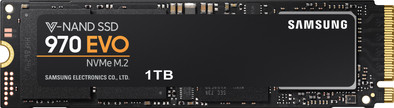
The Samsung 970 Evo 1TB is an internal NVMe SSD, suitable for demanding users. With extremely fast read speeds of 3500MB/s, and write speeds of 2500MB/s, you can process data in a few seconds. With this SSD, your laptop will boot in less than 15 seconds. On top of that, this SSD will last for years, thanks to a Terabytes Written of 600. The 256-bit Advanced Encryption Standard ensures the protection of your data. You can update the SSD's firmware and manage its performance through the Samsung Magician software.
This SSD is 80 millimeters long. Want to use this M.2 internal SSD? Make sure to check whether your motherboard supports this length. If not, the SSD won't fit and you won't be able to install it.
5 stars
164
4 stars
25
3 stars
0
2 stars
0
1 star
0
Installation ease
Reliability
Speed
Price-quality ratio
I had a slightly older system of 4 years with an SSD already, so I wasn't expecting much gain. But this 970 EVO just makes my computer feel a little snappier, even without a fresh install of Windows.
Easy to install if you have an M.2 port instead of the earlier SATAIII drives with cables.
Since I had such a previous model, I could use the empty port for this SSD and leave my previous SSD. Then, via the downloadable migration software tool, the data from my previous drive was copied onto the new one.
What is not said with that software is that the motherboard can have trouble with 2 different drives that have the same bootloader. I couldn't select the new SSD as the boot drive if the previous drive was active. It only worked when the old one was disconnected.
What I then did is with a Linux Live USB installation, completely wiped the old SSD. After that I was able to leave the old disk and the PC just started up with the new disk and old disk in the same system.
Not difficult in the end, but you should know before you assume that the SSD would not work or something. :)
Ian De Vos
9 July 2018
Automatically translated from Nederlands
Easy installation in my Macbook Pro Retina late 2013 with adapter. More than twice as fast as the original SSD. Feels like an excellent quality product.
JK
9 August 2019
Automatically translated from Nederlands
Great drive, works fine on Linux system
Henri
20 November 2019
Automatically translated from Nederlands