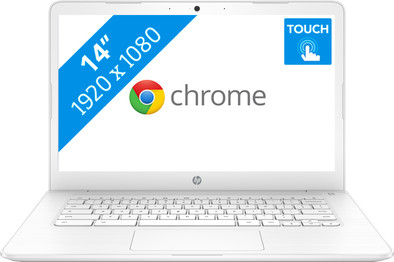
HP Chromebook 14-ca040nd
Never available again
View alternatives in the sidebar
View alternatives in the sidebar
Product number | 815069 | |
|---|---|---|
Manufacturer code | 4ES47EA#ABH | |
Brand | HP | |
Processing of your defect | Via Coolblue | |
Old product returned for free |
Screen size | 14 inches | |
|---|---|---|
Touchscreen | ||
Panel type | IPS panel | |
Sharpness | Full HD (1080p) | |
Resolution width | 1920 pixels | |
Resolution height | 1080 pixels | |
Screen reflection | Glossy | |
Adaptive Sync |
Processor | Intel Celeron | |
|---|---|---|
Processor code name | Apollo Lake | |
Processor cores | Dual-Core (2) | |
Clock speed | 1,1 GHz | |
Turbo speed | 2,4 GHz | |
Cache memory | 2 MB |
Internal RAM | 4 GB | |
|---|---|---|
Memory composition | 1x 4GB | |
Memory slot 1 | 4 GB | |
Total number of RAM slots | 1 | |
Maximum internal memory | 4 GB |
Total storage capacity | 32 GB | |
|---|---|---|
Storage type | Flash | |
SSD storage capacity | 32 GB | |
Hard drive type | eMMC |
Video card | Intel HD Graphics 500 | |
|---|---|---|
Type of video card | Shared |
Operating system | Google ChromeOS |
|---|
Laptop model | Chromebook | |
|---|---|---|
Color | White | |
Material | Plastic | |
Height | 1,83 cm | |
Width | 33,7 cm | |
Depth | 22,7 cm | |
Weight | 1,53 kg | |
Operating system language | Dutch, English, Multiple languages can be configured |
Mobile data connection | No |
|---|
USB port | ||
|---|---|---|
Number of USB ports | 4 | |
Type of USB port | Standard USB-A, USB-C | |
Protocol Female USB-C port | DisplayPort Alternative Mode, USB, USB electricity | |
Number of female standard USB-A ports | 2 | |
Female standard USB-A port version | 3.0 | |
Number of USB 3.0 Female USB-C ports | 0 | |
HDMI connector | ||
DisplayPort connector | ||
VGA connector | ||
Network connector | ||
Thunderbolt connector | ||
Headphone jack | ||
Memory card reader |
Keyboard layout | QWERTY | |
|---|---|---|
Physical keyboard layout | ANSI | |
Numeric keypad | ||
Spill-resistant | ||
Backlit keyboard | ||
Mechanical keyboard | ||
Programmable keys |
Built-in microphone | ||
|---|---|---|
Number of speakers | 2 | |
Sound reproduction | Stereo | |
Integrated computer speakers brand | Bang & Olufsen |
Built-in camera | ||
|---|---|---|
Image definition webcams | HD Ready (720p) |
Battery technology | Lithium-ion | |
|---|---|---|
Battery life according to customers | Excellent | |
Power connector input type (female) | USB Type C |
Manufacturer's warranty |
|---|
TPM (Trusted platform module) | ||
|---|---|---|
Kensington lock | ||
Windows Hello | ||
Fingerprint identity sensor |
Extra installed software |
|---|
Screen size | 14 inches | |
|---|---|---|
Processor | Intel Celeron | |
Internal RAM | 4 GB | |
Total storage capacity | 32 GB | |
Video card | Intel HD Graphics 500 | |
Panel type | IPS panel | |
Touchscreen |
According to our laptop expert
You can operate the Chromebook with your fingers using the touchscreen.
Chromebooks are less susceptible to viruses, so your Chromebook won't be compromised.
Energy-efficient, so you can use your Chromebook an entire working day without having to recharge it.
Windows programs don't work on a Chromebook.
This Chromebook is only suitable for simple tasks like internet browsing, emailing, and text processing.
The HP Chromebook 14-ca040nd is a laptop that can be used to surf the web or for text processing. You won't use Windows as the operating system on this laptop, but Chrome OS. Log in via your Google account and edit texts in Google Docs. You store files in the cloud, so a large hard drive is unnecessary. On top of that, you'll always have access to your files if you're logged in via Google. This makes getting a hold of your files at school or during a meeting easy. Thanks to the energy-efficient Chrome OS operating system, you can use Chromebook the whole working day without having to charge it.
Note: Windows programs don't work on a Chromebook. Do you want to use Microsoft Office? If so, buy Office 365 or download the Office app in the Google Play Store.
5 stars
9
4 stars
7
3 stars
0
2 stars
0
1 star
0
I read the Acer reviews and noticed that a lot of people had problems with the display hinges. That was why I chose an HP. It turned out to be the right choice. A very solid laptop with a good keyboard. And no hinge problem. Highly recommendable.
Rob de Vries
12 September 2018
Automatically translated from Nederlands
Chromebook delivered today. Looks amazing. Fast service from Coolblue too! Chromebook has nice keys/mousepad. I did buy a wireless HP mouse, because I like it better myself. Chromebook isn't very fast, but it certainly isn't slow either. Works great and simple. I will only use it for study and work. Maybe occasionally watch a Netflix movie on it, but haven't tried it yet in terms of image/sound. All in all a beautiful, white Chromebook, lightweight, so easy to carry. Also has touch screen. Works fine and simple. Recommended! ps. Can only be used with a Google account. Not a laptop.
Anoniem
4 August 2018
Automatically translated from Nederlands
It took some getting used to working with a Chrome book. Very nice now that I understand everything and the laptop is fast! Touch screen works really well and has no delay. Nice!
Gaetano van Vugt
7 October 2018
Automatically translated from Nederlands
