Google Nest Thermostat E
Never available again
View alternatives in the sidebar
According to our thermostat expert
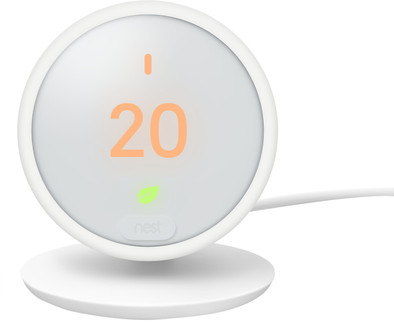
Save energy with the Google Nest thermostat E. Easily install the thermostat yourself thanks to the do it yourself installation. The thermostat automatically lowers the temperature (eco mode) when you're not at home. You can control the thermostat from every location with the app on your smart device (iOS and Android), exactly like you're used to with Google Nest. The app also shows you your energy history and whether there are any problems with your boiler. Give all family members access to the app so everyone can control the thermostat. The Google Nest thermostat E has a bright, high resolution LED display. Both the ring and the display are white, which means the thermostat blends in with your white wall. Because the thermostat consists of 2 parts, the thermostat and the E link, you can also place the thermostat in a different part of the room. The thermostat hardly stands out in the room. The integrated LED lighting is slightly dimmed, which gives it a soft and calm appearance.
This thermostat doesn't work if you have a hybrid or reversible water pump, district heating without a thermostat, or an electric, wood, or biomass heater.
The Google Nest Thermostat E is compatible with Google Assistant and Google Home.
Type of heating | Boiler, District heating, [Floor heating] | |
|---|---|---|
Thermostat type | Smart thermostat | |
Suitable for type boiler | All boilers, Modulating boilers | |
Wireless connection with heating | ||
Suitable for floor heating |
5 stars
34
4 stars
13
3 stars
0
2 stars
1
1 star
0
User friendliness
Settings
Ease of assembly
Believe me, I can't hang up, put down or, better yet, install this kind of thing without it disappearing defenseless and defective with the stuff to be composted afterwards. I've checked everything out. Colors of the wires, what should go where and why not. In the end, when I accidentally broke my old thermostat while looking for the “Opentherm symbol”, I ordered the Nest E. To my utter surprise, I had the Heat Link connected to my boiler within 16 minutes. Indeed only 2 wires as the old thermostat that carries the Opentherm (kind of ring on its side with 2 dots) symbol. And the boiler is modulating. He does it. It's 30 degrees here now, but that's because of the weather.
Bart
27 August 2019
Automatically translated from Dutch
The box contains everything you could possibly need, except for the two screwdrivers. The installation is first to prepare everything, then replace the thermostat. This was a little bit of an upside-down world for me.
During the installation they have a tip to take a picture of the current wiring. But they also included a sticker sheet with cable labels. This is really super useful if you don't have cables with different colors.
The installation was quite quick and easy to do, the app helps a lot. You don't have to think about it yourself and replacing an OpenTherm thermostat is a breeze. Are you handy but know less about central heating installations, just follow the steps of the app!
After going through the installation and everything, it works like a charm. I myself was not happy with the standard schedule, but that is something that you can easily adjust in the app itself.
If you press the HeatLink, you will also see when the heating is activated. An indicator will then appear briefly. The HeatLink also works as a temperature sensor, which gave me new insights into why it sometimes felt cold but was still warm with the old thermostat.
It would be nice if the dust cover came in multiple colors, there would also be support for Apple Homekit and the thermostat could also work on the battery, so that the cord could be removed from the thermostat. But who knows what will come in the future.
I was in doubt about the Nest Learning Thermostat for a long time, but because I had to place the HeatLink next to the central heating system, which is placed outside my home, that was not an option. But the Thermostat E is the solution!
Gert-Jan Admiraal
19 October 2018
Automatically translated from Dutch
I was able to install it myself (easy so ;) ). Operable by mobile phone so you can come home warm. Looks good (in any interior I think). Must first 'find' his way because it is self-learning. So sometimes 'on' and 'off' when it is not necessary. Top product but pricey.
Dieter Geldof
8 November 2018
Automatically translated from Dutch
Product number | 820264 | |
|---|---|---|
Manufacturer code | HF001235-EX | |
Brand | Google Nest | |
Warranty | 2 years | |
Processing of your defect | Via Coolblue | |
Old product returned for free |
Type of heating | Boiler, District heating, [Floor heating] | |
|---|---|---|
Suitable for brand boiler | ATAG, AWB, Bosch, Ferroli, Intergas, Itho, Junkers, Nefit, Radson, Remeha, Vaillant, Viessmann | |
Suitable for type boiler | All boilers, Modulating boilers | |
Optimal for modulating boilers | ||
OpenTherm | ||
Suitable for floor heating |
Thermostat type | Smart thermostat | |
|---|---|---|
Programmable per time unit | By weekend, Per day, Per holiday, Per week days | |
Wireless connection with heating | ||
Self-learning | ||
Touchscreen | ||
Geofencing | ||
Setting range degrees | 0 - 40 | |
Automatic daylight savings change | ||
Adjustable by half degrees | ||
Connection of external temperature sensor | ||
Adjustable temperature zones | ||
Control panel language | Dutch, English, French, German | |
Display backlight | ||
Brightness of backlight adjustable | ||
Built-in WiFi | ||
Programmable | ||
Installation on location |
Controls via app | ||
|---|---|---|
Controlled via Apple app | ||
Controlled via Android app | ||
Controlled via Windows app | ||
Compatible with smartphone / apps | ||
Smart home platform | Google Assistant |
Power supply type | Power grid | |
|---|---|---|
2-wire connector |
Height | 9,44 cm |
|---|---|
Depth | 3,2 cm |
Width | 8,16 cm |
Weight | 408 g |
Color | White |
Material | Metal, Plastic |
Guaranteed support with updates | Unknown |
|---|