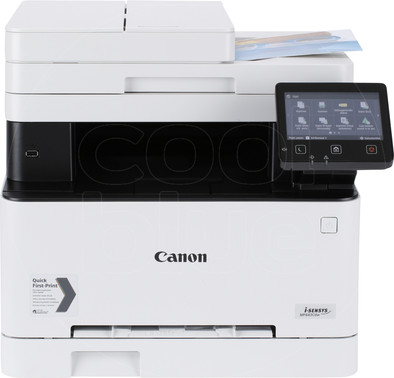
Canon i-Sensys MF643Cdw
Never available again
View alternatives in the sidebar
View alternatives in the sidebar
Product number | 833235 | |
|---|---|---|
Manufacturer code | 3102C008 | |
Brand | Canon | |
Processing of your defect | Via Coolblue | |
Old product returned for free |
Printer size | Extra large | |
|---|---|---|
Width | 45,1 cm | |
Depth | 46 cm | |
Height | 41,3 cm | |
Color | White | |
Weight | 18 kg |
Printer type | All-in-one | |
|---|---|---|
Photo printer | ||
Portable (mobile use) | ||
Recommended for use printers | Business printing |
Toner cartridge line | Canon 054 | |
|---|---|---|
Print technology | Laser | |
Number of cartridges/toner cartridges | 4 | |
Color printer | ||
Print speed black (ISO) | 21 ppm | |
Print speed color (ISO) | 21 ppm | |
First black page ready after | 10,4 seconds | |
Speed class | Very good | |
Maximum print resolution height | 600 dpi | |
Maximum print resolution width | 600 dpi | |
Maximum print size | A4 | |
Automatic duplex printing | ||
Borderless printing | ||
Maximum print size duplex printing | A4 |
Scan functionality | ||
|---|---|---|
Maximum optical scan resolution width | 600 dpi | |
Maximum optical scan resolution height | 600 dpi | |
Scanner type | File scanner, Flatbed scanner | |
Maximum scan size | A4 (21x29.7cm) | |
Automatic document feeder (ADF) | ||
Maximum paper size ADF | A4 | |
Scan sizes | A4, A5 | |
Scan speed (PPM) | 27 ppm | |
Color depth output | 24 bpp | |
Scan to | Cloud, Email, FTP, PC (local), USB | |
ADF capacity | 50 | |
OCR |
Copying functionality | ||
|---|---|---|
Copy speed black (ISO) | 12,7 Hz | |
Copy speed color (ISO) | 600 Hz | |
Maximum copy resolution height | 600 dpi |
Fax functionality |
|---|
Built-in screen | ||
|---|---|---|
Color screen | ||
Touchscreen |
Compatible with operating system | Android, Linux, Windows, iOS, macOS | |
|---|---|---|
Connection type | Wireless | |
Apple AirPrint | ||
Email print | ||
WPS (Wireless Protected Setup) | ||
Female standard USB-A port version | 2.0 | |
Number of Ethernet ports | 1 | |
NFC | ||
Built-in WiFi | ||
WiFi direct | ||
Bluetooth | ||
USB port |
Manual input tray | ||
|---|---|---|
Photo paper drawer | ||
Output capacity output drawer | 100 | |
Maximum print size standard paper tray | A4 | |
Input capacity standard paper tray | 250 | |
Number of standard paper trays | 1 |
Memory card reader |
|---|
Quality mark sustainable company | EcoVadis Gold | |
|---|---|---|
Quality mark sustainable product | Energy Star |
Print technology | Laser | |
|---|---|---|
Printer type | All-in-one | |
Color printer | ||
Automatic duplex printing | ||
Maximum print size | A4 | |
Automatic document feeder (ADF) | ||
WiFi direct |
According to our printer expert
It's a 3-in-1 printer, so you can scan and copy in addition to printing.
The color print speed of the printer is 21 pages per minute, so you don't have to wait long for your print.
Thanks to the automatic document feeder (ADF), the printer scans and copies a stack of paper in one go.
If you prefer a printer that isn't very large, choose a smaller size.
If you want to scan or print a stack of papers in one go, choose a printer with duplex automatic document feeder (DADF).
The Canon i-Sensys MF643Cdw is an all-in-one color laser printer for a small office. This printer has a 21-page-per-minute print speed, so you'll never have to wait very long for your printout. The i-Sensys MF643Cdw is multifunctional, because you can also use it for duplex printing, scanning, and copying. Thanks to the automatic document feeder, you can scan and copy a whole stack of documents in a row. You can easily print from your smartphone using WiFi. Don't worry about refilling the paper. The MF643Cdw has a 250-page paper capacity. You can easily change the settings on the 12.7cm color touchscreen.
5 stars
51
4 stars
65
3 stars
14
2 stars
2
1 star
2
Fast printing, scanning and copying in good quality. Installation is a bit of a search if you can no longer put a CD-ROM in your PC. My tip: YouTube instructional videos--> 1) download and install drivers, 2) download software and set it to your preference.
Ruben van Drie
26 March 2020
Automatically translated from Nederlands
This printer appears to be ideal. Not too expensive, lots of options and plenty of connectivity. But then you try to install the device. I'm fairly experienced, I really understand computer networks and protocols, but I give in with this printer. You can have made a printout and then the next day your computer can no longer be found for the scanner, or the scanner for your computer. While there have been no changes in terms of computer or connection to network etc. Because of that I had to install the printer again and again and hope again.... So, if it works then it's a nice thing, but with me it refused way too often shift. He has been sent back.
Gekke Henkie
1 May 2020
Automatically translated from Nederlands
Happy when the box flopped on the doormat: what a behemoth. Put it in place and everything connected. I knew after reviews here on Coolblue that the installation was quite a thing. And that was right. I don't have a DVD/CD drive in my laptop so I had to search for the correct installation files (found on Canon site). After an evening everything was installed. There are a lot of options, partly through some googling and searching on the internet I finally succeeded. Annoyingly, the printer address (router) kept changing for the first few days, which I found out later. Finally managed to fix this.
Tip: make some print screens of the settings and save youtube videos if you have to do re-installations later.
I've worn a lot here: Set up scan to PC -> https://www.youtube.com/watch?v=dfjFvG4pvcY Set up scan to mail -> https://www.youtube.com/watch?v=P_qnXJmfsWI
I wanted this printer because I wanted to print and scan in color. And print remotely. Then there are few options left. The toners of these are [what I quickly saw] cheaper than those of eg Brother, that also made the choice easier.
Sander Klein
16 September 2020
Automatically translated from Nederlands