Never available again
View alternatives in the sidebar
View alternatives in the sidebar
Product number | 854867 | |
|---|---|---|
Manufacturer code | 3774C066 | |
Brand | Canon | |
Processing of your defect | Via Coolblue | |
Old product returned for free |
Printer size | Medium | |
|---|---|---|
Width | 37,6 cm | |
Depth | 35,9 cm | |
Height | 14,1 cm | |
Color | Black | |
Weight | 6,23 kg |
Printer type | All-in-one | |
|---|---|---|
Photo printer | ||
Portable (mobile use) | ||
Recommended for use printers | Printing at home, Printing photos |
Cartridge line | Canon PGI-580 / CLI-581 | |
|---|---|---|
Print technology | Inkjet | |
Type of ink | Cartridges | |
Number of cartridges/toner cartridges | 5 | |
Color printer | ||
Print speed black (ISO) | 15 ppm | |
Print speed color (ISO) | 10 ppm | |
First black page ready after | 4 seconds | |
Speed class | Standard | |
Maximum print resolution height | 1200 dpi | |
Maximum print resolution width | 4800 dpi | |
Maximum print size | A4 | |
Automatic duplex printing | ||
Borderless printing | ||
Maximum print size duplex printing | A4 |
Scan functionality | ||
|---|---|---|
Automatic duplex scanning | ||
Maximum optical scan resolution width | 2400 dpi | |
Maximum optical scan resolution height | 1200 dpi | |
Scanner type | File scanner, Flatbed scanner | |
Maximum scan size | A4 (21x29.7cm) | |
Automatic document feeder (ADF) | ||
Scan sizes | A4 | |
Scan speed (PPM) | 7 ppm | |
Color depth output | 16 bpp | |
Scan to | Cloud, Dropbox, Email, Evernote | |
OCR |
Copying functionality | ||
|---|---|---|
Copy speed black (ISO) | 10 Hz | |
Copy speed color (ISO) | 4800 Hz | |
Maximum copy resolution height | 1200 dpi | |
Maximum copy resolution width | 600 dpi |
Fax functionality |
|---|
Built-in screen | ||
|---|---|---|
Color screen | ||
Touchscreen |
Printer cable included |
|---|
Compatible with operating system | Android, ChromeOS, Windows, iOS, macOS | |
|---|---|---|
Connection type | Wired, Wireless | |
Apple AirPrint | ||
Email print | ||
WPS (Wireless Protected Setup) | ||
Number of Ethernet ports | 0 | |
NFC | ||
Built-in WiFi | ||
WiFi direct | ||
Bluetooth | ||
USB port |
Manual input tray | ||
|---|---|---|
Photo paper drawer | ||
Output capacity output drawer | 50 | |
Input capacity photo paper tray | 20 | |
Maximum print size standard paper tray | A4 | |
Input capacity standard paper tray | 100 | |
Maximum print size photo paper tray | A4 | |
Number of standard paper trays | 2 |
Memory card reader |
|---|
Quality mark sustainable company | EcoVadis Gold |
|---|
Print technology | Inkjet | |
|---|---|---|
Printer type | All-in-one | |
Color printer | ||
Automatic duplex printing | ||
Maximum print size | A4 | |
Automatic document feeder (ADF) | ||
WiFi direct |
According to our printer expert
You can print, scan, and copy with this all-in-one printer.
With a print resolution of 4800x1200 DPI, you can print photos in good quality as well.
The printer has an extra photo black cartridge, so you can print photos with more contrast.
If you want to print or scan a stack of paper in one go, choose a printer which supports ADF.
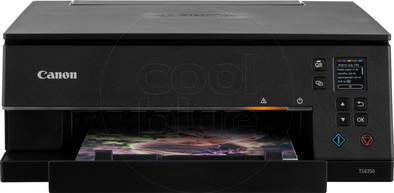
The Canon PIXMA TS6350a is an all-in-one inkjet photo printer for home use. This printer doesn't just print, it can also scan and copy documents. Thanks to the high print resolution of 1200x4800DPI, you can print sharp images and graphs. You can store photo paper and standard paper in the 2 separate paper trays and the printer automatically picks the right paper. Thanks to the 5 cartridges with black pigment and more, you can print even better quality photos with deeper colors. With the built-in WiFi, you can print via Apple AirPrint and email. You can connect to the printer via WiFi Direct, so you don't have to connect to a modem first. The PIXMA TS6350a can print without margins, so the entire paper is covered and doesn't have white borders.
Note: want to print a photo on photo paper? Place it in the printer with the back (with the logo) facing up.
Installation ease
Options
Print quality
Scanning is ok Printing just stops with little use, cleaning etc doesn't help either Too bad for the environment, printer can only be used as a scanner after a while
Leo Kanters
8 September 2022
Automatically translated from Nederlands
the explanation and instruction have not been tested on people who are not very familiar with ICT. As an older user, I encounter steps that do not make sense to me. Still haven't discovered the scanning..
Lidewij Verheggen
16 December 2022
Automatically translated from Nederlands
I already had a Canon before, and was very happy with it, and this one surpasses my previous one, the downside of which was that a lid had to be opened manually for printing: it has an automatic tray that extends when printing and retracts when the printer is turned off. printer, without having to arrive yourself.
Jean-Luc De Bodt
28 May 2021
Automatically translated from Nederlands