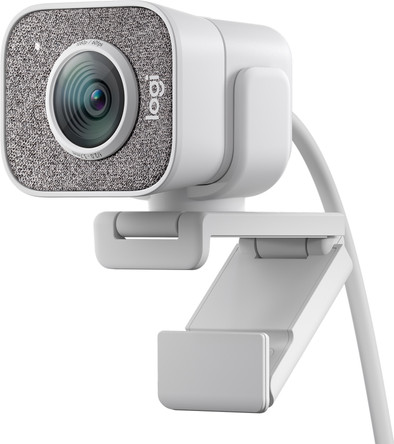
Logitech StreamCam via USB-C White
Choose your webcam:
White
Choose the better streaming webcam that brings you sharper into frame
Color: White
Choose your webcam:
White
Color: White
Current product
Â
Â
120,-
142,-
111,-
Yes
No
Yes
Yes
No
Yes
Windows, macOS
Windows, macOS
Windows, macOS
Yes
Yes
Yes
According to our webcam expert
Bring your content to the next level and share your passion via YouTube with the Logitech StreamCam via USB-C. That way, you can record videos in 1080p resolution and with 60 fps. Thanks to the support for vertical videos, this camera is suitable for creators for all types of content channels. Autofocus with facial recognition via AI, lighting, and vertical mounting options ensure you're always captures in the best way possible. And thanks to a clear audio performance, your voice always sounds clear. With the Logitech Capture software, you can also create content with multiple cameras, text overlays, transition effects, and other studio effects.
Plug and Play | ||
Compatible with operating system | Windows, macOS | |
Autofocus | ||
Sharpness | Full HD (1080p) | |
Built-in microphone |
5 stars
42
4 stars
13
3 stars
8
2 stars
2
1 star
1
Installation
Quality
Options
I read in a review that this camera would not work with the new M1 chip, but that is the case.
Gary Larosse
17 April 2021
Automatically translated from Dutch
Good and decent webcam, with adjustable quality (Max 1080p with 60hz). Keep in mind that the webcam must be connected to USB-C by default, so if you don't have such a connection on your computer, you have to order a dongle, which also provides that high quality and the accompanying data. can handle.
Wesley de Gast
25 December 2020
Automatically translated from Dutch
A worthy replacement for the previous webcam. The streamcam with Logitech Capture software offers many options/settings, recording options. Camera settings can be changed during use, which is useful during an online presentation. Because the Capture software offers the output as a Virtual Webcam, you can also offer yourself and another stream (Powerpoint) side by side. Through the chroma settings you can also come into the picture for, among other things, the Powerpoint. I could go on with all the positives, I'm still discovering new features.
Righard
16 October 2020
Automatically translated from Dutch
Coolblue takes care of everything, from taking out an insurance to repairs
For almost all accidents
More coverage in case of damage than your standard warranty
No deductible
First, add your webcam to your shopping cart. On the next page, choose one of the Protection Plans below. You always have a 30-day return window and pay no deductible in case of damage or theft.
2-year Protection Plan
7,99
one-time2-year Protection Plan with theft cover
8,99
one-time3-year Protection Plan
8,99
one-time3-year Protection Plan with theft cover
11,99
one-timeProduct number | 859077 | |
Manufacturer code | 960-001297 | |
Brand | Logitech | |
Warranty | 2 years | |
Processing of your defect | Via Coolblue | |
Old product returned for free |
Plug and Play | ||
Compatible with operating system | Windows, macOS | |
Sharpness | Full HD (1080p) | |
Autofocus | ||
Wide-angle | ||
Facial recognition | ||
Automatic brightness adjustment | ||
Coverable lens | ||
Tiltable | ||
Type of webcam holder | Universal clip | |
Built-in microphone | ||
Microphone noise suppression | ||
Microphone recording type | Stereo |
Type of USB port | USB-C | |
Connection type | Wired | |
Bluetooth | ||
Compatible with operating system | Windows, macOS | |
Cable length | 1,5 m |

Width | 6 cm | |
Depth | 5 cm | |
Height | 9 cm | |
Weight | 0,225 kg | |
Color | White | |
Material | Plastic |