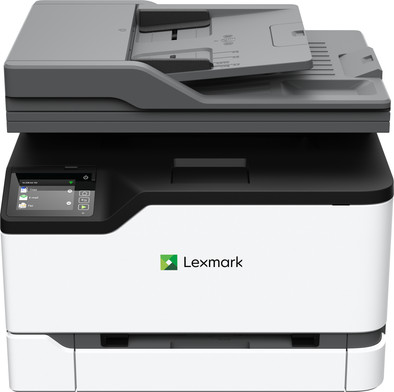
Lexmark MC3326adwe
Never available again
View alternatives in the sidebar
Product number | 860463 | |
|---|---|---|
Manufacturer code | 40N9160 | |
Brand | Lexmark | |
Processing of your defect | Via Coolblue | |
Old product returned for free |
Printer size | Large | |
|---|---|---|
Width | 41,1 cm | |
Depth | 39,4 cm | |
Height | 34,4 cm | |
Color | Gray | |
Weight | 19,4 kg |
Printer type | All-in-one | |
|---|---|---|
Photo printer | ||
Portable (mobile use) |
Toner cartridge line | Lexmark C3220 | |
|---|---|---|
Print technology | Laser | |
Number of cartridges/toner cartridges | 4 | |
Color printer | ||
Print speed black (ISO) | 24 ppm | |
Print speed color (ISO) | 24 ppm | |
First black page ready after | 10,6 seconds | |
Maximum print resolution height | 600 dpi | |
Maximum print resolution width | 600 dpi | |
Maximum print size | A4 | |
Borderless printing |
Scan functionality | ||
|---|---|---|
Maximum optical scan resolution width | 600 dpi | |
Maximum optical scan resolution height | 600 dpi | |
Scanner type | File scanner, Flatbed scanner | |
Maximum scan size | A4 (21x29.7cm) | |
Automatic document feeder (ADF) | ||
Maximum paper size ADF | A4 | |
Scan sizes | A4 | |
Scan speed (PPM) | 20 pps | |
Color depth output | 150 bpp | |
Scan to | Email, FTP, PC (local), PC (network), Searchable PDF, USB | |
ADF capacity | 50 | |
OCR |
Copying functionality |
|---|
Fax functionality | ||
|---|---|---|
Color fax |
Built-in screen | ||
|---|---|---|
Color screen | ||
Touchscreen |
Suitable for HP+ |
|---|
Compatible with operating system | Android, ChromeOS, Linux, Windows, macOS | |
|---|---|---|
Connection type | Wired, Wireless | |
Apple AirPrint | ||
Email print | ||
WPS (Wireless Protected Setup) | ||
Number of Ethernet ports | 1 | |
NFC | ||
Built-in WiFi | ||
WiFi direct | ||
Bluetooth | ||
USB port |
Manual input tray | ||
|---|---|---|
Photo paper drawer | ||
Output capacity output drawer | 100 | |
Maximum print size standard paper tray | A4 | |
Input capacity standard paper tray | 250 | |
Number of standard paper trays | 2 |
Memory card reader |
|---|
Print technology | Laser | |
|---|---|---|
Printer type | All-in-one | |
Color printer | ||
Maximum print size | A4 | |
Automatic document feeder (ADF) | ||
WiFi direct |
According to our printer expert
It's a 4-in-1 printer, so you can scan, copy and fax in addition to printing.
The print speed of the printer in color is 24 pages per minute, so you don't have to wait long for your print.
The input capacity of 250 sheets is high, so you don't have to refill the paper often.
If you prefer a printer that isn't large, choose a smaller size.
The Lexmark MC3326adwe increases your productivity at work, as you can print 24 pages per minute. This all-in-one color laser printer can handle any printer job, even faxing. hhe automatic document feeder (ADF) allows you to print more efficiently. The input tray can hold up to 50 sheets and the printer automatically makes copies. With the MC3326adwe, you not only print from a PC or laptop but you can also use WiFi to print from your smartphone or tablet. Start the Lexmark app and print documents right away. Not printing right now? The printer automatically goes into sleep mode, thanks to the energy-saving mode.
Have a good look at the specifications. In the end, I was very hesitant between an HP and a Lexmark. The Lexmark MC3224adwe was also very interesting, but for 50 euros extra, and the specifications compared to the HP, the choice was ultimately easy. Printing quality is really good. It is fast, software wise it is fine operation. very happy with it, having been using it for a few weeks
maxime
22 April 2020
Automatically translated from Nederlands
Ease of use and easy to install. Plug in the socket and everything works
Bert Engelen
7 May 2020
Automatically translated from Nederlands
I have been using the device for about 2 weeks now and I am very satisfied. Getting the scanner to work is ridiculously complicated. There is no standard button on the control panel and one has to create it via a shortcut in the web browser through a network drive or an FTP site. What a mess for a simple user! Out of misery then installed the scan app from Microsoft that works perfectly. Manual could be clearer!
Pascal Vanhoutte
13 July 2020
Automatically translated from Nederlands