Never available again
View alternatives in the sidebar
View alternatives in the sidebar
Product number | 864156 | |
|---|---|---|
Manufacturer code | 7FR50B | |
Brand | HP | |
Processing of your defect | Via Coolblue | |
Old product returned for free |
Printer size | Medium | |
|---|---|---|
Width | 42,5 cm | |
Depth | 30,4 cm | |
Height | 15,4 cm | |
Color | White | |
Weight | 3,42 kg |
Printer type | All-in-one | |
|---|---|---|
Photo printer | ||
Portable (mobile use) | ||
Recommended for use printers | Printing at home |
Cartridge line | HP 305 | |
|---|---|---|
Print technology | Inkjet | |
Number of cartridges/toner cartridges | 2 | |
Color printer | ||
Print speed black (ISO) | 7,5 ppm | |
Print speed color (ISO) | 5,5 ppm | |
First black page ready after | 15 seconds | |
Speed class | Basic | |
Maximum print resolution height | 1200 dpi | |
Maximum print resolution width | 4800 dpi | |
Maximum print size | A4 | |
Borderless printing |
Scan functionality | ||
|---|---|---|
Maximum optical scan resolution width | 1200 dpi | |
Maximum optical scan resolution height | 1200 dpi | |
Scanner type | Flatbed scanner | |
Maximum scan size | A4 (21x29.7cm) | |
Automatic document feeder (ADF) | ||
Scan sizes | A4 | |
Scan speed (PPM) | 1 ppm | |
Color depth output | 24 bpp | |
Scan to | Image, PDF | |
OCR |
Copying functionality | ||
|---|---|---|
Copy speed black (ISO) | 1 ppm | |
Copy speed color (ISO) | 1 ppm | |
Maximum copy resolution height | 300 dpi | |
Maximum copy resolution width | 300 dpi |
Fax functionality |
|---|
Built-in screen | ||
|---|---|---|
Color screen | ||
Touchscreen |
Suitable for HP+ | ||
|---|---|---|
Suitable for HP Instant Ink |
Compatible with operating system | Android, ChromeOS, Linux, Windows, Windows Phone, iOS, macOS | |
|---|---|---|
Connection type | Wired, Wireless | |
Apple AirPrint | ||
Email print | ||
WPS (Wireless Protected Setup) | ||
Female standard USB-A port version | 2.0 | |
Number of Ethernet ports | 0 | |
NFC | ||
Built-in WiFi | ||
WiFi direct | ||
Bluetooth | ||
USB port |
Manual input tray | ||
|---|---|---|
Photo paper drawer | ||
Output capacity output drawer | 25 | |
Maximum print size standard paper tray | A4 | |
Input capacity standard paper tray | 60 | |
Number of standard paper trays | 1 |
Memory card reader |
|---|
Print technology | Inkjet | |
|---|---|---|
Printer type | All-in-one | |
Color printer | ||
Maximum print size | A4 | |
Automatic document feeder (ADF) | ||
WiFi direct |
According to our printer expert
It is an all-in-one printer, which means you can also scan and copy in addition to printing.
This printer also supports HP Instant Ink, so you automatically receive new cartridges before they run out.
You can print your documents wirelessly via Apple AirPrint on this printer.
If you want to print more than 10 pages per minute in black and white, choose a printer with a higher printing speed.
There is no USB to USB-B cable included with this printer and you do need it to use the printer.
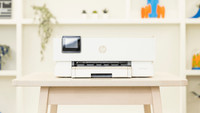
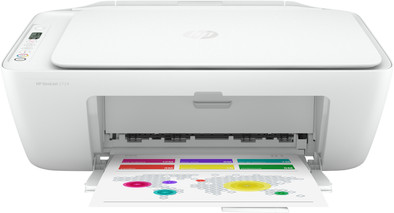
The HP DeskJet 2724 is a compact all-in-one inkjet printer for home use. Thanks to the compact size, you can place the printer on your desk. The DeskJet 2724 uses 2 cartridges, a black one and a 3-in-1 cartridge. This printer is suitable to print color documents, but it's not a photo printer. This makes the purchase price for all colors cheaper than 3 separate color cartridges. The printer is also suitable for HP Instant Ink. This service makes printing even easier and cheaper for you. If you also want to send wireless print jobs from your iPhone or iPad, you can use Apple AirPrint.
5 stars
82
4 stars
105
3 stars
22
2 stars
11
1 star
2
Installation ease
Options
Print quality
My previous printer suddenly no longer recognized the printhead, so time for a new one. It ended up being the HP Deskjet 2724. It cost almost as much as a new printhead for my previous printer (why environmental?). Ordered the HP Deskjet from Coolblue and it was delivered the next day. “Instant ink 2 month” was the first thing I saw on the box!? I saw clearly "6 months" on the Coolblue site!? Just unpack and install… (on my PC with USB cable and WiFi nearby) using the brief manual (1 A-4 with 6 languages). That was quite disappointing. Although the packaging suggests otherwise (after all, it says “Keep it simple”), the installation did not work. That should work, I thought, I have spent the past few years, i.e. already installed several printers without any problems. Then just download the drivers from the HP site. Fortunately, this site recognized my operating system. Downloaded the relevant files on my PC (2 pcs.) viz.: HPPSdr.exe and DJ2700_2028A_2028B_2028C.exe. The first file worked and recognized my Deskjet, but indicated that no drivers were installed. Then try the second program. My did not recognize this. After repeated attempts, try to download the “HP Smart” recommended on the HP site. Then you end up in the Microsoft store via HP and you have to log in with your Microsoft account (luckily I did). Unfortunately, my computer keeps "downloading" to no avail. Fortunately, my word processor and photo editing program (using probably the basic drivers "HP Deskjet PCL3 Class Driver") still recognized my printer, so I could still print and scan. These problems were reported to Coolblue including the Instant Ink (2 instead of 6 months of free printing). I got a response the next day. Unfortunately I didn't get much further with that, I couldn't solve the problems I described with it! After several prints, which in the meantime will roll out of the new printer, let's see how they do that on Youtube. Hey, there they use HP.EasyStart. I tried to download HP.EasyStart.exe from the HP site and it actually worked. E.e.a. started up, but because this printer uses Wi-Fi, among other things, I also had to struggle through a lot of screens and enter my network password. Then the “Instant Ink struggled through” part (I don't know how it would have ended if I didn't want this option) and… bingo! I also saw that I had 6 months of Instant Ink instead of 2 months as stated on the box. In the meantime, I just reported to Coolblue that the problem had been solved in the meantime. It turned out that they had prepared a personal discount (€ 5.00) for subsequent purchases as a plaster on the wound. After that I received several e-mails, including about “Instant Ink” including a message that my first cartridges were on the way, only confusion again. It said: Expected delivery time: October 29, 2020 while when I clicked on the embedded Tracking Number I saw October 15, 2020. Luckily it was October 15th! The printer also works well with the “startup cartridges”. I have no experience with the Instant Ink cartridges that have been received yet, I should only use them when the “start-up cartridges” are used up. Oh yes, Printing photos: if you put in 10x15 cm photo paper, it will only print a 9x13 cm image. The rest is an unevenly spaced white border around this image. Afterwards I remember that I read somewhere that the printer cannot print left/right and above 3 mm and below 15 mm (so white) and that it is not possible to print borderless. I could not find this in the (downloadable) manual. On the Coolblue site https://www.coolblue.nl/product/864156/hp-deskjet-2724.html#product-information, however, with the HP Deskjet 2724 under "Information" you can find: at "Borderless printing" a green check mark and explanation: “The 'Borderless printing' functionality offers a solution when you want to print photos or images without a white border. Such a printer then prints the entire sheet of (photo) paper. Make sure you choose the correct print settings to print borderless”. So this doesn't seem right to me!
With my son (HP Deskjet 2620) the installation went well right away so it must be me!
Johan S
17 October 2020
Automatically translated from Nederlands
A printer tailored to my needs!
Van Gerwen Chris
27 July 2020
Automatically translated from Nederlands
I really don't think the whole system is good on all new HP printers that require you to connect your printer to a WiFi network! I am a student and our wifi is not a private network. With all HP printers you can forget about it. I'm really not happy with this!
Arthur Wullaert
14 November 2020
Automatically translated from Nederlands