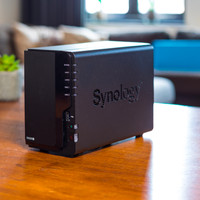
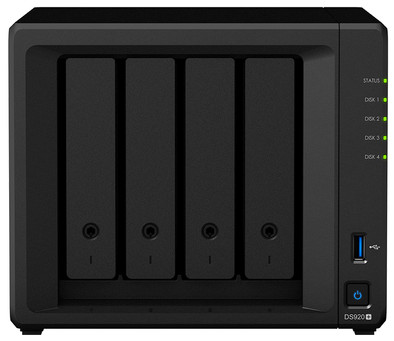
Synology DS920+

Never available again
View alternatives in the sidebar
View alternatives in the sidebar
Product number | 865961 | |
|---|---|---|
Manufacturer code | DS920+ | |
Brand | Synology | |
Processing of your defect | Via Coolblue | |
Old product returned for free |
Built-in hard drive | ||
|---|---|---|
Number of hard drive slots | 4 | |
Suitable for hard drive size | 2.5-inch HDD, 3.5-inch HDD, M.2 NVMe | |
Nubmber of M.2 connectors | 2 | |
RAID | JBOD, RAID 0, RAID 1, RAID 10, RAID 5, RAID 6, Synology Hybrid RAID | |
Internal RAM | 4 GB | |
Total number of RAM slots | 1 | |
Expandable memory | ||
Maximum internal memory | 4 GB | |
Memory type | SO-DIMM DDR4 |
Connection type | Wired | |
|---|---|---|
LACP Link aggregation | ||
Thunderbolt connector | ||
Bluetooth | ||
Number of Ethernet ports | 2 |
NAS functions | Backup server, Download server, FTP server, Mail server, Photo server, Surveillance station, VPN server, Web server, iTunes server | |
|---|---|---|
NAS application center | ||
Plex support | ||
Number of IP camera licenses included | 2 | |
DLNA | ||
UPnP AV support | ||
FTP server | ||
On/off switch | ||
Automatic switch on/off | ||
Kensington lock | ||
Apple Time Machine support | ||
Chromecast support | ||
Suitable for IFTTT | ||
Recommended for use | Business use, Making a backup, Media streaming, Personal cloud, Store photos and videos, Storing games |
Processor brand | Intel | |
|---|---|---|
Processor family | Celeron | |
Processor code name | Gemini Lake Refresh | |
Processor cores | Quad-Core (4) | |
Clock speed | 2 GHz |
Depth | 23 cm | |
|---|---|---|
Width | 20 cm | |
Height | 17 cm | |
Type NAS | Upright | |
Color | Black | |
Weight | 2,24 kg |
Number of hard drive slots | 4 | |
|---|---|---|
Suitable for hard drive size | 2.5-inch HDD, 3.5-inch HDD, M.2 NVMe | |
Internal RAM | 4 GB | |
Processor cores | Quad-Core (4) | |
Built-in hard drive |
According to our NAS expert
Install up to 4 HHDs or SSDs and 2 M.2 SSDs in this NAS.
With the Intel Celeron Quad-Core processor and 4GB RAM, the NAS can handle multiple tasks at once.
This NAS has 2 Gigabit Ethernet ports for super fast file transfers.
The internal hard drives and SSDs aren't included.
The Synology DS920+ is a NAS for home use with a powerful Intel Celeron Quad-Core processor. This 4-core processor improves the indexing of photos and reduces the response times of databases. You can stream, open files, and move files very quickly. With 4GB RAM, you can do several things at the same time on the NAS. For example, you can stream an HD movie to your TV via Plex while you make a backup of your computer. Install up to 4 hard drives. The DS920+ also has 2 built-in M.2 SSD slots, unlike its predecessor the DS918+. Install 2 NVMe SSDs to create an SSD cache and make your NAS several times faster, for example. The 2 Gigabit Ethernet ports double your potential internet speed.
5 stars
78
4 stars
59
3 stars
2
2 stars
0
1 star
0
Installation
Energy consumption
Speed
Software
I bought this NAS as a replacement for a DS216+ and DS209. With 4 HDD slots, all hard disks can be accommodated and that saves another device in maintenance and power. In addition, of course, completely futureproof with the latest series from Synology.
installation is a breeze if you've done it before with a Synology NAS. It takes some time to transfer large amount of data to new HDD, but you can do other things in the meantime. The Synology Migration Assistant does the work for you. Then check / adjust the various settings and you're done.
I personally find the NAS a bit noisy. You can also read more complaints about this on the various forums. Solutions are available in the form of vibration-damping mats under the cabinet, securing the HDD brackets between Velcro (soft side, not the side with the hooks) in the frame and screwing the HDD into their brackets instead of the plastic clips that Synology supplies. After these adjustments, I find the sound production quite acceptable. Also considered ordering two Noctua NF-A9 FLX super quiet fans to replace the stock fans. That could possibly be one last adjustment.
The NAS comes standard with 4GB of memory and I bought another 4GB for the free slot so that my DS920+ now goes like a rocket with 8GB. I didn't install the M.2 NVMe SSD for setting up a cache because it probably won't give much speed gain for my use (file server, few programs running, no VMs or anything). And I can always do that later.
For the time being very happy with this Top NAS and can recommend it to anyone who is willing to pay for it. Please note to also put good NAS drives in it and not "regular" desktop PC drives.
I don't have to say anything about the service and delivery by Cool Blue, do I? Loved that they delivered by bike!!
Paul Brouwer
7 May 2021
Automatically translated from Nederlands
I have only positive experiences with Synology, I used my previous Synology nas for 9 years and sold it because of the purchase of the DS920+. Purchase may be pricey, but you will enjoy it for years to come. I do believe that it is better to choose the Plus series so that they continue to offer sufficient performance in the future, you can also place extra internal system memory, the Plus series has more options compared to the entry-level J-series, if you only want filesharing want to do and not make too many demands, then the J-series is fine.
AvW
4 August 2020
Automatically translated from Nederlands
does what it's supposed to do
Mark oostindie
23 November 2020
Automatically translated from Nederlands