Never available again
View alternatives in the sidebar
View alternatives in the sidebar
Product number | 881302 | |
|---|---|---|
Manufacturer code | DSP2 | |
Brand | LG | |
Processing of your defect | Via Coolblue | |
Old product returned for free |
Height | 6,3 cm | |
|---|---|---|
Width | 76 cm | |
Depth | 9 cm | |
Weight | 3,19 kg | |
Color | Black | |
Quality category | Basic |
Separate subwoofer |
|---|
Sound quality according to customers | Standard | |
|---|---|---|
Number of audio channels | 2 | |
Number of subwoofer channels | 1 | |
Sound reproduction | Stereo | |
Hi-Res audio | ||
Radio |
HDMI connector | ||
|---|---|---|
HDMI ARC (Audio Return Channel) | ||
Digital optical connector | ||
Network connector | ||
USB port | ||
USB function | Device connection, Play media, Software updates |
Bluetooth | ||
|---|---|---|
Built-in WiFi | ||
Plays from network | ||
Multi-room audio | ||
NFC |
Compatible with smartphone / apps | ||
|---|---|---|
Controls via app | ||
Controlled via Android app | ||
Controlled via Apple app | ||
Controlled via Windows app |
Built-in WiFi | ||
|---|---|---|
Bluetooth | ||
Width | 76 cm | |
Height | 6,3 cm | |
HDMI ARC (Audio Return Channel) | ||
Sound reproduction | Stereo | |
Quality category | Basic |
According to our soundbar expert
Stream your favorite songs to the soundbar wirelessly via Bluetooth.
The soundbar has both an HDMI connector and optical connector to connect the bar to the TV.
An HDMI cable isn't included.
Recently a proud owner of a beautiful large LG smart television. Sound from the speakers is always of a lesser quality, so I've been looking for a soundbar for a while. Went in search of a soundbar from the same brand with the expectation that it all `talks' well to each other. I received the product and connecting it was really super easy. The supplied cables are easy to connect and there are various ways to establish the connection. Unfortunately, no HDMI cable was included.
Soundbar looks sleek and comes with a simple, but clear remote control. There is also an accompanying app. But honestly, I don't open my phone to control a soundbar. I rather use my television remote or the plus/minus buttons on my phone.
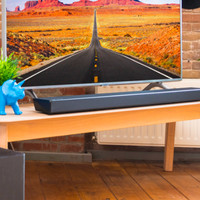
The soundbar takes up little space and has clear LED lights on the front. You can see at a glance whether there is a connection and how loud the sound is. It's also nice that you don't have to start up the soundbar yourself every time you turn on the television. The connection is established automatically and the soundbar is switched on immediately.
Quality of the sound. Yes, that is one point I want to mention here. For the price I actually expect more quality in the sound. It is tinny and little bass tones. Upgrade in regards to my television sound, but I'm not thrilled. I find the sound to be quite unsatisfactory.
If I look at the complete picture, ease of use, price and sound quality, I give the product a pass. But if you want a soundbar with nice sound, I would look further
Justin
25 August 2021
Automatically translated from Nederlands
Sound experience
I've always wanted to test a soundbar. I've always been curious how a soundbar performs in terms of sound compared to a 5.1 speaker setup. I do know that this is a basic soundbar without a separate sub woofer, so I don't expect deep bass. This can be a good solution for people who don't have room for a sub woofer or just want to hear simple simple sound that can replace the TV speakers to get a little more volume in the sound. I don't like the soundbar. The volume has to be turned up a bit to experience a good listening experience. As I said before, you won't hear deep shaky bass sounds but it's enough for movies.
With the bluetooth connection you can connect the soundbar to your smartphone or via USB on the back for music. You can select the sources on your remote control. The volume and sources are represented by 3 LEDs in a row that change color and light up at volume (green color) from top to bottom in various intensities. In terms of sound to stream your bluetooth music, this soundbar performs better than my WiFi speaker. It offers a little more volume to the sound. The sound quality of my music via USB in FLAC format is also good.
Surround There are 4 different sound modes to choose from: AI Sound, Music, Movie and Game. I haven't tried the Game Mode because I don't have a game console. So I mainly use the three other modes. The surround sound (virtual) is not disappointing. For someone who wants some spatial sound, this is more than enough. Lovers of real 5.1 sound will find that this single soundbar is lacking because you do not experience the 5.1 experience. Perhaps a soundbar with separate sub woofer and separate rear surround speakers can imitate this well.
Intensity The soundbar has enough power to provide the living room, in my case in an apartment, with good quality sound. I can certainly recommend the soundbar to people who have a smaller house.
Quality The quality of the sound is quite good. Just don't expect the quality of more expensive speakers, but that's comparing apples to oranges. High tones and middle sound come out well. Only the lower sounds as you are used to from a woofer, you cannot get out. But this is understandable due to the lack of a subwoofer.
Ease of use I still have an old flat screen without the HDMI-ARC connection. I connected the soundbar via the supplied optical cable to my optical OUT connection on the TV. I did, however, set the sound in the menu of the TV in such a way that the sound no longer goes through the TV speakers but directly to the optical output to the soundbar. Every time I switch on my Ziggo box and TV, the soundbar switches on automatically. All this I installed and set up within 10 minutes. The remote control is simple, no too many buttons. Power Button, Mute Button, Volume Button, Source Button, Bluetooth Button to enable Bluetooth pairing with your streaming device (Tablet, Smartphone or other device), 4 sound mode buttons and a cursor button (Left and right for previous or next track, Up and Down for the subwoofer volume and the center button for Pause or play the tracks) The supplied manual is only briefly intended to install and use the product. For the extensive manual you can download this via a QR code or via a reference to the website. The soundbar can also be set up via the LG Soundbar app. However, not all functions can be operated with this. The app only works via bluetooth. I personally prefer to use the remote. The app is just a gimmick and nothing more than that with a small number of extra functions. What I think is a big plus is that the wall brackets to hang the subwoofer are just in the box.
Link The soundbar has several ways to improve the sound of your music or movies. First of all, via the HDMI-ARC connection on modern TVs. or via the optical connection, especially applicable if your TV does not have HDMI-ARC but simply has HDMI connections, which is mainly the case with TVs that are older. Another method is via Bluetooth which allows you to stream your music. I mainly use this if I want to listen to music via Youtube or music that I have on my NAS / PC and want to listen to it via my smartphone with the bluetooth connection. You can also listen to your music via the USB connection behind your soundbar. You can then use the soundbar's remote control to skip to the next or previous track and pause with the central button of the cursor button. Frankly, I don't find this very useful if you have several songs on your USB stick and want to look for a certain song. This is only useful if you want to play music from your USB stick continuously and if you want to increase the atmosphere in your room as background music.
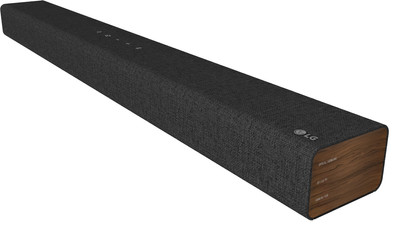
design The design of the soundbar is simply beautiful. It's not an everyday black soundbar. The side has a dark brown wood pattern with black accents. So a modern design. It's also not flashy under your TV as it's only 76cm wide. Personally, this soundbar does not bother in terms of size. The whole is finished with fabric from the front, top and back. Especially that the fabric continues to the back is neat. The top has soft buttons, namely the , Power On, Connection, Volume up and Down and the Bluetooth button. The lights on the front behind the fabric are not bright but subtle. They do light up briefly when a certain function is selected. But this speaks for itself. The soundbar is 6 cm high and 9 cm deep. I can't imagine that the soundbar with these dimensions would be disturbing or that there would be no place to be placed in front of the TV.
S.D.
9 August 2021
Automatically translated from Nederlands
I live in an assisted living home so was looking for a soundbar with little bass and power for a small space. It was a good purchase for me because I was looking for this. There are better ones out there for a few cents more.
A Witvoet
17 November 2021
Automatically translated from Nederlands