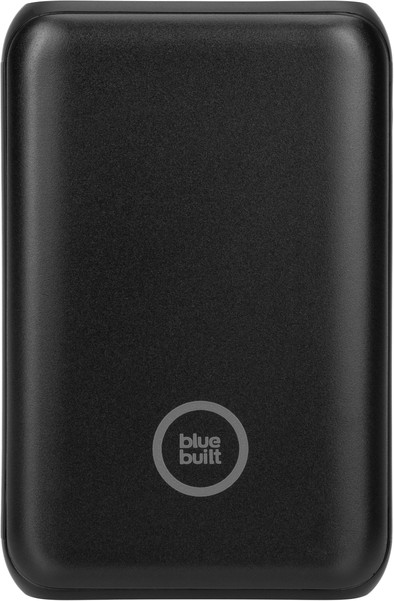
BlueBuilt Power Bank 10,000mAh with Power Delivery and Quick Charge
Never available again
View alternatives in the sidebar
View alternatives in the sidebar
BlueBuilt products have the best price-quality ratio because we've put them together ourselves. Based on product data, feedback from customers, and our own product knowledge. In other words, good products. We are so confident, that we'll even give you an extra long warranty. Read everything on BlueBuilt.

Product number | 899024 | |
|---|---|---|
Manufacturer code | BBPB1020 | |
Brand | BlueBuilt | |
Processing of your defect | Via Coolblue | |
Old product returned for free |
Number of charges smartphone | 2 | |
|---|---|---|
Battery/battery capacity | 10000 mAh | |
Power | 20 W | |
Easy to take with you | Good | |
Fast charge type | Power Delivery 3.0, Quick Charge 3.0 | |
Recommended for product type | Smartphone | |
Type of USB port | Standard USB-A, USB-C | |
Number of USB ports | 3 | |
Type of USB cable included | USB-C to USB-C |
Height | 9,5 cm | |
|---|---|---|
Width | 6,3 cm | |
Depth | 2,31 cm | |
Weight | 198 g | |
Color | Black | |
Material | Plastic | |
Water-resistant | ||
Shockproof |
Wireless charging | ||
|---|---|---|
Power bank chargeable via fast charging |
Lightning connector | ||
|---|---|---|
Number of USB-C ports | 2 | |
Output or Input USB-C port | Both | |
Power USB-C port | 18 W | |
Fast charging USB-C port | ||
Type of fast charging USB-C port | Power Delivery 3.0 | |
Output or Input second USB-C port | Output | |
Power second USB-C port | 20 W | |
Fast charging second USB-C port | ||
Type of fast charging second USB-C port | Power Delivery 3.0 | |
Number of female standard USB-A ports | 1 | |
Power standard USB-A port | 18 W | |
A / C connection |
Solar cell | ||
|---|---|---|
Battery level indicator | ||
Flashlight |
Type of included second USB cable | USB-A to USB-C |
|---|
Made for brand | Apple, Huawei, Motorola, Samsung, Sony, Universal, Xiaomi |
|---|
Battery/battery capacity | 10000 mAh | |
|---|---|---|
Fast charge type | Power Delivery 3.0, Quick Charge 3.0 | |
Recommended for product type | Smartphone | |
Type of USB port | Standard USB-A, USB-C | |
Easy to take with you | Good | |
Power | 20 W | |
Number of USB ports | 3 | |
Type of USB cable included | USB-C to USB-C |
According to our power bank expert
You can charge your smartphone or tablet extra fast via the Power Delivery port.
This compact power bank fits in your pocket and you can easily take it with you.
This BlueBuilt power bank comes with a 5-year warranty.
You need a power bank with more capacity to also charge your tablet or laptop.
You need a USB-C to Lightning cable to fast charge your iPhone 14 or older via Power Delivery.
Note: the touch button isn't an on/off button. If you touch this button, you can check the battery level of the power bank. The power bank turns on automatically when you connect a device, and turns off again when you disconnect the device.
Capacity
Size
Build quality
Charging time
When I want to charge a device with the power bank, the power bank keeps 'disconnecting'. The device is therefore always alternately charged and then not. In fact, you just can't use it that way.
Alexander
16 December 2022
Automatically translated from Nederlands
I bought this power bank to mount on my oldtimer moped. On longer trips, my phone's battery is far from sufficient to keep the navigation on for the entire ride. I printed a matching holder (3D printer ftw) and it works perfectly. In total I now have 13000 mAh at my disposal instead of 3000 and that is more than enough for a day of touring. And it really does reach that 10000, my USB measuring device has confirmed that. All in all, a really handy device.
Then that touch button on the side. Almost all reviews have already said something about it, but no one seems to have come to the same conclusion as me. Coolblue has even changed the description and manual to say that it is not an on/off button, but only to activate the battery indicator. I don't think this is correct. It is indeed an on/off button. 1x tap = on. Touch 2x in quick succession = off. It doesn't work 100%, but it almost always does. I found out about this because I have another similar power bank with a physical button that does come with a decent manual. Because this power bank has a physical button that you don't just press, it won't bother you much, but the touch button of the BlueBuilt power bank is a different story. It is quite sensitive and sometimes seems to respond if you simply pick up the device or touch it (in places other than the button). Because of this, it has happened to me a few times that I accidentally turned off the power bank while I was charging a device. As a result, after half an hour you are left with a device that has not charged a percent. The power bank sometimes also goes out on the moped. I can't prove it, but I blame the touch button. A simple physical push button would have solved all the problems.
Don't let the above put you off too much, because despite that I enjoy this power bank every ride I make!
Aron
3 June 2023
Automatically translated from Nederlands
This is exactly the power bank I was looking for: small, powerful, fast charging, and easy to charge with USB-C. I only wish there was a better manual with it. There is only a quickstart sheet, but it does not say in any way what the purpose of the on/off button is, and that you (I believe) have to turn it on before the power bank can charge. It is also not clear that the lights go off automatically after 20 seconds. It would be really nice to have a manual that really describes all the functionalities, and not just half of it. I even had to call customer service because I couldn't figure it out at first, and I don't think that's the intention anyway.
Anna Schipper
22 July 2022
Automatically translated from Nederlands