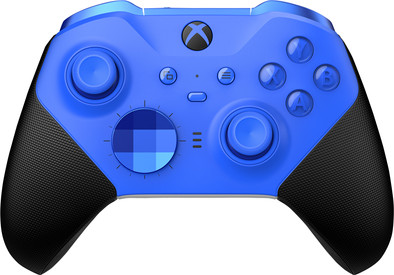
Microsoft Xbox Elite 2 Controller Core Blue
Never available again
View alternatives in the sidebar
View alternatives in the sidebar
Product number | 925353 | |
|---|---|---|
Manufacturer code | RFZ-00018 | |
Brand | Microsoft | |
Processing of your defect | Via Coolblue | |
Old product returned for free |
Type of controller | Gamepad | |
|---|---|---|
Force feedback | ||
Programmable buttons | ||
Haptic feedback |
Connection type | Wired, Wireless | |
|---|---|---|
Type of USB port | USB-C | |
Power supply type | Rechargeable battery, USB port PC/laptop |
Computer platform | PC (Windows), Xbox One, Xbox Series S, Xbox Series X |
|---|
Color | Blue |
|---|
Computer platform | PC (Windows), Xbox One, Xbox Series S, Xbox Series X | |
|---|---|---|
Connection type | Wired, Wireless | |
Force feedback | ||
Color | Blue | |
Programmable buttons | ||
Power supply type | Rechargeable battery, USB port PC/laptop |
According to our controller expert
You control your game character with more precision than with a 'normal' Xbox controller, thanks to interchangeable paddles and a rubber grip.
You can use the accompanying app to customize and adjust the controller.
In a first person shooter, you shoot faster than your opponent with the Hair Trigger Locks.
The grips of the hollow analog sticks can feel a bit slippery.
Play like a pro with the new Xbox Elite Series 2 controller. Adjust the controller to your liking, thanks to interchangeable parts and three personal profiles. You can store those profiles on your controller, so you can also use them when you're at a LAN party. With the interchangeable sticks, D-pads, and paddles, you can fully adjust it to your needs. You can enjoy your games for longer with the rechargeable battery, which provides up to 40 hours of gaming fun. You can use the controller with your Xbox One, Xbox Series X | S, and Windows 10 / 11 devices.
My experience is good you can adjust the entire controller to your own liking. And an example is that the tab of my previous elite also watch out.
Dennis van der Wijst
11 October 2022
Automatically translated from Nederlands
He's just delicious
Faas
18 December 2023
Automatically translated from Nederlands
Works perfectly on Windows! Adjust via an app. Definitely recommend it!
Danny
11 February 2024
Automatically translated from Nederlands