Never available again
View alternatives in the sidebar
View alternatives in the sidebar
Product number | 932832 | |
|---|---|---|
Manufacturer code | 5415N7040008 | |
Brand | Mio Technology | |
Processing of your defect | Via Coolblue | |
Old product returned for free |
Weight | 0,13 kg | |
|---|---|---|
Color | Black | |
Material | Plastic | |
Width | 6,17 cm | |
Height | 10,2 cm | |
Depth | 4,2 cm | |
Memory card | MicroSDXC | |
Expandable storage capacity up to | 256 GB | |
Number of memory slots (filled) | 1 |
Wide-angle | ||
|---|---|---|
Viewing angle | 140 ° | |
Image stabilization | ||
Type of image sensor | 1/1.8" | |
Technology image sensor | Exmor R CMOS | |
Type of image definition support | Ultra HD (4K) | |
4K, frames per second | 30p | |
Ultra HD, frames per second | 4K, 30p | |
Video file format | H.264, H.265, MP4, MPEG-4, MPEG-4 AVCHD (H.264) | |
LCD screen | ||
Screen size | 2,7 inches | |
Touchscreen | ||
Dual dash cam | ||
Night vision |
Bluetooth | ||
|---|---|---|
NFC | ||
Built-in WiFi | ||
USB port |
Loop recording | ||
|---|---|---|
Motion detection sensor | ||
Parking mode | ||
GPS sensor | ||
GPS function | Yes, included | |
Power supply type | Car charger 12V |
Type of image definition support | Ultra HD (4K) | |
|---|---|---|
Dual dash cam | ||
GPS sensor | ||
Image stabilization | ||
Built-in WiFi | ||
Viewing angle | 140 ° |
According to our dash cam expert
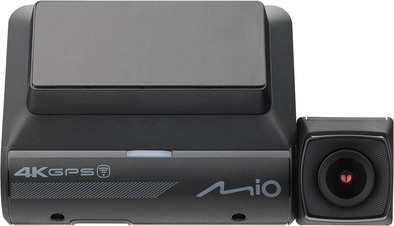
Thanks to the large 1/1.8-inch image sensor, you can make razor-sharp videos in 4K resolution both during the day and in the dark.
Details are clearly visible with the HDR function, such as the license plates of other cars.
The dash cam warns you if you drive too fast on a road with speed checks.
You don't receive a camera that records the traffic behind your car.
A memory card isn't included.
Image quality
Design
Options
Blackvue has been using the DR-500 GW and DR750S for years, given the price of the latest Blackvue ultimately opted for the MiVue 955WD, the dashcam itself is good, the images are good (better than those of the DR750S)
Considering the price, you ultimately pay for it somewhere, in this case it comes down to setting and using the dashcam, everything must be set on the dashcam itself and the settings of the rear camera can only be set if it is also connected to the dashcam This can still be solved by first starting the camera indoors using a USB charger and setting it as far as possible.
Once the dashcam has been set up as desired, the first reason for me to look back at images, I encountered the problem that the MiVue manager has no way of reading the dashcam, according to MIO support the 955WD is not supported by MiVue Manager and is It is also not known when and whether this will be added to the application.
Searching for images means guessing whether something is under Event or Normal and then you have to guess which images they are. If you want the images from the other camera, you then have to go to another folder to view the other images there. It is also possible time was missing if no GPS was available, with the result that the images from the parking garage I was looking for were on 01/01/2022 00:00 instead of neatly at the correct date/time.
What is positive is that the image quality is what you would expect, during the day everything is clearly readable (license plates/signs) and at night it is still good enough to decipher what is written, I personally have all the 'extra' functions such as lane departure and forward collision disabled.
Erik
15 February 2024
Automatically translated from Nederlands
Nice dashcam that is easy to install and handle. The long cables for the front and rear cameras are perfect for keeping everything neatly hidden. Apart from the cameras themselves, you don't see that they are there. You must purchase an SD card separately, but you can format it directly in the dashcam. No fiddling around with first connecting the card to your PC and then using it. Top! Also warns neatly about speed cameras. With section control, it even calculates your average speed, so you can be sure that you won't be faced with any surprises there either. The app is easy to operate. And also useful to see the live image of your cameras when you hang them, which is useful when installing the rear camera. Be careful when using the static stickers and tape to attach the dashcams to your window. You only have one static sticker for each camera. And even though they are static stickers, once you remove them they hardly stick a second time. To compress! Because it didn't work out right the first time on the rear window, so I had to buy a new sticker + mounting tape before I could hang it.
M. Wirix
3 February 2024
Automatically translated from Nederlands
I used to have a BlackVue but after a break-in in the car they unfortunately stole it too. Because BlackVue is considerably more expensive I chose the cheaper Mio this time. In itself I am very satisfied with the dashcam and its quality but what I have to get off my chest is the lack of self-adhesive cable guides as supplied with other brands. In the manual Mio assumes quite cheaply and lazily that you can do the job neatly with cable ties. Well, that is certainly not the case. Where in my BMW I could hide the wiring along the loose interior trim, this is not possible in my Volvo. And now you have to tell me where on earth I can attach those cable ties!? So, the wiring in my car is completely useless and I find this very annoying in all honesty
Nico
31 October 2024
Automatically translated from Nederlands