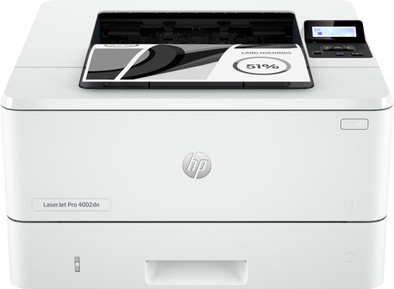
HP LaserJet Pro 4002dn
Never available again
View alternatives in the sidebar
View alternatives in the sidebar
If you purchase a participating HP LaserJet Pro 4000 between 1 February 2026 and 31 July 2026, you'll receive a cashback from HP. You can register your promotional product for the HP promotion up to 30 days after purchase. Go to the promotional Terms and Conditions (PDF) for more information.

If you purchase this printer, you receive a 3-year warranty. This way, you have the default 1-year warranty and 2 extra years of warranty. You can register your promotional product for the HP promotion until 60 days after purchase. Go to the promotional Terms and Conditions for more information.

Product number | 943913 | |
|---|---|---|
Manufacturer code | 2Z605F | |
Brand | HP | |
Processing of your defect | Via Coolblue | |
Old product returned for free |
Printer size | Medium | |
|---|---|---|
Width | 38,1 cm | |
Depth | 35,7 cm | |
Height | 21,6 cm | |
Color | White | |
Weight | 8,22 kg |
Printer type | Printing only | |
|---|---|---|
Photo printer | ||
Print quality photos | Low | |
Portable (mobile use) | ||
Recommended for use printers | Business printing, Printing at home |
Usage costs for 1 page | 3 eurocents | |
|---|---|---|
Toner cartridge line | HP 149 | |
Print technology | Laser | |
Type of ink | Toner cartridges | |
Number of cartridges/toner cartridges | 1 | |
Color printer | ||
Print speed black (ISO) | 40 ppm | |
First black page ready after | 6 seconds | |
Speed class | Excellent | |
Maximum print resolution height | 1200 dpi | |
Maximum print resolution width | 1200 dpi | |
Maximum print size | A4 | |
Automatic duplex printing | ||
Borderless printing | ||
Maximum print size duplex printing | A4 |
Scan functionality | ||
|---|---|---|
Automatic duplex scanning | ||
Automatic document feeder (ADF) | ||
OCR |
Copying functionality |
|---|
Fax functionality |
|---|
Built-in screen | ||
|---|---|---|
Color screen | ||
Touchscreen |
Compatible with operating system | Android, ChromeOS, Linux, Windows, Windows Phone, iOS, macOS | |
|---|---|---|
Connection type | Wired | |
Apple AirPrint | ||
Email print | ||
WPS (Wireless Protected Setup) | ||
Female standard USB-A port version | 2.0 | |
Ethernet port | ||
Number of Ethernet ports | 1 | |
Built-in WiFi | ||
WiFi frequency printers | 2.4GHz | |
WiFi direct | ||
Bluetooth | ||
USB port |
Location paper input | Front | |
|---|---|---|
Manual input tray | ||
Output capacity output drawer | 150 | |
Maximum print size standard paper tray | A4 | |
Input capacity standard paper tray | 250 | |
Number of standard paper trays | 2 |
Memory card reader |
|---|
Our digital expert will help you, but it can sometimes make mistakes, like humans do.
According to our printer expert
Print large files quickly: you won’t wait long for large print jobs thanks to the excellent speed class.
Save paper: you automatically print on both sides, so you use less paper.
No scanning or copying: you only print documents, because this printer doesn’t scan or copy.
It is the printer for personal use. Although I certainly also print regularly for work, it is particularly suitable for home use because of its small size and limited options. It is only a printer. There is also no wifi and therefore not suitable for professional use. The speed is not lacking. I have never had such a fast printer. 40 pages per minute is overkill but better too fast than too slow. Installation went smoothly, as far as you could call it an installation because it is literally plug and play. Windows does the rest automatically. The ultimate home printer.
Elizabeth
31 January 2025
Automatically translated from Nederlands
It is a nice printer with a paper tray that can hold 250 sheets. This is usually half a pack. and I use it for about a month. It is only a printer but with a high quality. You can put a stick in it to print but I personally do not use this. I have the printer in my office and use it exclusively for work. It is wired and not wifi and therefore in my opinion not suitable if you want to print with multiple people. At the time of writing there is also a cashback going on and so you will be a bit cheaper.
Tim
15 January 2025
Automatically translated from Nederlands
This is the definition of a printer. Small, light and only able to print in a fast and cheap way. With 40 pages per minute there are not many printers in this segment that can do it and it does not make much noise. The preparation for first use consists of only connecting cables and turning on the printer. Windows does the rest. There is a small screen to choose wifi networks and such. I never use this because it can be done much better and faster via the HP software. I have printed a lot and the toner is still almost full. It is expensive but because it is at home and I only use it, I think this is okay.
Diane
15 January 2025
Automatically translated from Nederlands