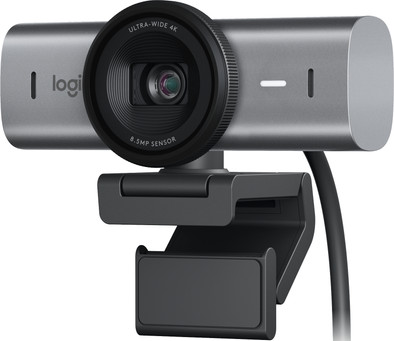
Logitech MX Brio Ultra HD 4K Webcam Black
Similar webcams
- AI functions
- 4K Cinema
- Autofocus
199,-
Delivered tomorrow
- 4K webcam
- AI functions
- Tilts automatically
230,-
Delivered tomorrow
199,-
Delivered tomorrow
230,-
Delivered tomorrow
Current product
Â
Â
Â
Â
196,-
199,-
230,-
196,-
175,-
Yes
Yes
Yes
Yes
Yes
Yes
Yes
Yes
Yes
Yes
4K Cinema
4K Cinema
4K Cinema
4K Cinema
4K Cinema
Yes
Yes
Yes
Yes
Yes
According to our webcam expert
With the Logitech MX Brio Ultra HD 4K Webcam Black, you look razor-sharp during meetings and streams. This USB-C webcam has a 4K resolution at 30 fps or 1080p at 60 fps. The image quality of the MX Brio was improved by AI. For example, the automatic lighting and white balance are improved so you're also clearly visible in badly lit rooms. Thanks to the built-in noise-suppressing microphones, background noise isn't audible for your conversation partner. This allows you to keep talking without distractions. With the Show Mode, you can easily tilt the webcam and show your notes on your desk. You also don't have to worry about your privacy with the Logitech MX Brio. It protects you via the built-in privacy switch. This webcam works with Zoom, Teams, Skype, Google Meet, and other programs. Do you have multiple Logitech MX products? Control your streams via your MX keyboard and mouse.
5 stars
9
4 stars
2
3 stars
1
2 stars
1
1 star
0
Installation
Quality
Options
A known problem with this camera appears to be that MS Teams does not recognize it properly and uses the lowest resolution. For a description of the issue, search for "Logitech 4K Poor Quality Video In Teams Desktop App", so this is a known issue that has not been resolved for a year.
AJ
5 July 2024
Automatically translated from Dutch
Finally a webcam with really good image quality. Plug it in, hang it up and you're done right away. You may not need 4K, but it does allow you to zoom in a bit and it will still be sharp. Ambient light doesn't matter that much anymore. Feel free to sit by a window - this thing will correct it, so you're always in the picture. Microphone is mediocre, but if you want good sound quality, just buy a separate USB microphone.
Rom
26 March 2024
Automatically translated from Dutch
I work from home 3-4 days a week, often via Teams. I had a Logitech Brio webcam and was very satisfied with it, but the Show Me function of this new one is super useful for me. Unfortunately I had not noticed that it does not support Windows Hello, which is a shame.
Steven
4 April 2024
Automatically translated from Dutch
Coolblue takes care of everything, from taking out an insurance to repairs
For almost all accidents
More coverage in case of damage than your standard warranty
No deductible
First, add your webcam to your shopping cart. On the next page, choose one of the Protection Plans below. You always have a 30-day return window and pay no deductible in case of damage or theft.
2-year Protection Plan
7,99
one-time2-year Protection Plan with theft cover
11,99
one-time3-year Protection Plan
11,99
one-time3-year Protection Plan with theft cover
18,99
one-timeProduct number | 944912 | |
Manufacturer code | 960-001559 | |
Brand | Logitech VC | |
Warranty | 2 years | |
Processing of your defect | Via Coolblue | |
Old product returned for free |
Plug and Play | ||
Sharpness | 4K Cinema | |
Autofocus | ||
Wide-angle | ||
Automatic brightness adjustment | ||
Coverable lens | ||
Tiltable | ||
Type of webcam holder | Universal clip | |
Built-in microphone | ||
Microphone noise suppression | ||
Microphone recording type | Omnidirectional |
Type of USB port | USB-C | |
Connection type | Wired | |
Bluetooth | ||
Cable length | 1,5 m |

Width | 9,8 cm | |
Depth | 5,22 cm | |
Height | 6,16 cm | |
Weight | 0,17 kg | |
Color | Black | |
Material | Plastic | |
Finish | Matte |