Epson EcoTank ET-2871 + 1 Set Extra Ink Bottles
Never available again
View alternatives in the sidebar
Choose the better printer that saves paper
Epson EcoTank ET-2950
Better model
View alternatives in the sidebar
Better model
Product number | 944187 | |
|---|---|---|
Manufacturer code | C11CJ66422 | |
Brand | Epson | |
Processing of your defect | Via Coolblue | |
Old product returned for free |
Printer size | Small | |
|---|---|---|
Width | 37,5 cm | |
Depth | 34,7 cm | |
Height | 17,9 cm | |
Color | Black | |
Weight | 3,9 kg |
Printer type | All-in-one | |
|---|---|---|
Photo printer | ||
Print quality photos | Stand | |
Portable (mobile use) | ||
Recommended for use printers | Printing at home, Printing photos |
Ink bottle series | Epson 104 | |
|---|---|---|
Usage costs for 1 page | 1 eurocent | |
Print technology | Ink tank | |
Type of ink | Ink bottles | |
Number of cartridges/toner cartridges | 4 | |
Color printer | ||
Print speed black (ISO) | 10 ppm | |
Print speed color (ISO) | 5 ppm | |
First black page ready after | 10 seconds | |
Speed class | Standard | |
Maximum print resolution height | 1440 dpi | |
Maximum print resolution width | 5760 dpi | |
Maximum print size | A4 | |
Automatic duplex printing | ||
Borderless printing |
Scan functionality | ||
|---|---|---|
Automatic duplex scanning | ||
Maximum optical scan resolution width | 1200 dpi | |
Maximum optical scan resolution height | 2400 dpi | |
Scanner type | Flatbed scanner | |
Maximum scan size | A4 (21x29.7cm) | |
Automatic document feeder (ADF) | ||
Scan sizes | A4 | |
Scan speed (PPM) | 4 ppm | |
Color depth output | 24 bpp | |
Scan to | Dropbox, Email, Email address, Email server, FTP, Folder, Image, Network, PC (local), PDF, PDF/A | |
OCR |
Copying functionality | ||
|---|---|---|
Copy speed black (ISO) | 4 ppm | |
Copy speed color (ISO) | 4 ppm | |
Maximum copy resolution height | 1440 dpi | |
Maximum copy resolution width | 5760 dpi |
Fax functionality |
|---|
Built-in screen | ||
|---|---|---|
Color screen | ||
Touchscreen |
Awards DE | Stiftung Warentest | |
|---|---|---|
Result Stiftung Warentest | Good |
Compatible with operating system | Android, Windows, Windows Phone, iOS, macOS | |
|---|---|---|
Connection type | Wired, Wireless | |
Apple AirPrint | ||
Email print | ||
WPS (Wireless Protected Setup) | ||
Female standard USB-A port version | 2.0 | |
Ethernet port | ||
Number of Ethernet ports | 0 | |
NFC | ||
Built-in WiFi | ||
WiFi frequency printers | 2.4GHz | |
WiFi direct | ||
Bluetooth | ||
USB port |
Location paper input | Back | |
|---|---|---|
Manual input tray | ||
Photo paper drawer | ||
Output capacity output drawer | 30 | |
Maximum print size standard paper tray | A4 | |
Input capacity standard paper tray | 100 | |
Number of standard paper trays | 1 |
Memory card reader |
|---|
Product number | 884212 | |
|---|---|---|
Manufacturer code | C13T00P640 | |
Brand | Epson | |
Processing of your defect | Via Coolblue |
Suitable for brand line | Epson Ecotank | |
|---|---|---|
Suitable for model | Epson EcoTank ET-2861, Epson EcoTank ET-2870, Epson EcoTank ET-2871, Epson Ecotank ET 1810, Epson Ecotank ET 2710, Epson Ecotank ET 2720, Epson Ecotank ET 2810, Epson Ecotank ET 2820, Epson Ecotank ET 4700 |
Manufacturer's ink | Original | |
|---|---|---|
Ink bottle series | Epson 104 | |
Page yield black | 4500 | |
Page yield color | 7500 | |
Usage costs for 1 page | 0,33 eurocent | |
Ink/toner color | Black, Cyan, Magenta, Yellow | |
Ink contains a color | ||
Number of colors | 4 colors | |
Quantity | 1 |
According to our printer expert
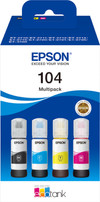
You can print up to 4500 black and white pages and 7500 colored pages with the extra ink bottles set, so you won't be without ink for a while
With this all-in-one printer, you can print, scan, and copy.
Thakns to the 5760x1440DPI print resolution, you can also print high-quality photos.
If you want to save paper, choose a printer with duplex printing.
You should get a printer that has an automatic document feeder if you want to scan or print a stack of paper in one go.
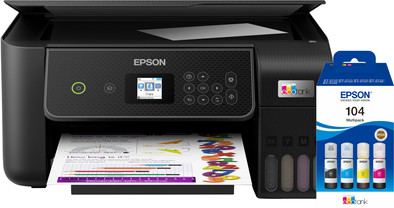
Get ink for the next few years with the Epson EcoTank ET-2871 + 1 Set Extra Ink Bottles bundle. With this printer, you receive an extra set of ink so you can print about 15,000 colored pages in total. The Epson EcoTank ET-2871 is the affordable print solution for the household. Print, scan, and copy your documents with this all-in-one EcoTank printer. You don't fill the EcoTank with cartridges, but with ink from a bottle. With 1 set of ink bottles, you can print up to 4500 pages in black and white and 7500 pages in color. On the exterior of the printer, you can see how much ink there's still left in the ink tank. You can connect the printer via WiFi or WiFi Direct, the own network of the printer. This way, you can also use the printer at places without wireless network. You can control the printer via the Epson Smart Panel app or via the LCD screen.
Installation ease
Options
Print quality
With the Epson EcoTank ET-2871 I save a lot on my consumable costs thanks to the ink tanks and I print documents sharply. I do not automatically print double-sided with this printer.
Low running costs This printer does not use cartridges, but has an ink tank that I fill with ink from bottles. Filling the ink tanks is very easy. I place an ink bottle on the attachment and the ink automatically flows into the tank. I was afraid of stains on my desk, but ink automatically stops flowing from the bottle when the tank is full. The biggest advantage of these ink tanks is that they are much cheaper than cartridges. With one set of ink bottles you can print approximately 4,500 pages in black and white and 7,500 in color. I print about 300 pages and after this I see no difference in the ink level. This makes the printer economical to use if you print a lot.
Small size and easy connection What I like about the printer is that it is compact and light. The light weight of the printer makes it easy to unpack. Due to its compact size, the printer fits easily on my desk next to my laptop and monitor. Connecting the printer to my WiFi network also goes smoothly. I connect my smartphone directly to the printer's own WiFi network. I scan a QR code on the printer's screen and am then immediately connected. My laptop does not have a USB input to which I connect the printer, but this is not a problem. I print via Apple AirPrint and the Epson Smart Panel app. I can copy or scan at the touch of a button via the LCD screen. The printer does not automatically print on both sides, so I only print single-sided documents.
High print quality The printer is on the slow side. Printing a 10-page color document takes about 2 minutes. A full-page image is ready after a minute. I often print small documents myself, so I don't mind waiting a while. If you often print reports with many pages, I would choose a faster printer. The quality of text and color documents is good. The printer has a high print resolution of 5,760 by 1,440 dpi. This also allows me to print images sharply. With the standard print settings, I think the colors look a bit dull on the paper. After I choose the high print quality, I do get vibrant colors.
Kayleigh. Printer specialist.
11 April 2024
Automatically translated from Nederlands
Do yourself a favor, buy a different printer than this one. It is very unclear how to install the printer. For example, it indicates that there is no USB connection for certain functions, while there is indeed one. Establishing a WiFi connection is terribly difficult. And the paper jams very quickly.
Corine
11 November 2024
Automatically translated from Nederlands
The primary thing is that the printer can make good quality prints at a reasonable speed, that aspect is certainly successful. This printer was the successor to my Brother printer (DPC-J562DW), which unfortunately broke down. During installation I really longed for how it used to be with that old printer! I do not recommend people who are not so handy with the digital world to choose this printer. Installation on my desktop was fairly easy after downloading an app, the manual hardly mentions anything about this. I have fast wifi in my house thanks to TP-Link, but the command to print was slow. A USB cable did wonders! I had read that you had to load the paper at the back, I assumed a cassette, but you have to insert the paper at the top of the back, with an A4 more than half protrudes above the printer. Not pretty, but you can live with it.... I also knew about the small screen in advance, but that it was so small, you actually need a magnifying glass. What a difference with my former Brother, is that still necessary in 2024? But the most important thing is it works!
André
22 October 2024
Automatically translated from Nederlands