MSI Thin 15 B13VE-2051NL

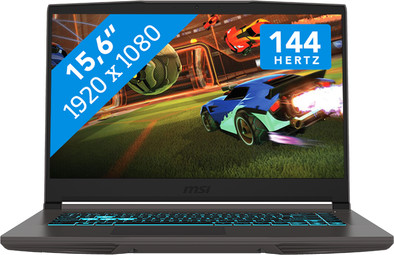
Never available again
View alternatives in the sidebar
View alternatives in the sidebar
If you purchase of a laptop or desktop, you receive 1 year of Norton 360 Deluxe for free. One day after purchase, you'll receive an email with a personal voucher code. Go to the promotional Terms and Conditions for more information.

Product number | 947342 | |
|---|---|---|
Manufacturer code | 9S7-16R831-2051 | |
Brand | MSI | |
Processing of your defect | Via Coolblue | |
Old product returned for free |
Screen size | 15,6 inches | |
|---|---|---|
Screen quality: laptops | Basic | |
Touchscreen | ||
Panel type | IPS panel | |
Sharpness | Full HD (1080p) | |
Resolution width | 1920 pixels | |
Resolution height | 1080 pixels | |
Refresh rate | 144 Hz | |
Aspect ratio | 16:9 | |
Screen reflection | Anti-glare | |
Adaptive Sync | ||
Brightness | 250 cd/m2 | |
Blue light filter | ||
HDR support |
Processor | Intel Core i7 | |
|---|---|---|
Processor number | 13620H | |
Processor generation | 13th gen | |
Processor code name | Raptor Lake | |
Processor cores | Deca-Core (10) | |
Threads | 16 | |
Clock speed | 2,4 GHz | |
Turbo speed | 4,9 GHz | |
Cache memory | 24 MB | |
Speed class laptops | Very good | |
Intel Evo laptop |
Internal RAM | 16 GB | |
|---|---|---|
Memory composition | 2x 8GB | |
Memory slot 1 | 8 GB | |
Memory slot 2 | 8 GB | |
Total number of RAM slots | 2 | |
Maximum internal memory | 64 GB | |
RAM type (DDR type) | DDR4 | |
Memory speed | 3200 MHz | |
Number of replaceable RAM slots | 2 | |
Number of free RAM slots | 0 | |
Total graphics power | 45 W | |
RAM expandable up to | 64 GB |
Total storage capacity | 512 GB | |
|---|---|---|
Storage type | SSD | |
SSD storage capacity | 512 GB | |
Hard drive type | NVMe | |
Number of replaceable storage slots | 2 | |
Number of free storage slots | 0 | |
Internal storage expandable up to | 64 GB |
Video card | NVIDIA GeForce RTX 4050 | |
|---|---|---|
Video card brand | NVIDIA | |
Type of video card | Dedicated | |
Video card RAM | 6 GB |
Operating system | Windows | |
|---|---|---|
Windows OS version | Windows 11 Home | |
Operating system language | Multiple languages can be configured |
Recommended for use | Gaming, Music production and DJing, Photo editing, School, Video editing |
|---|
Build quality laptops | Mid-range | |
|---|---|---|
Laptop model | Laptop | |
Color | Gray | |
Material | Metal, Plastic | |
Metal type | Aluminum | |
Material top of laptop | Metal | |
Material keyboard casing laptop | Plastic | |
Material bottom of laptop | Metal | |
Height | 2,17 cm | |
Width | 35,9 cm | |
Depth | 25,4 cm | |
Weight | 1,86 kg | |
Type of military test | MIL-STD-810H | |
Passed military test |
Mobile data connection | No | |
|---|---|---|
WiFi standards | Wireless A (WiFi 2), Wireless AC (WiFi 5), Wireless AX (WiFi 6), Wireless AXE (WiFi 6E), Wireless B (WiFi 1), Wireless G (WiFi 3), Wireless N (WiFi 4) | |
Bluetooth | ||
Bluetooth version | 5.3 |
USB port | ||
|---|---|---|
Number of USB ports | 4 | |
Type of USB port | Standard USB-A, USB-C | |
Protocol Female USB-C port | DisplayPort Alternative Mode, USB | |
USB version Female USB-C port | 3.0 | |
Video output via USB-C possible | Yes | |
Number of female standard USB-A ports | 3 | |
Female standard USB-A port version | 3.0 | |
Number of USB 3.0 Female USB-C ports | 1 | |
HDMI connector | ||
Number of HDMI connectors | 1 | |
Female HDMI Type A port version | 2.0 | |
DisplayPort connector | ||
VGA connector | ||
Network connector | ||
Number of Ethernet ports | 1 | |
Thunderbolt connector | ||
Headphone jack | ||
Memory card reader |
Keyboard layout | QWERTY | |
|---|---|---|
Physical keyboard layout | ANSI | |
Numeric keypad | ||
Spill-resistant | ||
Backlit keyboard | ||
Color keyboard lighting | Blue | |
Mechanical keyboard | ||
Programmable keys |
Built-in microphone | ||
|---|---|---|
Number of speakers | 2 | |
Sound reproduction | Stereo | |
Integrated computer speakers brand | DTS Studio Sound |
Built-in camera | ||
|---|---|---|
Image definition webcams | HD Ready (720p) | |
Camera slider |
Battery capacity laptop | 52,4 Wh | |
|---|---|---|
Battery technology | Lithium polymer | |
Power connector input type (female) | Other brand/product specific | |
Laptop wattage | 120 W | |
Charger included | ||
Charging cable included | ||
Power charger | 120 W |
Manufacturer's warranty |
|---|
TPM (Trusted platform module) | ||
|---|---|---|
TPM type | Firmware TPM | |
Kensington lock | ||
Windows Hello | ||
Fingerprint identity sensor | ||
Security class laptops | Basic | |
Built-in privacy screen |
Extra installed software | ||
|---|---|---|
ISV certification |
Recommended for use
Gaming, Music production and DJing, Photo editing, School, Video editingOur digital expert will help you, but it can sometimes make mistakes, like humans do.
According to our laptop expert
You can edit videos and stream your gameplay on Twitch with the Intel Core i7 processor.
The medium-sized screen shows your games clearly, and you can easily take the laptop with you.
With the 144Hz refresh rate, you can enjoy smooth images during competitive games.
You need an RTX 4060 video card if you want to play medium demanding games.
For professional streaming, 3D editing, or game design, you need an i9, Ryzen 9, or Ultra 9 processor.
Recommended for use
Gaming, Music production and DJing, Photo editing, School, Video editing5 stars
2
4 stars
2
3 stars
4
2 stars
0
1 star
1
The MSI Thin is the entry-level series of gaming laptops for light games, such as Minecraft, Fortnite and Call of Duty. The model I tested had an RTX 3050 video card, a 12th generation Intel Core i7 processor and 16 gigabytes of DDR4 RAM. I ran a number of games with this, but I also tested the laptop for video editing and multitasking in various programs. In this review you can read my findings.
Video card suitable for light games The NVIDIA GeForce RTX 3050 video card makes this laptop suitable for graphically light games. For example, I opened Minecraft, played a few games of Halo Infinite (without winning unfortunately) and also tried a somewhat heavier title in Hogwarts Legacy. As expected, Minecraft and Halo Infinate ran without problems in 1,080p high with 60 to 100 frames. The MSI Thin had more trouble with Hogwarts Legacy, because it is a newer game. Due to the extra detailed graphics and lighting effects, I had to adjust the resolution to 1,080p medium. Playing modern games is possible, but I do recommend that you enable DLSS support. This boosts the frame rate through AI technology, which makes your gaming just a little bit smoother. For older, light titles, I find the RTX 3050 more than suitable. The RTX 4050 and RTX 4060 models run these games at a higher frame rate.
Powerful processor and RAM combination The 12th generation Intel Core i7 processor and the 16 gigabytes of DDR4 RAM memory make this one of the more powerful entry-level models. For example, I edited some gameplay videos in Adobe Premiere Pro and the laptop processed my projects in no time. The RTX 3050 video card gave me extra graphic power for editing lighting effects. For extra precise editing, I recommend the RTX 4050 and 4060 models with an Intel Core i7 or AMD Ryzen 7 processor. The newer generation of video cards processes pixels and textures faster than the RTX 3050 variant.
Sleek gaming design with fast fans The design has an advantage and a disadvantage. The advantage is the color in combination with the blue keyboard lighting. This matches nicely with each other and the WASD buttons are made transparent for an extra gaming effect. The disadvantage is the plastic housing. This quickly became warm with heavy use and did not feel very sturdy at the bottom of the screen. In addition, I found the laptop quite heavy for 15 inches, but that is logical due to the extra components in a gaming laptop. The biggest advantage I think is the shortcut for the fans. I turned on this boost while playing Hogwarts Legacy and the laptop remained well cooled.
Giorgos. Laptop specialist.
23 September 2024
Automatically translated from Nederlands
With this graphics card and processor you would expect it to be a good fast laptop to play games at normal framerate. Unfortunately I can't even play my games at the lowest setting without a lot of frame dips. Drops almost standard below 60fps
Jan
11 October 2024
Automatically translated from Nederlands
This MSI is lighter than the MSI Katana I had before. Better processor and therefore nice and fast. It took some getting used to the lack of Num Lock, but that's fine now.
Stippel404
29 December 2024
Automatically translated from Nederlands