Welcome to your environment! You can order everything from your assortment with your personal budget here.

You can always return to the normal Coolblue website by clicking here.

Your outstanding budget (incl. VAT) is always visible here, so you know exactly how much you can spend.

Coolblue home

Help with your product

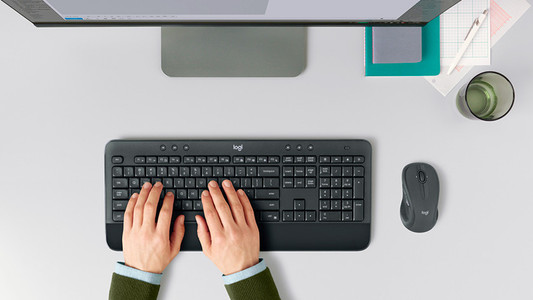
Logitech MK545 Wireless Keyboard and Mouse QWERTY 2-Pack
0 reviews

The Logitech MK545 Wireless Keyboard and Mouse QWERTY 2-Pack, you can provide 2 computers with a mouse and keyboard. You have lot of freedom of movement while you're working. You can use the wireless USB receiver to connect the mouse and the keyboard to your computer or laptop. You'll only need 1 USB port, so you'll have more space to connect other peripherals as well. The multimedia keys on the keyboard keep you in control of your music, so you can keep focusing on your work whilst skipping songs with 1 press of a button. The 2 thumb buttons on the side of the mouse can be used to navigate your web browser, easily returning to the previous page, for instance.

Read all tips here

How do I solve problems with my wireless keyboard and mouse?

Is the connection of your wireless keyboard or mouse poor? Or does your peripheral not have any connection at all? Then you can try out a couple of things. You can switch USB ports or put in new batteries, for example. In this article, you can read what you can do to solve problems with your wireless peripherals yourself.

How do I solve problems with my wireless keyboard and mouse?

Is the connection of your wireless keyboard or mouse poor? Or does your peripheral not have any connection at all? Then you can try out a couple of things. You can switch USB ports or put in new batteries, for example. In this article, you can read what you can do to solve problems with your wireless peripherals yourself.

How do I solve problems with my wireless keyboard and mouse?

Is the connection of your wireless keyboard or mouse poor? Or does your peripheral not have any connection at all? Then you can try out a couple of things. You can switch USB ports or put in new batteries, for example. In this article, you can read what you can do to solve problems with your wireless peripherals yourself.

How do I solve problems with my wireless keyboard and mouse?

Is the connection of your wireless keyboard or mouse poor? Or does your peripheral not have any connection at all? Then you can try out a couple of things. You can switch USB ports or put in new batteries, for example. In this article, you can read what you can do to solve problems with your wireless peripherals yourself.

How do I solve problems with my wireless keyboard and mouse?

Is the connection of your wireless keyboard or mouse poor? Or does your peripheral not have any connection at all? Then you can try out a couple of things. You can switch USB ports or put in new batteries, for example. In this article, you can read what you can do to solve problems with your wireless peripherals yourself.

How do I solve problems with my wireless keyboard and mouse?

Is the connection of your wireless keyboard or mouse poor? Or does your peripheral not have any connection at all? Then you can try out a couple of things. You can switch USB ports or put in new batteries, for example. In this article, you can read what you can do to solve problems with your wireless peripherals yourself.

Didn't find your answer?

Find an answer to your question quickly and easily via our customer service.

Coolblue specialist
Personal chat Digitalk.
You're now chatting with Coolblue customer service
This chat is closed
foo
Oeps File size is larger than 5MB. Upload a smaller file.