Written by Andrea
Edited on
23 August 2022
·
12:55
How do you create a user profile on your Tanita BC-545N scale?
You've purchased the Tanita BC-545N scale, but you're unable to create a user profile. You need this to perform a segmental analysis and automatically transfer your data to the Tanita app. We'll explain step by step how to create a profile here.

Set up the user profile in 4 steps
Use these steps to create a user profile on your Tanita scale.
Step 1. Prepare the scale
Step 2. Enter your age
Step 3. Enter your gender
Step 4. Enter your height
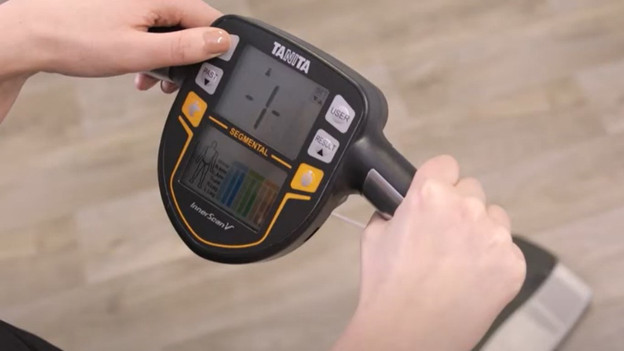
Step 1: prepare the scale
-
Turn on the scale, but don't step on it until the profile is completely set up.
-
Grab the handles and press the 'set' button. You'll now see the number '1' on the screen.
-
If you're creating a user profile for the first time, select number 1 by pressing 'set'.
-
Do you want to create a second or third profile? Press the arrow buttons until the number 2 or 3 appears on the screen and press 'set'.

Step 2: enter your age
-
Use the arrow keys 'set'.
-
Do the same for your birth month and your birthday.

Step 3: enter your gender
-
You'll now see 3 figures on the screen. Select the 'male' icon or the 'female' icon.
-
Do you exercise intensively several times a week? Select the running figure. The scale will then take into account your active life during the measurements.
-
Press 'set' to confirm your choice.
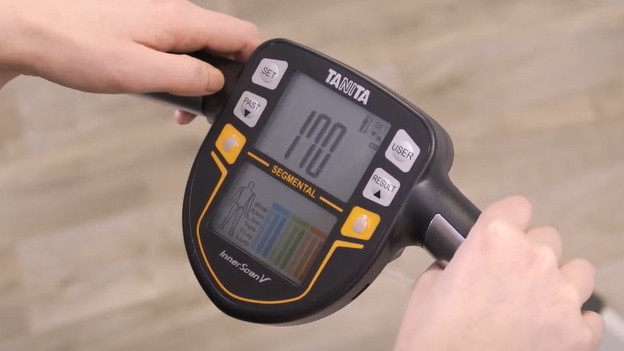
Step 4: enter your height
-
Now select your height in centimeters. Use the arrow keys to scroll up or down and confirm your height by pressing 'set'.
-
Press the down arrow key until 'yes' appears on the screen and press 'set'.
-
Your user profile is now saved.
Article by Andrea
Personal Scale Expert.