
Written by Kayleigh
Edited on
21 March 2025
·
16:32
How do you register your Brother printer for EcoPro?
You bought a Brother printer that's suitable for EcoPro, the Brother ink subscription. With EcoPro, you pay for the number of pages you print each month. You get cartridges sent home automatically, before your current has run out. We'll tell you how to register your printer for Brother EcoPro in 5 steps.

Register for EcoPro in 5 steps
First, set up your Brother printer before you register for EcoPro. Keep your payment details at hand.
- Step 1. Download the Brother Mobile Connect App.
- Step 2. Select your printer.
- Step 3. Choose a print plan.
- Step 4. Log in with your account.
- Step 5. View your information in the app.

Step 1: download the Mobile Connect app
You can register for Brother EcoPro with the Brother Mobile Connect app on your smartphone. Don't you have this app yet? Download it first via the App Store or the Google Play Store. Create an account and add it to your printer in the app. You need the login information of this account in step 4.
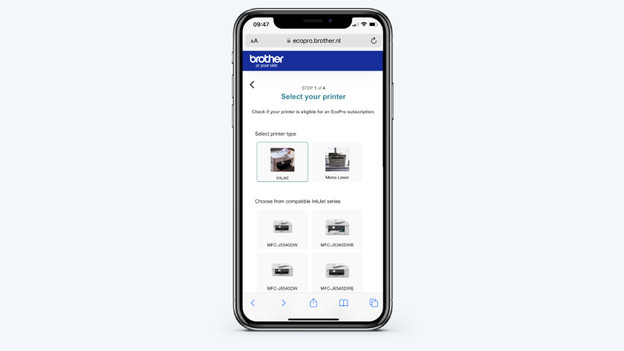
Step 2: select your printer
Click the EcoPro icon in the Mobile Connect app. You'll be directed to the Brother EcoPro webiste. Click Try for free and select your printer. Select your printer type first, that's InkJet or Mono Laser. After this, you'll see a list of suitable printers. Click your printer model. Note: many names of the printer models look alike. Make sure you choose exactly the same name.

Step 3: choose a print plan
You can now choose a print plan that matches your use. Not sure how many pages you'll use? That's okay, because you can adjust your subscription at any time. Or buy 10 additional pages for € 0.99.

Step 4: log in with your account
Now log in to your Brother account that you made before in the app. Your printer is connected to this account. Now enter your payment information and confirm your registration. The display of your printer will ask if you want to use this printer for your EcoPro subscription. Click OK. Your printer is registered for Brother EcoPro.
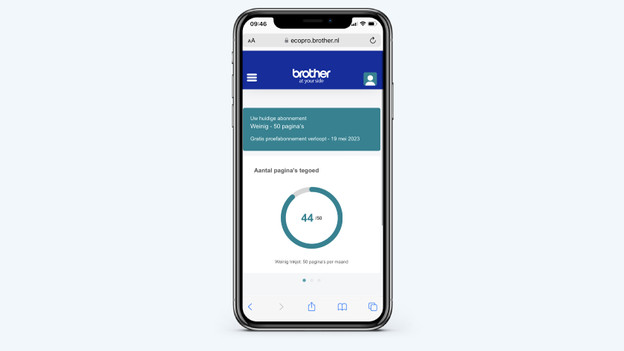
Step 5: view your information in the app
Do you want to see the information of EcoPro? Click the EcoPro icon in the Brother Mobile Connect app. On the EcoPro page, you can see how many pages you still have left and your recent orders. When you have a free trial subscription, you can see when it expires.
Article by Kayleigh
Printer Expert.
