With a network switch, you can set up more wired internet connectors. You connect your switch via the Ethernet cable and connect your devices to that. Want to change settings? If you choose a managed switch, you can adjust it to your preferences. That way, you can set up better security and increase the performance. Choose a PoE switch if you want to run power through the Ethernet cable. You connect this type of network switch to a suitable surveillance camera or access point, so you don't need a power adapter.
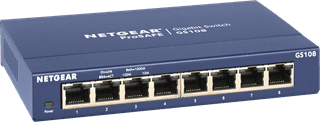
Our choice for a plug and play switch|Color blue|None VLAN|None PoE support
- You can connect 7 extra devices to your network. This switch is plug and play, so you can use it right away.
- You can mount this switch under a desk or to the wall, so it fits anywhere in a small room.
- We recommend the NETGEAR GS108 if you need Ethernet cables for the devices in 1 room.
29,99
In stock
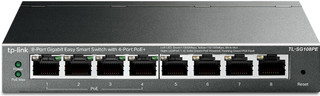
Our choice for a small switch you can install and manage yourself|64 W|Color black|VLAN
- You can provide 4 devices with power via the network cable thanks to the PoE ports.
- With this managed switch, you can set up extra functions for the security of your network.
- You can connect up to 7 wired devices with this switch, so they always have the most stable internet connection.
49,99
In stock

Our choice for a switch that lets you extend your Ubiquiti UniFi network|52 W|UniFi|Color white
- In the UniFi app, you can see this switch right away as soon as you connect it to your UniFi network.
- The switch has 4 PoE+ ports, so your connected devices receive power and internet through the same cable.
- You can prioritize your most important devices on the network with Quality of Service.
129,-
In stock

Our choice for a switch that allows you to connect extra devices|63 W|Color black|None VLAN
- The switch has 4 PoE ports, so your connected devices receive power and internet through the same cable.
- This PoE+ switch provides more power than a regular PoE switch, so you can also connect devices with a higher consumption.
- You don't need much technical knowledge to install this switch.
55,-
In stock
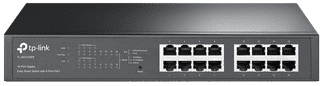
Our choice for a switch for your home office or small workplace|110 W|Color black|VLAN
- Thanks to the 16 ports, all your devices in your home office have a fixed network connection.
- Thanks to the PoE ports, access points, cameras, and IP phones receive power via the same cable that supplies internet.
- You can keep your home office tidy because you need fewer separate adapters and cables.
141,-
In stock

Our choice for a switch when you work with multiple colleagues|95 W|UniFi|Color silver
- With 24 ports, you can supply every colleague at the office with a fixed network connection.
- PoE supplies power to phones, cameras, and UniFi access points, so you use fewer separate adapters.
- You only use 1 central switch for the entire office.
481,-
In stock

Our choice for a switch that lets you provide wired internet for a large company|190 W|Color blue|VLAN
- Thanks to the PoE ports, your connected devices are powered via the network cable.
- Connect up to 23 devices with this switch and provide them with a stable internet connection.
- You can set up this managed switch to your liking, for example by giving devices priority on your network.
324,-
In stock

Our choice for a switch that allows you to connect devices with a higher consumption.|350 W|UniFi|Color silver
- Thanks to PoE++, you can also provide devices with a high consumption with a PoE connection.
- With 24 ports, you can connect many PCs, cameras, and access points at once.
- With this managed switch, you can set up extra functions for the security of your network.
807,-
In stock