Never available again
View alternatives in the sidebar
View alternatives in the sidebar
If you buy the Asus ZenScreen MB16AC now, you'll receive a refund after purchasing this router. You register for this via Asus. Go to the promotional Terms and Conditions (PDF) for more information on how much money you'll get back. All steps are also explained here.

Product number | 787645 | |
|---|---|---|
Manufacturer code | 90LM0381-B01170 | |
Brand | ASUS | |
Processing of your defect | Via Coolblue | |
Old product returned for free |
Screen size | 15,6 inches | |
|---|---|---|
Recommended display resolution | 1920x1080 | |
Sharpness | Full HD (1080p) | |
Aspect ratio | Standard (16:9) | |
Refresh rate | 60 Hz | |
Response time | 5 ms | |
Panel type | IPS panel | |
Brightness | 220 cd/m2 | |
Local dimming | ||
HDR support | ||
Contrast ratio | 800 | |
Touchscreen | ||
Screen reflection | Glossy | |
Blue light filter | ||
Flicker-free technology | ||
Color space | sRGB | |
Color depth | 17 million colors (8-bit) | |
Adaptive Sync | ||
Resolution width | 1920 pixels | |
Resolution height | 1080 pixels | |
Horizontal viewing angle | 178 ° |
Height | 8 cm | |
|---|---|---|
Width | 37 cm | |
Depth | 23 cm | |
Weight | 0,78 kg | |
Color | Silver | |
Including stand | ||
Material | Metal | |
Cable management | ||
Appearance | Neutral | |
Curved |
Number of USB-C ports | 1 | |
|---|---|---|
Type of USB port | USB-C | |
Number of USB ports | 1 | |
Type of USB cable included | USB-C to USB-C | |
USB-C dock |
Included by default | USB cable | |
|---|---|---|
Not included by default | HDMI cable |
Adjustable in height | ||
|---|---|---|
Tiltable | ||
Pivotable stand | ||
Pivot function | ||
VESA mount option |
Energy label | F | |
|---|---|---|
Energy consumption standby | 2 W | |
Energy consumption active | 8 W | |
Energy consumption per 1000h | 13 kWh | |
Annual energy consumption | 18,98 kWh | |
Annual energy costs | 4,18 euros |
Built-in speakers | ||
|---|---|---|
Webcam | ||
Split screen | ||
Kensington lock | ||
Best tested |
Recommended for use | Internet, email, and text processing, Office work, On the go, Watching movies in Full HD |
|---|
Sharpness | Full HD (1080p) | |
|---|---|---|
Curved | ||
Aspect ratio | Standard (16:9) | |
Refresh rate | 60 Hz | |
Response time | 5 ms | |
Panel type | IPS panel | |
Color depth | 17 million colors (8-bit) | |
Built-in speakers |
According to our monitor expert
Take this monitor with you everywhere you go, thanks to the included protective cover.
The IPS panel displays true-to-life colors from all angles.
Create a 2-monitor workplace on the go with this Asus monitor.
This monitor requires a USB-C or USB-A 3.0 connector. When using the USB-A adapter, external Asus drivers are required.
The auto-rotation function only works on the Windows operating system.
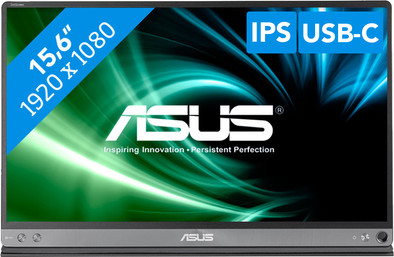
With the Asus ZenScreen MB16AC portable monitor, you can work with a second screen anytime, anywhere. Flip open the Smartcase to use it as a stand, connect the screen to the USB-C or USB-A 3.0 port of your laptop, and you're ready to work more efficiently. Both the power and image signal are transmitted via the USB-C or USB-A (with drivers) connector, so you don't have to deal with messy cables while you're on the train, in the plane, or at your flex workspace. Thanks to the IPS panel, you can see true-to-life colors from any viewing angle. The monitor can be used both in landscape and in portrait mode, which is convenient when viewing your entire invoice or code block at a glance.
Installation ease
User friendliness
Image quality
Price-quality ratio
Design
I bought the Asus Zenscreen because I was looking for a solution for a second screen at home, in the student room and in the classroom.
The Asus Zenscreen came out as the best and it has proven that in the meantime.
In addition to the beautiful image, the response time is also a gift to work with. I often read that the screen can be too dark and that you see bad things on it, I have not had any problems with this. In fact, the screen has more backlight than my laptop at full brightness, (in battery mode, though).
The portability of the thing is great, just fold it up and it can go in the bag. The supplied case is of high quality, the magnets that are in it ensure that the case is firmly attached to the screen.
The general build quality of the screen is very clean. When you hold it you feel that you are dealing with a high-end device. The thin bezels around the screen confirm this once again.
I was also very blown away by the plethora of options you can set on the screen, blue filter, special modes.. Everything is there! There is also space to save 5 schedules yourself.
The only point that I have to point out is that an extra button was not a luxury. If you have to go through the menu of the screen, you have to push the button a lot. If you missed you have to do the whole round again.
Short and sweet: Looking for a high-quality portable second screen? Then the Asus Zenscreen MB16AC is what you're looking for.
Glenn De Smedt
14 January 2018
Automatically translated from Nederlands
Reason for purchase: As a web developer/programmer, using a second screen is a must. Now I am sometimes in rooms where it is not possible to use a second screen. Or is there no monitor available. So a portable screen is a great solution for this.
Positive:
Image quality: The image quality of the screen is fantastic for such a thin screen and certainly nice to work with.
Dimensions: The size of the screen is great! Super thin and light. The screen also fits very easily in my bag with my other computer stuff.
Cable: The monitor uses 1 USB-C to USB-C, so you don't need a large power brick to power the screen.
Negative:
cover: The cover works great as protection, but unfortunately it works less great as a standard. In my opinion, the magnets in the case are not strong enough. You only have to tap your screen lightly and your screen almost falls over. A separately adjustable standard that you click on, for example, would be more convenient.
Cable: The supplied cable is very stiff, so difficult to bend it at different angles. This can of course be solved by buying another smoother cable.
Brightness: What you are already told in several reviews is that the screen is not very bright. Now I may have less problems with this than others because it doesn't really bother me but I understand that this can be inconvenient for some.
Buttons(menu): The screen uses 2 simple buttons, with which you can navigate through the menu, unfortunately this is a bit more difficult than expected, as this is quite inconvenient with cooperation of the cover as your cover keeps coming loose from the screen.
Conclusion: I recommend this screen for people who are often "on the move" or often do not have the option to use a second screen. This screen is easy to carry and uses 1 port on your computer.
Robbert de Vries
13 October 2017
Automatically translated from Nederlands
Because I work a lot at different locations, this is an ideal screen to take with me. Quick to connect. Not too big and yet the convenience of a second screen.
Robbert
2 June 2018
Automatically translated from Nederlands