Apple TV 4K 32GB (2017)
Never available again
View alternatives in the sidebar
According to our media player expert
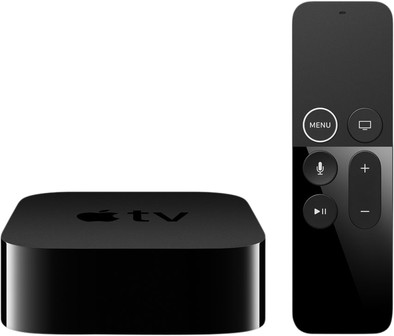
With Apple TV 4K, you can watch movies, series, and photos in 4K resolution. Thanks to the high 3840x2160 pixel image quality, media looks up to 4 times sharper than the Full HD resolution of its predecessor, the Apple TV 4. The color representation is also richer thanks to High Dynamic Range (HDR), so colors look more vibrant and lifelike. Use your iPhone or iPad to stream your videos or pay music. Like games? Thanks to the powerful AX10 Fusion chip, you can also play games in high resolution. Your iPhone or the included remote then functions as the game controller. This Siri Remote also has a microphone, so you can control the Apple TV via the voice assistant Siri. This way, you can look for the most recent 4K movies in your iTunes library or prepare for a night of binge-watching Netflix.
HDMI connector | ||
Type of image definition support | Ultra HD (4K) | |
Streaming services | Amazon Prime, Apple Music, Disney+, HBO Max, Netflix, Pathé Thuis, Plex, Spotify, TADAAM, Viaplay, Videoland, YouTube, iTunes | |
Supports Netflix | ||
Built-in hard drive | ||
Built-in WiFi | ||
Network connector |
5 stars
960
4 stars
332
3 stars
18
2 stars
3
1 star
3
Sound quality
User friendliness
Image quality
Design
Options
I think Apple TV is a valuable addition if you don't already have a smart TV with Apple TV. I show my holiday photos to my family easily and razor-sharp with AirPlay.
Beautiful design for a smart home I have tried Apple TV HD and 4K. The look caught my eye first. This media player is compact and beautifully finished and can be seen. The included Siri Remote also looks sleek. Apple TV also works as a HomeKit hub. So you control all your smart lamps and devices via your Apple devices.
Razor-sharp image The resolution of movies and series on Apple TV 4K shines on my 4K television. I see all the details of my favorite series even sharper and the colors also splash off the screen. With Apple TV HD I don't have that high resolution and so I see images 'below the level' of my television.
Thanks to AirPlay, I can view my vacation photos on a big screen AirPlay is the biggest advantage of Apple TV for me. Thanks to this function, I can easily view my photos and videos on my television wirelessly. Very useful when I want to show my holiday photos to family and friends. When I want to explain to my grandmother how to install an app on her iPhone, I mirror my screen to Apple TV so she can watch me on the big screen.
Wide range of apps, games, movies and series After installing Apple TV, I search for interesting apps and movies and series on Apple TV. In the App Store I find a lot of apps that I can install: from news apps to games and streaming services like Netflix. For games I can also go to Apple Arcade, the gaming platform of Apple itself. This app is automatically on Apple TV. I don't use many apps myself, so 32GB is enough storage for me. If you plan to download a lot of apps or store your entire Apple Music library on Apple TV, you might want to choose Apple TV 4K 64 GB.
Siri as a personal assistant When I come home in the evening after a busy day, I feel like watching a movie that is easy to watch. I ask Siri for a fun comedy movie from the 80s and Siri collects all the movies from that era for me, both from Netflix and Apple TV itself.
Robyn. Apple TV specialist.
9 March 2020
Automatically translated from Dutch
Device and Interface Apple can deliver a beautiful product like no other. The Apple TV 4 is considerably heavier and somewhat higher than its predecessor. I don't really find this a problem myself, rather it's nice because it gives strength and you can also keep your cable management clean in this way.
I think the remote control is genius, it's really nice to swipe through everything. T feels just like any other apple product with a touchscreen t just works flawlessly.. Although I have to say that when you use it for the first time you have to get used to it.
I don't know yet whether the light remote allows the more serious games to be operated properly. At Asphalt I thought it was very "weird" that I had such a light thing in my hands that I had to tilt to steer. But that too is a matter of getting used to?
I think the interface is very nice, everything is clean and tidy and especially the eye candy, just wonderful that everything has an "effect". And as you are used to, you can force close apps (double home), like in the iOS multitasker. Moving apps again has been kept simple. (just hold the touchpad and you can swipe the app to the place you want).
Features The features of the out-of-the-box Apple TV are bare. Personally, I really like this, you can immediately start setting up your own media player! and don't have to throw off 10 apps because they use up space and you're never going to use them anyway. The Appstore.app is of course also present here you will find the useful apps that you want. And everyone also recognized: Youtube, Netflix, Airbnb and last but not least Plex! Heerlijn in combination with my Synology NAS ! The amount of apps is good for now but I can't wait for the apps they can make to get the most out of this Apple TV. Incidentally, you can access via Siri in English, but that's only a "half" solution, there will definitely be an update? Not? Let's hope so..
Then don't forget Apple Music, of course, and that looks good. There is no option for taking music offline. Switching between two Apple IDs is not useful in combination with Apple Music. The library has to be downloaded first and before you can play a song you are really 4 minutes further... too bad but who knows what the future will bring us.
You can search, in iTunes Movies and Apps. I didn't see results from Netflix like this. This only works with Siri Search unfortunately. Hopefully, Apple will make the API available to apps soon. For example, if Plex will use this, you will be able to find your own movies faster.
The screensavers are beautiful and just like the sound of the moving cursor in the menu (which also 'moves' through the speakers from left to right and vice versa. Nice Apple touches.
In some cases, you can use your iPhone as a game controller. This doesn't seem to be an option anywhere, but it's implemented very well (Apple's way). If a game can use the iPhone as a controller, you install the corresponding app and you can connect via WiFi via your iPhone. Karaoke by Smule, for example, works fine (except for my fake voice xD).
All in all a top device and certainly not a bad buy!
Collin Borgans
13 November 2015
Automatically translated from Dutch
I first used the Media Box from ziggo, (netflix and videoland) but it kept crashing or was it so slow... Now with the Apple TV 4K, everything runs a lot faster. Can be operated via my iPhone. Beautiful image in combination with my 4K TV. Also received a funny card with delivery that made me laugh! XD
Dury Duckers
31 January 2018
Automatically translated from Dutch
Product number | 793777 | |
Manufacturer code | MQD22FD/A | |
Brand | Apple | |
Warranty | 2 years | |
Processing of your defect | Via Coolblue | |
Old product returned for free |
Type of image definition support | Ultra HD (4K) | |
HDR support | ||
Type of HDR | Dolby Vision, HDR10 | |
Parental controls | ||
Internal RAM | 3 GB | |
Built-in WiFi | ||
Operating system | tvOS | |
Web browser |
Processor brand | Apple | |
Processor | Apple A10X |
Supports Netflix | ||
Supports Torrents | ||
Internet radio | ||
Streaming services | Amazon Prime, Apple Music, Disney+, HBO Max, Netflix, Pathé Thuis, Plex, Spotify, TADAAM, Viaplay, Videoland, YouTube, iTunes | |
Displays photos | ||
Photo file format | JPEG, TIFF | |
Plays music | ||
Audio file format | AC3, AIFF, MP3, WAV, aac, dd+, flac | |
Plays videos | ||
Video file format | H.264, HEVC/H.265, M4V, MOV, MP4, MPEG-4 |
AirPlay | ||
DLNA | ||
SonosNet | ||
Spotify Connect | ||
Google Cast | ||
UPnP AV support | ||
Miracast | ||
Plex support |
Built-in hard drive | ||
Total storage capacity | 32 GB | |
SD card slot |
Headphone jack | ||
Microphone connector | ||
HDMI connector | ||
Network connector |
Height | 3,5 cm |
Width | 9,8 cm |
Depth | 9,8 cm |
Weight | 0,425 kg |
Color | Black |
Controls via app | |
Controlled via Apple app | |
Controlled via Android app |