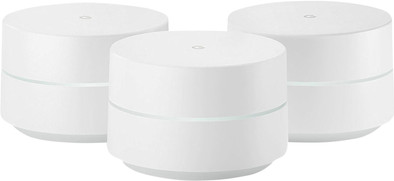
Google WiFi Multi-room WiFi 3-Pack

Never available again
View alternatives in the sidebar
View alternatives in the sidebar
Product number | 795147 | |
|---|---|---|
Manufacturer code | GA00158-NL | |
Brand | ||
Processing of your defect | Carry-in warranty | |
Old product returned for free |
Number of stations | 3 | |
|---|---|---|
Can be expanded with extra stations |
Frequency bands | Simultaneous dual-band | |
|---|---|---|
WiFi speed | AC1200 | |
2.4GHz band speed | 300 Mbit/s | |
5GHz band speed | 867 Mbit/s | |
Number of WiFi antennas | 3 | |
Jumbo frame support |
Ethernet speed | Gigabit Ethernet (1000Mbps) | |
|---|---|---|
Network connector | ||
Number of Ethernet ports | 2 | |
PoE support | ||
USB port |
Automatically switches to 3G/4G | ||
|---|---|---|
SIM card slot |
Quality of Service (QoS) | ||
|---|---|---|
MU-MIMMO | ||
Seamless roaming | ||
Beamforming | ||
Port forwarding | ||
LACP Link aggregation |
Parental controls | ||
|---|---|---|
WLAN security | WPA2, WPA2-PSK | |
Firewall | ||
Firewall type | NAT Firewall, SPI Firewall | |
Guest network | ||
VPN server | ||
VPN client | ||
VPN passthrough |
Mounting possible | ||
|---|---|---|
Width | 10,6 cm | |
Height | 6,9 cm | |
Depth | 10,6 cm | |
Weight | 340 g | |
Color | White | |
Material | Plastic |
Battery level indicator |
|---|
Ethernet speed | Gigabit Ethernet (1000Mbps) | |
|---|---|---|
Frequency bands | Simultaneous dual-band | |
WiFi speed | AC1200 | |
Number of Ethernet ports | 2 | |
Number of stations | 3 |
According to our router expert
Multi-room WiFi let's you create 1 large WiFi network that provides a strong signal throughout your home.
Beamforming increases the range and stability of your WiFi signal.
Use the parental controls to protect children from inappropriate content.
To benefit from the highest speed that this router offers, all connected devices have to support 5GHz.
With the Google WiFi 3 pack, you can equip a medium-sized house with a strong and stable WiFi signal. The router's 3 stations communicate and create a mesh network. The smart Google satellites and the mesh network ensure that you'll always maintain a stable Internet connection, without the need to change the settings. For instance due to a change in the frequency every 5 minutes. Want to make some changes to the router anyway? You can do so with the simple app. For instance, set it up so your children don't get wireless internet after their bedtime, while you can stay online. Or prioritize certain devices: keep streaming on your smart TV, even when you're downloading.
5 stars
118
4 stars
32
3 stars
5
2 stars
3
1 star
0
Range
Installation ease
Speed
Design
I waited a long time for this to come to the Netherlands and almost went to Germany for it. Now luckily available at my own CoolBlue! I have a Ziggo Horizon box and no Connect box.
The WiFi that is in it is really to cry. That's why I installed a Netgear NightHawk R7000 as an access point, which regulated all the WiFi traffic. So now completely over to Google WiFi...
Good...Netgear out...Google Wifi unpacked (already a very pleasant activity, nicely packaged and sleek design) and the thought "is this going to be okay" with the Horizon box.
Great...I had bought three, so number 1 (it doesn't matter which of the three that is) with a network cable connected to the Horizon box and the power adapter with usb C connection in the socket...and wait.. ..
A nicely colored ring indicates the status of the WiFi point....and it started flashing blue... I started the Google WiFi app on my Pixel and from that moment on you can't believe your eyes. You are completely taken into the process, in easy to follow directions (even for a child) on the screen and after having "connected" all 3 wifi points (place and adapter in the socket and let the app do its thing) the whole wifi network up and running...
After some fine tuning here and there (location of the wifi points) you are ready. Google... hats off!
It's too early to say if it's fast, stable and nothing to complain about, but so far everything is very promising...
Evert Ketelaars
19 October 2017
Automatically translated from Nederlands
I am very happy with this product! Now I have one large network throughout my house. This means that all devices (Hue lamps, Irobot, Bosu boxes, Nest, telephone, laptop, etc.) are connected to one network and have good range throughout the house to operate them.
Situation for Google Wifi I was unable to set up one large network in my apartment. I live in the city where there are many jammers and other Wi-Fi networks. That's why I bought a 2nd router (Netgear Nighthawk R7000) and tried to pair it. What I got were 2 separate networks in my house. I had coverage everywhere but had to constantly switch networks on my phone, for example. If I was connected to network 2 on the other side of my house, I couldn't control the Hue lamps because they were connected to network 1. Very annoying. It may have been possible to set up the 2 routers as one network, but I never succeeded.
Situation now I bought the Wifi Google Triple pack and now I have 1 stable network in my house. This means that all devices are connected to this one network and I no longer have to switch to the other network.
One Google station is behind my TV, one in the bedroom and one in my back room. The entire house (apartment) now has good coverage. Because I wired the TV (UTP internet cable) and also have my Hue base station here, I connected a switch to the Google base station on which the TV and Hue base station are located). This works great. The disadvantage is that each base station only has 1 internet port.
Ease of use This is perfect. You connect everything in about 10 minutes and the app on your smartphone guides you through all the steps.
design Compared to a normal router, the design is really much better. No ugly cables over burning lights. There is one light on it, but you can turn it off (or adjust it in strength) with the app. I don't want blinking lights in my bedroom or living room.
Price I think it is more than worth the price. No more irritations because I have to switch in terms of network. What a convenience.
Sjoerd Commandeur
23 October 2017
Automatically translated from Nederlands
I am a demanding user. After reading the many reviews in which the Google Wifi did not always come out well, I decided to buy the Google WiFi, because I could easily return it to coolblue if it did not suit me. Preliminary measurements taken throughout the house with my phone. The old setup was ; Asus router rt-ac87 and 2 x repeater TP-Link RE450. Despite this setup, not always a good signal in the attic and in the garden and the signal strength fluctuated too much. Then installed the Google WiFi 3pack. 1 Wifi in the (front) living room, 1 on the 1st floor (rear) and 1 under the veranda (23 meters from the house and the wifi on the 1st floor). Again measurements taken at the same locations as with the old setup. The speeds were slightly lower overall (about 10%), but the stability of the WiFi signal more than made up for this. A much better signal everywhere in the house and therefore a significantly improved user experience. Streaming from the living room PC to the (chromecast) TV in the veranda is no problem at all (directly with telephone also fine) and without buffering. So despite the higher speeds with the old setup, the Google Wifi is really much faster and more stable in practice. The Google Home and connected Philips Hue and Wemo switches, TVs and network receiver respond much faster. The Google WiFi may be "expensive", but well worth the investment. The advantage is also that Google WiFi is modular, so you can start with 1 Google WiFi and connect additional WiFi to it depending on the need. The user interface is as you are used to from Google...straight to the point and pleasant to use. The family controls work as they should, breaks in the internet use of the children are easy to realize. Are you ready for a new router? , then I would recommend the Google Wifi.
Bob Visser
28 August 2018
Automatically translated from Nederlands