Never available again
View alternatives in the sidebar
View alternatives in the sidebar
Product number | 808383 | |
|---|---|---|
Manufacturer code | MR1100-100EUS | |
Brand | Netgear | |
Processing of your defect | Via Coolblue | |
Old product returned for free |
Type router | Mobile WiFi router | |
|---|---|---|
WiFi speed class | Basic | |
Number of stations | 1 | |
Can be expanded with extra stations | ||
Built-in modem |
Fastest WiFi standard | Wireless AC (WiFi 5) | |
|---|---|---|
Frequency bands | Dual-band | |
WiFi speed | AC1200 | |
2.4GHz band speed | 300 Mbit/s | |
5GHz band speed | 870 Mbit/s | |
Number of WiFi antennas | 4 | |
Jumbo frame support |
Ethernet speed | Gigabit Ethernet (1000Mbps) | |
|---|---|---|
Network connector | ||
Maximum ethernet speed | 1000 Mbit/s | |
Number of Ethernet ports | 1 | |
PoE support | ||
USB port | ||
Type of USB port | Standard USB-A | |
Number of USB ports | 1 |
Highest type of mobile data connection | 4G | |
|---|---|---|
Maximum speed mobile internet | 1000 Mbit/s | |
Automatically switches to 3G/4G | ||
Mobile data connection | 2G, 3G, 4G | |
SIM card slot |
Quality of Service (QoS) | ||
|---|---|---|
MU-MIMMO | ||
Seamless roaming | ||
Beamforming | ||
Port forwarding | ||
LACP Link aggregation |
Parental controls | ||
|---|---|---|
WLAN security | WEP, WPA, WPA-PSK, WPA2, WPA2-PSK | |
Firewall | ||
Firewall type | NAT Firewall | |
Guest network | ||
VPN support | ||
VPN server | ||
VPN client | ||
VPN passthrough |
Mounting possible | ||
|---|---|---|
Width | 10,55 cm | |
Height | 2,035 cm | |
Depth | 10,55 cm | |
Weight | 240 g | |
Color | Black | |
Material | Plastic |
Power supply type | Battery, Rechargeable battery | |
|---|---|---|
Battery level indicator |
Fastest WiFi standard | Wireless AC (WiFi 5) | |
|---|---|---|
Ethernet speed | Gigabit Ethernet (1000Mbps) | |
Frequency bands | Dual-band | |
WiFi speed | AC1200 | |
Number of Ethernet ports | 1 | |
Type router | Mobile WiFi router | |
Number of stations | 1 | |
Maximum speed mobile internet | 1000 Mbit/s |
According to our router expert
With a 24-hour battery life, you can use the WiFi hotspot the entire day without charging.
The WiFi hotspot has a memory card reader to share files via the network.
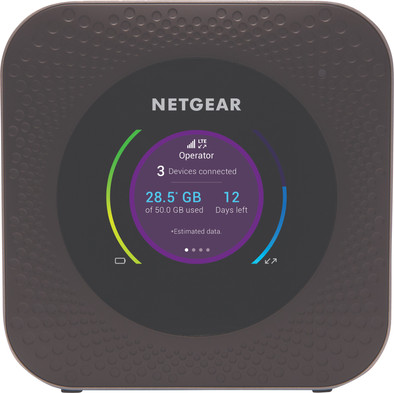
You can view important information such as battery life, the connection status, and the data usage on the clear screen.
With this MiFi router, you only have 4G reception in Europe.
You can't use the MiFi router as a power bank for your smartphone or tablet.
Note: you need a SIM card with a data plan when you use a MiFi router.
The NETGEAR Nighthawk M1 is a WiFi hotspot that lets you go online across Europe. With a download speed of up to 1Gbps, the hotspot is suitable for demanding network tasks. For example, you can stream HD videos on the go and work with a stable internet connection remotely. You can view your used data, your current upload and download speed, and the remaining battery life on the built-in screen. You can connect multiple smartphones, laptops, and handhelds via the 2.4GHz band or the 5GHz band. This way, you can stay connected to the internet on trips with friends and family. Connect an external storage and you can instantly stream videos to all connected devices.
Range
Installation ease
Speed
Design
Have a subscription where you can put a multi data sim on this router. I use this as redundant internet, on vacation in the car for the family for ipad prepaid phone so that other members can still use whatsapp etc. without me being present with an expensive subscription. You share the internet use with your telephone subscription
Dennis WS
19 June 2018
Automatically translated from Nederlands
I used this unit in Egypt on a 2 week work assignment. Locally bought a data Silvaner from Vodafone and had WiFi on 3 devices at the office. Walking in the city at night with the Nighthawk in my camera bag and WiFi on IPhone! Blessed!
Fons S'Jegers
7 November 2018
Automatically translated from Nederlands
Product is easy and quick to install. Basically plug & play. Many settings are possible via the app for the more experienced or demanding user, but the standard settings are fine in my opinion.
One point I really don't understand: the inputs for USB, LAN and charging cable are on the front and the button to turn it on and operate it (with the on/off button you walk through the screens) is at the back. Or the screen on top is wrong, just how you see it. It seems to me that every user wants the cables at the back. Have checked if the screen automatically rotates like on smart phones, but couldn't find that.
Edwin Baars
17 December 2020
Automatically translated from Nederlands