Never available again
View alternatives in the sidebar
View alternatives in the sidebar
Product number | 823841 | |
|---|---|---|
Manufacturer code | 27UK670-B.AEU | |
Brand | LG | |
Processing of your defect | Via Coolblue | |
Old product returned for free |
Screen size | 27 inches | |
|---|---|---|
Recommended display resolution | 3840x2160 | |
Sharpness | 4K (UHD) | |
Aspect ratio | Standard (16:9) | |
Refresh rate | 60 Hz | |
Response time | 5 ms | |
Panel type | IPS panel | |
Brightness | 350 cd/m2 | |
Local dimming | ||
HDR support | ||
Contrast ratio | 1000 | |
Touchscreen | ||
Screen reflection | Anti-glare | |
Blue light filter | ||
Flicker-free technology | ||
Color space | sRGB | |
sRGB color coverage percentage | 99 % | |
Color depth | 17 million colors (8-bit) | |
Adaptive Sync | ||
Type of adaptive sync | FreeSync | |
Resolution width | 3840 pixels | |
Resolution height | 2160 pixels | |
Anti-reflection type | Anti glare | |
Horizontal viewing angle | 178 ° |
Height | 52,73 cm | |
|---|---|---|
Width | 61,32 cm | |
Depth | 25,1 cm | |
Weight | 7 kg | |
Color | Black | |
Including stand | ||
Material | Plastic | |
Cable management | ||
Appearance | Neutral | |
Curved |
Number of HDMI connectors | 2 | |
|---|---|---|
Number of Female HDMI type A 2.0 ports | 2 | |
Number of headphone jacks | 1 | |
Type of headphone connection | 3.5mm (TRRS) | |
Number of Female Standard DisplayPort 1.2 ports | 1 | |
Number of female 3.5mm TS Audio Jack ports | 1 | |
Number of female 3.5mm TRRS Audio Jack ports | 1 | |
Type of USB port | USB-C | |
Number of USB ports | 3 | |
Type of USB cable included | USB-C to USB-C |
Included by default | USB cable |
|---|
Adjustable in height | ||
|---|---|---|
Tiltable | ||
Pivotable stand | ||
Pivot function | ||
VESA mount option | ||
VESA mount | 100x100mm |
Energy consumption standby | 0,3 W | |
|---|---|---|
Energy consumption active | 41 W |
Built-in speakers | ||
|---|---|---|
Webcam | ||
Split screen | ||
Kensington lock | ||
Best tested |
Recommended for use | Image editing and graphic design |
|---|
Sharpness | 4K (UHD) | |
|---|---|---|
Curved | ||
Aspect ratio | Standard (16:9) | |
Refresh rate | 60 Hz | |
Response time | 5 ms | |
Panel type | IPS panel | |
Color depth | 17 million colors (8-bit) | |
Built-in speakers |
According to our monitor expert
Thanks to the 4K resolution, you'll have more workspace for all your programs and documents.
Connect your laptop with 1 USB-C cable.
This monitor has a modern design with thin bezels.
This monitor doesn't have integrated speakers.
The power with which the screen can charge your laptop is not enough to charge your MacBook Pro while you're working.
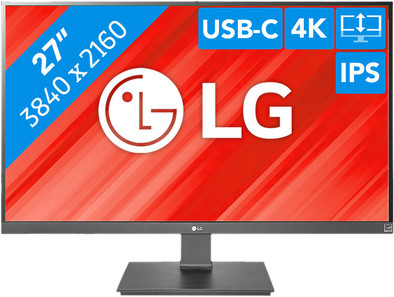
The LG 27UK670 is a 27-inch 4K monitor for business use, with a USB-C connector. With it, you can connect this screen to your MacBook with 1 cable to transmit a 4K image while charging your laptop at 40 watts. Adjust the screen for a pleasant posture, and rotate the screen by 90 degrees to work vertically. That's useful when you're programming or want to view your website's new design at a single glance. Thanks to the on-screen controls, the monitor is easy to control. You can also use them to set the split-screen mode. Finally, thanks to the thin bezels, the screen has a modern, professional look, and it's very suitable if you want to place 2 or more screens next to each other.
5 stars
9
4 stars
7
3 stars
0
2 stars
0
1 star
0
Installation ease
User friendliness
Image quality
Price-quality ratio
Design
For me it was important that the display was screen (I am a graphic designer) and that it could be connected via USB-C. This screen has both. The USB-C is powerful enough to charge my MacBook directly. Exactly what I was looking for, a very good screen for a good price. The design is also beautiful and the ease of use is as desired.
Renske Lorier
25 June 2019
Automatically translated from Nederlands
As the description says, this monitor only charges with 40 watts. You can charge your Macbook Pro with this, or at a lower speed. With more intensive programs, the battery level will drop, but not as quickly as when there is no power connected. For controlling the brightness are of course the built-in controls, but via a program for macOS you can also adjust the brightness from your mac. Very satisfied with the purchase.
Stefan den Haan
1 March 2019
Automatically translated from Nederlands
Very nice image and very sharp. I don't think the price is too high for the quality either.
Jan Martens
6 February 2019
Automatically translated from Nederlands
