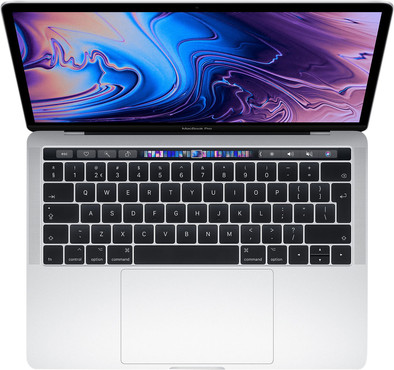
Apple MacBook Pro 13 inches Touch Bar (2019) MV992N/A Silver

Never available again
View alternatives in the sidebar
View alternatives in the sidebar
Product number | 832427 | |
|---|---|---|
Manufacturer code | MV992N/A | |
Brand | Apple | |
Processing of your defect | Via Coolblue | |
Old product returned for free |
Screen size | 13,3 inches | |
|---|---|---|
Touchscreen | ||
Panel type | IPS panel | |
Sharpness | Retina | |
Resolution width | 2560 pixels | |
Resolution height | 1600 pixels | |
Refresh rate | 60 Hz | |
Screen reflection | Glossy | |
Adaptive Sync | ||
Brightness | 500 cd/m2 |
Processor | Intel Core i5 | |
|---|---|---|
Processor code name | Coffee Lake | |
Processor cores | Quad-Core (4) | |
Clock speed | 2,4 GHz | |
Turbo speed | 4,1 GHz | |
Cache memory | 6 MB |
Internal RAM | 8 GB | |
|---|---|---|
Memory composition | 1x 8GB | |
Memory slot 1 | 8 GB | |
Total number of RAM slots | 1 |
Total storage capacity | 256 GB | |
|---|---|---|
Storage type | SSD | |
SSD storage capacity | 256 GB | |
Hard drive type | NVMe, PCIe |
Video card | Intel Iris Plus Graphics 655 | |
|---|---|---|
Type of video card | Shared |
Operating system | macOS |
|---|
Laptop model | Laptop | |
|---|---|---|
Color | Silver | |
Material | Metal | |
Metal type | Aluminum | |
Height | 1,49 cm | |
Width | 30,41 cm | |
Depth | 21,24 cm | |
Weight | 1,37 kg |
Mobile data connection | No | |
|---|---|---|
WiFi standards | Wireless A, Wireless AC, Wireless B, Wireless G, Wireless N | |
Bluetooth | ||
Bluetooth version | 5.0 |
USB port | ||
|---|---|---|
Number of USB ports | 4 | |
Type of USB port | USB-C | |
Protocol Female USB-C port | DisplayPort Alternative Mode, Thunderbolt Alternative Mode, USB | |
USB version Female USB-C port | 3.1 | |
Number of USB 3.1 Female USB-C port | 4 | |
HDMI connector | ||
DisplayPort connector | ||
VGA connector | ||
Network connector | ||
Thunderbolt connector | ||
Headphone jack | ||
Memory card reader |
Keyboard layout | QWERTY | |
|---|---|---|
Physical keyboard layout | ISO | |
Numeric keypad | ||
Spill-resistant | ||
Backlit keyboard | ||
Mechanical keyboard | ||
Programmable keys |
Built-in microphone | ||
|---|---|---|
Number of speakers | 2 | |
Sound reproduction | Stereo | |
Integrated computer speakers brand | Standard speakers |
Built-in camera | ||
|---|---|---|
Image definition webcams | HD Ready (720p) |
Battery technology | Lithium-ion | |
|---|---|---|
Battery life according to customers | Good | |
Power connector input type (female) | Other brand/product specific |
Manufacturer's warranty | ||
|---|---|---|
Type of manufacturer's warranty | Manufacturer's carry-in warranty | |
Manufacturer's carry-in warranty | 2 years |
TPM (Trusted platform module) | ||
|---|---|---|
Kensington lock | ||
Windows Hello | ||
Fingerprint identity sensor |
Extra installed software |
|---|
Screen size | 13,3 inches | |
|---|---|---|
Processor | Intel Core i5 | |
Internal RAM | 8 GB | |
Total storage capacity | 256 GB | |
Video card | Intel Iris Plus Graphics 655 | |
Panel type | IPS panel | |
Touchscreen |
According to our laptop expert
The Touch Bar switches along with programs that you use and shows the matching function keys.
The True Tone Retina display automatically adjusts to the temperature of the ambient light, so you always see clear, true-to-life colors.
Thanks to the compact size of this MacBook Pro, you can easily take it with you to school or work.
A newer version of this model is available with better specifications.
This MacBook Pro has 4 ThunderBolt 3 connectors. If you want to connect a device with a Thunderbolt 2, HDMI, DVI, or VGA output, you'll need a separate cable converter.
The Apple MacBook Pro 13 "Touch Bar (2019) is a compact powerhouse with its 13 inch. Inside, there is an 8th generation Intel core i5 processor with 4 cores, making it difficult to edit graphic files. You use the Touch Bar to work more efficiently in different programs - for example, you can switch brushes faster in Photoshop - the Retina screen has True Tone, which automatically adjusts white balance to the light in your area, making it also visible when working on the balcony With the 4 usb Thunderbolt 3 ports you always have enough space for all your peripherals.
Receive an email with a personal voucher code for 1 year of free Norton 360 Deluxe antivirus one day after purchase.
I have a Macbook (pro) for the first time in my life. I've always worked with Windows because I heard macOS would work so much differently. I haven't missed my Windows laptop for a day and should have made this switch much sooner. It is a relief, especially if you use multiple Apple devices, the cooperation between them is so flawless. I come from a 17 inch laptop and with spreadsheets I may find that just a bit nicer, but for everything else 13 inches is perfect. Even if you take it with you on the road, it is a super nice size, not too big and heavy. I hesitated for a long time between the pro and the air. Because I also have graphic work and run my accounting program on it, I decided with pain in my heart (and wallet ;-) to go for the pro. Why isn't this one just available in gold, that would have saved me a lot of doubt ;-) Since I didn't have a strong preference for silver or spacegrey, I kept some money in my pocket and went for silver. This saved me €200 and for that I bought an Apple magic keyboard with numerical part and a mouse, this is not a superfluous luxury, especially not if you also do administration. I took the 256gb and this is enough for me. I work with the cloud (office 365) and iCloud and I keep my private files on an external drive. Unlocking with touch id works flawlessly. For all my Windows laptops I needed an IT person to install it properly. The MacBook was really a piece of cake and I was able to do it myself. Never again for me!
Suus
29 August 2019
Automatically translated from Nederlands
Great first experience with macOS
M. Bakker
9 February 2020
Automatically translated from Nederlands
It is a nice laptop, as you are used to from Apple. I think it's a shame that there are no more normal USB ports and that you can't put in an SD card.
Melanie Koster
25 April 2020
Automatically translated from Nederlands
