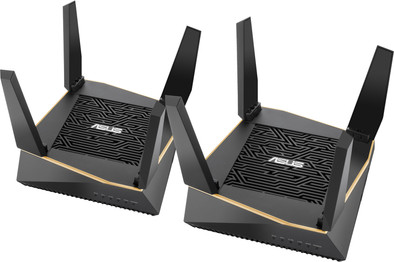
Asus AiMesh RT-AX92U (2-pack)

Never available again
View alternatives in the sidebar
View alternatives in the sidebar
Product number | 832815 | |
|---|---|---|
Manufacturer code | 90IG04P0-MO3020 | |
Brand | ASUS | |
Processing of your defect | Via Coolblue | |
Old product returned for free |
Type router | Mesh WiFi system | |
|---|---|---|
WiFi speed class | Mid-range | |
Usage situation | Gaming and downloading, Stream movies and music, Work from home | |
Living situation | Large apartment, Small apartment | |
Number of stations | 2 | |
Can be expanded with extra stations | ||
Built-in modem |
Frequency bands | Tri-band | |
|---|---|---|
WiFi speed | AX6000 | |
2.4GHz band speed | 400 Mbit/s | |
5GHz band speed | 4804 Mbit/s | |
Number of WiFi antennas | 6 |
Ethernet speed | Gigabit Ethernet (1000Mbps) | |
|---|---|---|
Network connector | ||
Number of Ethernet ports | 4 | |
PoE support | ||
USB port | ||
Type of USB port | Standard USB-A | |
Number of USB ports | 2 |
Automatically switches to 3G/4G | ||
|---|---|---|
Mobile data connection | No | |
SIM card slot |
Quality of Service (QoS) | ||
|---|---|---|
MU-MIMMO | ||
Seamless roaming | ||
Beamforming | ||
Port forwarding | ||
LACP Link aggregation |
Parental controls | ||
|---|---|---|
WLAN security | WPA2 | |
Firewall | ||
Firewall type | DoS, NAT Firewall, SPI Firewall | |
Guest network | ||
VPN support | ||
VPN server | ||
VPN client | ||
VPN passthrough |
Mounting possible | ||
|---|---|---|
Width | 15,5 cm | |
Height | 5,26 cm | |
Depth | 15,5 cm | |
Weight | 0,65 kg | |
Color | Black | |
Material | Plastic |
Power supply type | Power grid |
|---|
Ethernet speed | Gigabit Ethernet (1000Mbps) | |
|---|---|---|
Frequency bands | Tri-band | |
WiFi speed | AX6000 | |
Number of Ethernet ports | 4 | |
Type router | Mesh WiFi system | |
Number of stations | 2 | |
Living situation | Large apartment, Small apartment |
According to our router expert
These routers have AiMesh, so you can connect them to each other to set up a multi-room WiFi network.
Use the parental controls to protect children from inappropriate content.
WiFi standard AX is up to 2.3 times faster than WiFi standard AC.
To achieve the highest speed this router has to offer, all connected devices must support Wireless AX.
This system only has 2 mesh stations, so your WiFi coverage is limited to 2 floors in a townhouse.
With the Asus AiMesh RT-AX92U Duo Pack, you can create a super fast wireless connection that covers your entire home. This set consists of 2 routers that you can divide across your home. This means you'll have a fast wireless connection in your living room as well as your bedroom. Thanks to the Wireless AX standard, you can connect multiple devices to this router set. This makes this set very suitable for crowded houses with lots of streaming and smart home products. Thanks to AiProtection, you can secure your home network against viruses and hackers. You can also make sure your children don't visit harmful websites.
5 stars
47
4 stars
30
3 stars
1
2 stars
0
1 star
0
Range
Installation ease
Speed
Design
I bought these routers to get a Wifi 6 mesh at home. After switching on and configuring, the WiFi 6 frequencies appear to be used for the connection (backhaul) between the 2 WiFi routers. This backhaul SSID is hidden by default, and wifi 6 is off. If you turn on WiFi 6, you'll get a warning that this only works if you don't set the backhaul SSID to hidden anymore. It then turns out that there is an overhead in the backhaul that prevents you from achieving WiFi 6 speeds. In my case, the WiFi backhaul is unnecessary because I have connected both WiFi stations with Ethernet. You effectively have a wifi 5 (wifi ac) situation in terms of connectivity with this set, with the only advantage that there is a dedicated connection for the connection between the two mesh stations.
J.M. van der Kolk
15 May 2020
Automatically translated from Nederlands
A great tri-band router at a great price.
The range is more than good, the speed is fantastic. We now have internet everywhere in the house and because this router has three different transmission bands (1x 2.4Ghz, 2x 5Ghz) you can flexibly build your wireless network.
The installation may require some knowledge of routers and networks and will not be for everyone. It was not 1 - 2 -3 to get it working. Especially if you, like me, use a different subnet than the one used by Asus by default.
In our case, this system is connected directly to the fiber optic NT cabinet. So we 'flicker' the router of the provider (XS4all) in the old box!
If you want to use aiMesh there is a trick you should know!
Step 1: Configure the router first, WITHOUT changing the internal IP range!!! Step 2: Add the 'mesh node'.
Anyone who uses the KPN/XS4all network and fiber optic (October 2019) should know that Internet and TV are separate networks. In short, KPN/XS4all uses a VLAN.
Internet is at: 6 TV is on: 4
When installing the router, you choose a custom installation and check the option that the provider requires additional settings.
For example, you must provide a username and password. What you enter here is not really important, as long as you use a username and a password. (You can think of this yourself)
In addition, you indicate that internet is on 6 with priority 1 (Lan 1 and Lan 3) and TV on 4 with priority 1. (Lan 4).
Under LAN and IPTV, put at: USE DHCP ROUTES: RFC3442
Installation (XS4all) should now be a breeze. Although I have not tested this myself on IPTV, because we use Ziggo for that. But it should work in theory.
GT1903
6 November 2019
Automatically translated from Nederlands
Use convenience. No worries and clients automatically switch to the strongest/fastest node.
Marinus Klaassen
19 June 2020
Automatically translated from Nederlands