Samsung Odyssey G9 QLED gaming
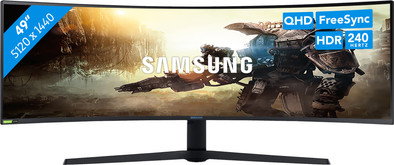
Never available again
View alternatives in the sidebar
View alternatives in the sidebar
Product number | 864292 | |
|---|---|---|
Manufacturer code | LC49G95TSSPXEN | |
Brand | Samsung | |
Processing of your defect | Via Coolblue | |
Old product returned for free |
Screen size | 49 inches | |
|---|---|---|
Recommended display resolution | 5120x1440 | |
Sharpness | Quad HD (1440p) | |
Aspect ratio | Super ultrawide (32:9) | |
Refresh rate | 240 Hz | |
Response time | 1 ms | |
Panel type | VA panel | |
Brightness | 1000 cd/m2 | |
Local dimming | ||
HDR support | ||
Contrast ratio | 2500 | |
Touchscreen | ||
Type of HDR | DisplayHDR 1000 | |
Screen reflection | Anti-glare | |
Blue light filter | ||
Flicker-free technology | ||
Color space | DCI-P3 | |
Color depth | 1 billion colors (10-bit) | |
Adaptive Sync | ||
Type of adaptive sync | FreeSync, FreeSync 2, G-Sync Compatible | |
Resolution width | 5120 pixels | |
Resolution height | 1440 pixels | |
Anti-reflection type | Anti glare | |
Horizontal viewing angle | 178 ° |
Height | 53,7 cm | |
|---|---|---|
Width | 114,8 cm | |
Depth | 41,6 cm | |
Weight | 16,7 kg | |
Color | White | |
Including stand | ||
Material | Plastic | |
Cable management | ||
Appearance | Gaming | |
Curved | ||
Screen curve | 1800 R |
Number of HDMI connectors | 1 | |
|---|---|---|
Number of Female HDMI type A 2.0 ports | 1 | |
Number of headphone jacks | 1 | |
Type of headphone connection | 3.5mm (TRRRS) | |
Number of Female Standard DisplayPort 1.4 ports | 2 | |
Number of female standard USB-A ports | 2 | |
Female standard USB-A port version | 3.0 | |
Number of female 3.5mm TRRRS Audio Jack port | 1 | |
Type of USB port | Standard USB-A | |
Number of USB ports | 2 | |
Suitable for daisy chaining |
Included by default | DisplayPort cable, USB cable | |
|---|---|---|
Not included by default | HDMI cable, USB-C cable |
Adjustable in height | ||
|---|---|---|
Tiltable | ||
Pivotable stand | ||
Pivot function | ||
VESA mount option | ||
VESA mount | 100x100mm |
Energy label | G | |
|---|---|---|
Energy consumption standby | 0,5 W | |
Energy consumption active | 108 W | |
Energy consumption per 1000h | 55 kWh | |
Annual energy consumption | 80,3 kWh | |
Annual energy costs | 32,12 euros |
Built-in speakers | ||
|---|---|---|
Webcam | ||
Kensington lock | ||
Best tested |
Recommended for use | Gaming, Image editing and graphic design, Internet, email, and text processing, Watching movies in Full HD |
|---|
Sharpness | Quad HD (1440p) | |
|---|---|---|
Curved | ||
Aspect ratio | Super ultrawide (32:9) | |
Refresh rate | 240 Hz | |
Response time | 1 ms | |
Panel type | VA panel | |
Color depth | 1 billion colors (10-bit) | |
Built-in speakers |
According to our monitor expert
The 49-inch ultrawide screen is just as wide as two 27-inch monitors side by side.
Thanks to the combination of 240Hz and 1ms, gaming is always smooth.
QLED and HDR 1000 ensure a high brightness and realistic lighting.
This monitor doesn't have built-in speakers to play music or the sound of your games.
For this screen, you need a laptop or desktop with 4K or 5K support.
The Samsung Odyssey G9 QLED Gaming is without a doubt the flagship among gaming monitors. With the enormous 49-inch ultrawide screen, you become completely absorbed in your favorite games, especially since it has a curve of 1000R. Samsung combines QLED and HDR 100, which makes for a clear gaming experience with realistic lighting and high contrasts. The Odyssey G9 has a high refresh rate of 240Hz. That means you can play even the most fast-paced shooters smoothly. And thanks to the 1ms response time, you won't have any issues with ghosting. The ultrawide screen supports G-Sync as well as FreeSync Premium. This allows you to prevent lags, regardless of which video card you have. Even from up close, your games are razor-sharp thanks to the WQHD resolution. The DCI-P3 color space and 10-bit color depth provide a broader color representation. The Odyssey has adjustable LED lighting at the back. You can adjust the monitor in height so you're comfortable during long gaming sessions.
Note: make sure the drivers of this monitor are up-to-date to prevent ghosting while gaming. You can update them via the settings menu of Windows or Mac. Contact our product support hub below for a more extensive advice article.
Installation ease
Gebruiksgemak
Image quality
Price-quality ratio
Design
Well, what can I say other than that this is the ultimate display!
This exceeds all 2 or 3 screen setups. Not seeing edges between screens makes more difference than I thought beforehand. I used to have a setup with 3 screens, after a while you didn't really notice those edges anymore. And yet this is much better and more pleasant.
The colors are very good in my opinion. Not the very best HDR you will find, but still very beautiful. I like the color experience better than on my 2 year old Samsung TV.
If you want to work productively, this screen is the best you will find. With DisplayFusion you can virtually divide the screen into multiple screens. This really works very nicely. If you think you're short on space, combine the screen with an MX-Master so that you can swipe up and down between multiple Windows desktops with your mouse.
Building the screen was simple and can be done on your own. Although I can still recommend having 2 helping hands because the screen is heavy. (oh, crazy with 49")
The back-light (can be switched off) is also nice if you work in the dark, so I have significantly less trouble with my eyes in the evening.
The menu to change settings could have been better. Yet you will find everything in it. The 3 adjustable profiles ensure that you can easily switch between settings.
I think there are only two reasons why you wouldn't want this screen.
Still, I can't imagine that you wouldn't find this screen worth the money once you've used it.
Small point of attention: If you want to be able to play new games properly, get a 2080Ti. You might just get by with a 2080, but not for long.
All in all a real recommend for every nerd ;)
Luck Hermsen
8 August 2019
Automatically translated from Nederlands
I bought the screen for office use. That was unfortunately a mistake. It is a very nice screen, with very good contrast, brightness, nice colors and good black values, no doubt very suitable for gaming and multimedia, but unfortunately text is not displayed sharply. Don't get me wrong, text is perfectly legible, but there's just a blurry edge to it. I've tried all possible settings on the screen itself and in Windows, but unfortunately I never got the text completely sharp. Some online research has taught me that this is probably caused by the sub-pixel layout that Samsung uses in its VA panels. Some people can live with it, others can't. Unfortunately I belong to the latter category... A few hours on the internet will probably not be a problem, but 8 to 10 hours of office use is unfortunately too much of a good thing.
Kristof
8 February 2021
Automatically translated from Nederlands
After being out of the market for a while due to QA issues (loose display of the housing) suddenly back in stock at Coolblue and so I took the gamble. Unfortunately, the box does not show whether these have been rechecked, but my copy is free of backlight issues and dead pixels. There is only a hair-thin light leak in the housing at the top left of an inch, which you only see in the dark and if you go looking for it (and I mean really looking). Before the recall I saw pictures of screens where the display was half detached from the housing, so this is of a different order. I read on forums that many recent deliveries still have that light leak, but for me that is no reason to return it for the time being, especially since I don't have any issues further in the picture, which would be really disturbing.
Furthermore, this monitor is a feast for the eyes (not at 100% brightness, then you are looking at a radiant heater and you can feel it). After a few hours you are used to the size and the curvature and only notice how ideal this is; from every viewing angle you have the same distance to the screen, within games you have a lot of overview, and for work you can open 3 to 4 windows next to each other. I wouldn't recommend Word or Excel over the full width, then it will look curved. But you can't do that across multiple screens with a multi-monitor setup. I still have some flickering with geforce on and strong ghosting when the response time is accelerated, but that sort of thing will be solved with a firmware update and/or Nvidia driver.
Nick
27 August 2020
Automatically translated from Nederlands
