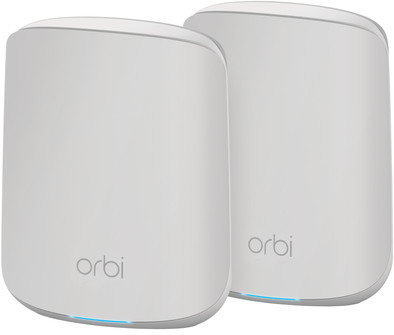
Netgear Orbi RBK352 Mesh WiFi 6 (2-pack)
Never available again
View alternatives in the sidebar
View alternatives in the sidebar
Product number | 869852 | |
|---|---|---|
Manufacturer code | RBK352-100EUS | |
Brand | Netgear | |
Processing of your defect | Via Coolblue | |
Old product returned for free |
Type router | Mesh WiFi system | |
|---|---|---|
WiFi speed class | Mid-range | |
Usage situation | Gaming and downloading, Stream movies and music, Study at home, Work from home | |
Living situation | Large apartment, Small apartment | |
Number of stations | 2 | |
Can be expanded with extra stations | ||
Built-in modem |
Frequency bands | Dual-band | |
|---|---|---|
WiFi speed | AX1800 | |
2.4GHz band speed | 600 Mbit/s | |
5GHz band speed | 1200 Mbit/s | |
Number of WiFi antennas | 2 |
Ethernet speed | Gigabit Ethernet (1000Mbps) | |
|---|---|---|
Network connector | ||
Number of Ethernet ports | 3 | |
PoE support | ||
USB port |
Automatically switches to 3G/4G | ||
|---|---|---|
Mobile data connection | No | |
SIM card slot |
Quality of Service (QoS) | ||
|---|---|---|
MU-MIMMO | ||
Seamless roaming | ||
Beamforming | ||
Port forwarding | ||
LACP Link aggregation |
Parental controls | ||
|---|---|---|
WLAN security | 802.1X, WEP, WPA, WPA-PSK, WPA2, WPA2-PSK | |
Firewall | ||
Firewall type | DoS, NAT Firewall, SPI Firewall | |
Guest network | ||
VPN support | ||
VPN server | ||
VPN client | ||
VPN passthrough |
Mounting possible | ||
|---|---|---|
Width | 14,48 cm | |
Height | 17,78 cm | |
Depth | 6,01 cm | |
Weight | 662 g | |
Color | White | |
Material | Plastic |
Power supply type | Power grid |
|---|
Ethernet speed | Gigabit Ethernet (1000Mbps) | |
|---|---|---|
Frequency bands | Dual-band | |
WiFi speed | AX1800 | |
Number of Ethernet ports | 3 | |
Type router | Mesh WiFi system | |
Number of stations | 2 | |
Living situation | Large apartment, Small apartment |
According to our router expert
This router supports WiFi 6, so you can set up a faster connection and have better coverage.
You can connect the stations of this mesh system with each other by wire, so you can have WiFi on multiple places in very large houses.
Thanks to the app, you can set up this WiFi system quickly and easily.
Because this mesh system only has 2 stations, the coverage is limited to a large apartment or 2 floors of a small house.
To take advantage of all the improvements of WiFi 6, you need compatible devices.
With the Netgear Orbi RBK352 Mesh WiFi system, you get the latest version of WiFi with coverage throughout your apartment or on 2 floors of a small house. The multi-room WiFi system consists of 2 stations that are connected to each other wirelessly. This ensures better coverage than with a standard router. Thanks to WiFi 6, you can connect more devices to your WiFi at the same time without your wireless internet becoming unstable. As a result, this multi-room system is very suitable for a smart home or if everyone in your household uses the internet. It's easy to set up the WiFi system via the app.
5 stars
18
4 stars
7
3 stars
0
2 stars
0
1 star
0
The Netgear Orbi (RBK352) has become it. After a long time of hesitation and searching the Coolblue website about what should be my replacement for my 7-year-old Apple Airport Extreme, I'm glad I made the right choice with the Netgear Orbi.
Because I was fine with Apple for years but now it is no longer supported (or at least at least), and because I have not followed the evolution of networks and WiFi systems, I had to search: TP-Link, Ubiquiti, Linksys, etc... I have them all compared and viewed.
But still I ended up at Netgear; because of their fun app, reviews and beautiful design of the "Orbi's"
Because I have a Telenet modem/router, like many of us Belgians, I have put it in Access Point mode. A bit of a waste of money because I was able to buy an Access Point immediately, I agree. But then I came up with things to hang on the wall (or ceiling), meh, not a fan of. The current Telenet modem/router is in the attic and has very bad WiFi on the lower floors, so using that signal was not an option. Not then and not now...
Packaging wise it's a bit Apple style and nicely packed, I got the one with 1 main staton and an extra satellite. So 2 in total.
I was already afraid that things would go wrong during the installation, but everything went smoothly: installing the app in advance is probably the best (Netgear Orbi) and the rest will show itself. Well in English.
It is best to place the 2nd (satellite) directly in a good place, here it is in the living room. The "main station" on the bedroom/desk in my case. On the main station you have 3 extra ethernet ports, including a PS4 connected to it. And on the satellite 2. Handy, you also have ax WiFi 6
Setting AP mode is through the browser; 192.168.1.1 -> Stated in advanced, Router/AP mode. Once set up, you can no longer go to that address, so if you want to go back to the settings via the browser you have to go to 192.168.0.xxx - You can find this via the app on your smartphone. You log in with admin and password that you set in the setup (not the WiFi password! or you should have chosen the same)
For the rest, the setup went very quickly, plug & play and that's it. Firmware updates done. And everything was done in less than half an hour.
In terms of range, I now have a speed of around 150/15 on my iPhone 12 (including ax) at a considerable distance from the 2 stations in the garden (20m further). In house 185/18 on different ax devices. The house is around 20 years old so already quite thick concrete and insulated. So even better coverage than my Airport Extreme
So far I give a score of 9/10. I have the cheapest model AX1800. So in terms of value for money it is quite good. For the rest I can't say much about it, very satisfied with it and the fast shipping from Coolblue and Bpost.
-Jonas
Jonas Dhont
15 February 2021
Automatically translated from Nederlands
The product was delivered quickly and installed very easily. The wifi is great and can be used with several people at the same time
Marnix Boer
18 February 2021
Automatically translated from Nederlands
It is quite difficult to estimate in advance how many satellites you will need. Range in an average house is not enough if you only have 2.
David
29 September 2022
Automatically translated from Nederlands