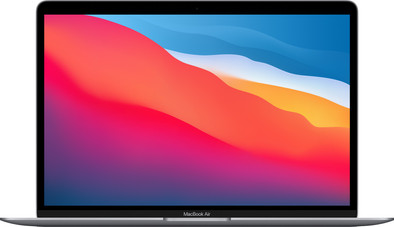
Apple MacBook Air (2020) 16GB/512GB Apple M1 with 8-core GPU Space Gray
Never available again
View alternatives in the sidebar
View alternatives in the sidebar
Product number | 874175 | |
|---|---|---|
Manufacturer code | Z125-MGN73-04 | |
Brand | Apple | |
Processing of your defect | Via Coolblue | |
Old product returned for free |
Screen size | 13,3 inches | |
|---|---|---|
Touchscreen | ||
Panel type | IPS panel | |
Sharpness | Retina | |
Resolution width | 2560 pixels | |
Resolution height | 1600 pixels | |
Refresh rate | 60 Hz | |
Screen reflection | Glossy | |
Adaptive Sync | ||
Brightness | 400 cd/m2 |
Processor | Apple M1 chip | |
|---|---|---|
Processor code name | Apple M1 | |
Processor cores | Octa-Core (8) |
Internal RAM | 16 GB | |
|---|---|---|
Memory composition | 1x 16GB | |
Memory slot 1 | 16 GB | |
Total number of RAM slots | 1 |
Total storage capacity | 512 GB | |
|---|---|---|
Storage type | SSD | |
SSD storage capacity | 512 GB |
Video card | Apple M1 chip | |
|---|---|---|
Type of video card | Shared |
Operating system | macOS | |
|---|---|---|
Operating system language | Multiple languages can be configured |
Laptop model | Laptop | |
|---|---|---|
Color | Gray | |
Material | Metal | |
Metal type | Aluminum | |
Height | 1,61 cm | |
Width | 30,41 cm | |
Depth | 21,24 cm | |
Weight | 1,29 kg |
Mobile data connection | No | |
|---|---|---|
WiFi standards | Wireless A, Wireless AC, Wireless AX, Wireless B, Wireless G, Wireless N | |
Bluetooth | ||
Bluetooth version | 5.0 |
USB port | ||
|---|---|---|
Number of USB ports | 2 | |
Type of USB port | USB-C | |
Protocol Female USB-C port | Thunderbolt Alternative Mode, USB | |
USB version Female USB-C port | 4.0 | |
HDMI connector | ||
DisplayPort connector | ||
VGA connector | ||
Network connector | ||
Thunderbolt connector | ||
Headphone jack | ||
Memory card reader |
Keyboard layout | QWERTY | |
|---|---|---|
Physical keyboard layout | ISO | |
Numeric keypad | ||
Spill-resistant | ||
Backlit keyboard | ||
Mechanical keyboard | ||
Programmable keys |
Built-in microphone | ||
|---|---|---|
Number of speakers | 2 | |
Sound reproduction | Stereo | |
Integrated computer speakers brand | Standard speakers |
Built-in camera | ||
|---|---|---|
Image definition webcams | HD Ready (720p) |
Battery technology | Lithium polymer | |
|---|---|---|
Power connector input type (female) | USB Type C |
Manufacturer's warranty |
|---|
TPM (Trusted platform module) | ||
|---|---|---|
Kensington lock | ||
Windows Hello | ||
Fingerprint identity sensor |
Extra installed software | ||
|---|---|---|
ISV certification |
Screen size | 13,3 inches | |
|---|---|---|
Processor | Apple M1 chip | |
Internal RAM | 16 GB | |
Total storage capacity | 512 GB | |
Video card | Apple M1 chip | |
Panel type | IPS panel | |
Touchscreen |
According to our laptop expert
Thanks to the Apple M1 chip, you can effortlessly use demanding programs such as Final Cut Pro and the battery lasts up to 18 hours.
With 16GB RAM, you can easily edit large photo and video files while running applications in the background.
Thanks to the 512GB SSD drive, you have enough space for all your personal files.
This MacBook has 2 Thunderbolt 3 (USB C) connectors. Do you want to use a device with a different connection? You need a docking station or cable converter.
You can edit photos and vides, write reports, and watch series with the Apple MacBook Air (2020) 16GB/512GB Apple M1 with 8-core GPU Space Gray. The Apple M1 chip is powerful enough for demanding graphic programs such as Final Cut Pro. And it's energy-efficient, so the battery lasts up to 18 hours. Thanks to 16GB RAM, you can edit large photo and video files without your laptop slowing down or crashing. You can take this Apple MacBook Air with you without any problems, because it only weighs 1.29kg. The True Tone Retina display automatically adjusts the color temperature to the amount of light in the room. That way, you always see bright, true-to-life images.
Advice from our expert
Receive an email with a personal voucher code for 1 free year of Norton 360 Deluxe antivirus one day after purchase.
I have used Windows laptops for years. My previous one was a pretty big six-year-old thing that weighed about five kilos with a charger. It was a gaming beast (for the time). But in the long run I wanted something more compact, lighter and, above all, faster.
After months of browsing YouTube and reading tech reviews, I finally settled on the Macbook Air M1, not the Pro. But the Air! In my opinion, the difference in performance compared to the Pro is really too small to justify the additional price. The screen is just as nice (100 nits less in brightness), the pro has better speakers and microphones (both don't bother me since I have to put on headphones for my work). And the Pro has the touchbar, which I personally don't see any added value in ;)
Compiling code is incredibly fast on the Air. I am a software developer myself and I noticed with my old laptop that it could no longer keep up. Even the Air can be used for coding without any problems, which I personally think is a step forward compared to the older Airs with Intel processor. The Air starts up very quickly and has a great battery life of about twelve hours. I can just sit on the couch with this thing in the evening after I've worked for a day.
I also think the design is a bit on the older side. It is a lot more modern than my old laptop so I have no complaints. But for people who have been running Macs for years, it's probably still too much of the same.
I personally like the fact that there is no fan in the Air. Because the SoC in the device is passively cooled, you will not be bothered by the fact that your laptop takes off when, for example, you run Microsoft Teams together with other software on your laptop. I've never been so quiet in my room, all I hear is the noise from outside. I think that alone is a real plus.
It is also still possible to run old applications made for Intel Macs through a software layer called Rosetta 2. You will lose a little bit of performance and interfaces will run slightly slower. But at the moment developers are busy transferring their software to M1 Macbooks. I also notice when I play a game like World of Warcraft, for example, that it still runs smoothly. You can also play other games made for iOS on this Macbook with a controller. These games also run very smoothly!
I've only had the laptop for a few days now, but I really think it's a breath of fresh air. Nice and fast, all my software just works and it is very quiet. The only downside that I do regret is that I can't put Windows on it for some purposes. But I solved this myself with a remote desktop to my regular Windows PC.
Personally, I did not opt for the entry-level model, but the more extensive 512GB with 16GB RAM variant because I get more out of my laptop if I can have more storage on it. After installing most of my programs (XCode, Visual Studio, Visual Studio Code, Azure Data Studio, etc.) and loading some projects, I finally came up with almost 100GB of storage. I would personally recommend opting for an upgraded Air instead of buying the Macbook Pro. You get a lot more value for your money in my opinion. :)
Bryan
25 January 2021
Automatically translated from Nederlands
The M1 chip is ridiculously fast. He eats heavy RAW files like candy. The battery lasts for 2 working days and the laptop weighs nothing. The operating system takes some getting used to, especially if you were a Windows fanboy like me.
Steven
22 June 2021
Automatically translated from Nederlands
After five years of Windows laptop back on the familiar MacOS on the MacBook. Apparently the investment is worth it because I only lasted five years with the Windows laptop, while my previous MacBookPro lasted more than 10 years. That is why we have now opted for a larger SSD (512 Gb) and also for double memory (16 Gb): ready for the next decade. Transferring the documents etc from the Windows to the MacBook Air was easy, download from the backup to the NAS. Photos from the iPhone are really transferred in no time via AirDrop, which is really fast. I choose to arrange the backup via Cloud Station on the NAS and not with Time Machine because it gives me a bit more control. Not because it wouldn't work, because Time Machine has already helped me out. But that was in the era when you had to laboriously reinstall all programs, nowadays everything is done easily via the Cloud. So I only need a backup of my documents. The great thing is that you basically have everything on board: Pages can easily edit Word documents and save them as Word. Numbers does that with Excel. And Keynote with PowerPoint. And the Preview app is fine with PDF, movies, etc. So I don't have to hunt for all kinds of extra additional software for the time being. The only downside is that only one extra screen can be connected. In short: if you can, choose a MacBook and then go for the Air: it is now almost as good as the PRO but is cheaper.
Luuk
1 May 2021
Automatically translated from Nederlands
