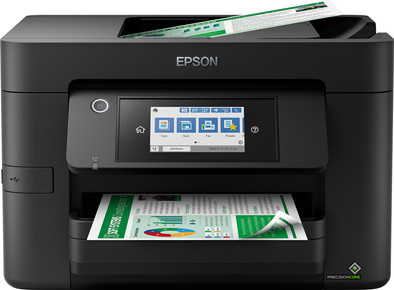
Epson WorkForce WF-4820DWF
Never available again
View alternatives in the sidebar
Choose the printer that also allows you to print and scan larger sizes
Epson WorkForce WF-7840DTWF
Better model
View alternatives in the sidebar
Better model
If you purchase the Epson WorkForce WF-4820DWF, you'll receive 4 months of Epson ReadyPrint for free. Go to the promotional Terms and Conditions (PDF) for more information. Want to know what Epson ReadyPrint is first? Read our advice page.
Product number | 874263 | |
|---|---|---|
Manufacturer code | C11CJ06403 | |
Brand | Epson | |
Processing of your defect | Via Coolblue | |
Old product returned for free |
Printer size | Medium | |
|---|---|---|
Width | 42,5 cm | |
Depth | 38,9 cm | |
Height | 26,5 cm | |
Color | Black | |
Weight | 10,2 kg |
Printer type | All-in-one | |
|---|---|---|
Photo printer | ||
Print quality photos | Stand | |
Portable (mobile use) | ||
Recommended for use printers | Business printing |
Cartridge line | Epson 405 | |
|---|---|---|
Usage costs for 1 page | 3 eurocents | |
Print technology | Inkjet | |
Type of ink | Cartridges | |
Number of cartridges/toner cartridges | 4 | |
Color printer | ||
Print speed black (ISO) | 25 ppm | |
Print speed color (ISO) | 12 ppm | |
First black page ready after | 22 seconds | |
Speed class | Good | |
Maximum print resolution height | 2400 dpi | |
Maximum print resolution width | 4800 dpi | |
Maximum print size | A4 | |
Automatic duplex printing | ||
Borderless printing | ||
Maximum print size duplex printing | A4 |
Scan functionality | ||
|---|---|---|
Automatic duplex scanning | ||
Maximum optical scan resolution width | 1200 dpi | |
Maximum optical scan resolution height | 2400 dpi | |
Scanner type | File scanner, Flatbed scanner | |
Maximum scan size | A4 (21x29.7cm) | |
Automatic document feeder (ADF) | ||
Maximum paper size ADF | A4 | |
Scan sizes | A4, A5, A6, A7 | |
Scan speed (PPM) | 12 Hz | |
Color depth output | 8 bpp | |
Scan to | Image, PDF | |
ADF capacity | 50 | |
OCR |
Copying functionality | ||
|---|---|---|
Copy speed black (ISO) | 3 ppm | |
Copy speed color (ISO) | 2 ppm | |
Maximum copy resolution height | 2400 dpi | |
Maximum copy resolution width | 4800 dpi |
Fax functionality |
|---|
Built-in screen | ||
|---|---|---|
Color screen | ||
Touchscreen |
Suitable for HP Instant Ink | ||
|---|---|---|
Suitable for Epson ReadyPrint |
Compatible with operating system | Android, ChromeOS, Linux, Windows, Windows Phone, iOS, macOS | |
|---|---|---|
Connection type | Wired, Wireless | |
Apple AirPrint | ||
Email print | ||
WPS (Wireless Protected Setup) | ||
Female standard USB-A port version | 2.0 | |
Ethernet port | ||
Number of Ethernet ports | 1 | |
NFC | ||
Built-in WiFi | ||
WiFi frequency printers | 2.4GHz, 5GHz | |
WiFi direct | ||
Bluetooth | ||
USB port |
Location paper input | Back, Front | |
|---|---|---|
Manual input tray | ||
Photo paper drawer | ||
Output capacity output drawer | 80 | |
Maximum print size standard paper tray | A4 | |
Input capacity standard paper tray | 250 | |
Number of standard paper trays | 1 |
Memory card reader |
|---|
Print technology | Inkjet | |
|---|---|---|
Printer type | All-in-one | |
Color printer | ||
Automatic duplex printing | ||
Maximum print size | A4 | |
Automatic document feeder (ADF) | ||
WiFi direct |
According to our printer expert
The inkjet technology lets you print colors and photos in high quality.
You can save paper thanks to the automatic duplex printing feature.
You can print documents quickly, so this printer is also suitable for your home office or small business.
You don’t print documents on A3 or A3+ paper.
Because the cartridges for an inkjet printer are more expensive, you have higher printing costs per page.
Installation ease
Options
Print quality
Printer arrived the next day, connected and set up within minutes.
Mike B
4 November 2022
Automatically translated from Nederlands
Returned because it was impossible to install. Apparently a known problem, during installation of the software the progress bar hangs endlessly (3 hours) because the printer cannot complete the connection. Solution: exchange for the same model...
Thibaut
1 April 2025
Automatically translated from Nederlands
Occasional printing is expensive. When you don't print much, the ink cartridges dry out, and you end up with approximately 120 pages per set of cartridges. And the software doesn't allow printing until the ink runs out; it decides for you, so one day you simply can't print anything because one cartridge is empty.
Pieter
10 December 2025
Automatically translated from Nederlands