Never available again
View alternatives in the sidebar
View alternatives in the sidebar
Product number | 876377 | |
|---|---|---|
Manufacturer code | 9S6-3DB65H-007 | |
Brand | MSI | |
Processing of your defect | Via Coolblue | |
Old product returned for free |
Screen size | 34 inches | |
|---|---|---|
Recommended display resolution | 3440x1440 | |
Sharpness | Quad HD (1440p) | |
Aspect ratio | Ultrawide (21:9) | |
Refresh rate | 100 Hz | |
Response time | 1 ms | |
Panel type | VA panel | |
Brightness | 250 cd/m2 | |
Local dimming | ||
HDR support | ||
Contrast ratio | 3000 | |
Touchscreen | ||
Screen reflection | Anti-glare | |
Blue light filter | ||
Flicker-free technology | ||
Color space | sRGB | |
Color depth | 17 million colors (8-bit) | |
Adaptive Sync | ||
Type of adaptive sync | FreeSync | |
Resolution width | 3440 pixels | |
Resolution height | 1440 pixels | |
Anti-reflection type | Anti glare | |
Horizontal viewing angle | 178 ° |
Height | 51 cm | |
|---|---|---|
Width | 81 cm | |
Depth | 27 cm | |
Weight | 6,91 kg | |
Color | Black | |
Including stand | ||
Material | Metal, Plastic | |
Cable management | ||
Appearance | Neutral | |
Curved |
Number of HDMI connectors | 2 | |
|---|---|---|
Number of Female HDMI type A 1.4 ports | 1 | |
Number of Female HDMI type A 2.0 ports | 1 | |
Number of headphone jacks | 1 | |
Type of headphone connection | 3.5mm (TRS) | |
Number of USB 3.0 Female USB-C ports | 1 | |
Number of Female Standard DisplayPort 1.2 ports | 1 | |
Number of female 3.5mm TRS Audio Jack ports | 1 | |
Suitable for daisy chaining |
Included by default | HDMI cable |
|---|
Adjustable in height | ||
|---|---|---|
Tiltable | ||
Pivotable stand | ||
Pivot function | ||
VESA mount option | ||
VESA mount | 75x75mm |
Energy consumption standby | 0,23 W | |
|---|---|---|
Energy consumption active | 46 W |
Built-in speakers | ||
|---|---|---|
Webcam | ||
Split screen | ||
Kensington lock |
Recommended for use | Gaming, Image editing and graphic design, Internet, email, and text processing, Watching movies in Full HD |
|---|
Sharpness | Quad HD (1440p) | |
|---|---|---|
Curved | ||
Aspect ratio | Ultrawide (21:9) | |
Refresh rate | 100 Hz | |
Response time | 1 ms | |
Panel type | VA panel | |
Color depth | 17 million colors (8-bit) | |
Built-in speakers |
According to our monitor expert
The QHD resolution of this monitor projects images that are two times sharper than with Full HD.
Thanks to the slight curve in the screen, you can take in the entire screen and prevent neck and back issues.
You can create an ergonomic gaming posture by tilting, turning, or adjusting the monitor in height.
An ultrawide monitor takes up a lot of space on our desk, so measure your desk beforehand to make sure that it's big enough.
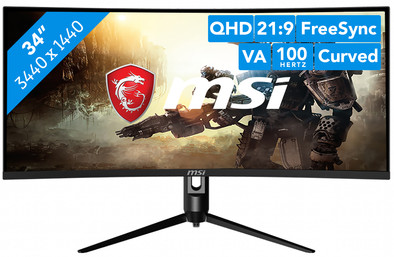
THE MSI Optix MAG342CQRV is a 34-inch monitor for gamers who want to play in high resolution without screen tearing. With a 100Hz refresh rate and 1ms response time, you can play games smoothly. Thanks to the QHD resolution, you'll experience landscapes and characters two times sharper than in Full HD. Do you have an AMD video card, such as the Radeon 6800? FreeSync will synchronize the fps of your video card with the refresh rate of your monitor. As a result, you'll even experience fast shooters and racing games without screen tearing. Thanks to the slight curve in your screen, you can take in the entire playing field. This makes you feel like you're in the game. In addition, you can create an ergonomic gaming posture by tilting, turning, or adjusting the monitor in height. This way, you'll prevent neck and back issues during long gaming sessions.
Note: for QHD gaming, you'll need a powerful video card, such as an NVIDIA GeForce RTX GPU or AMD Radeon RX 5000 series GPU, an Xbox One, Xbox Series X or S, or a PlayStation 5.
I first had a 4K 27 inch, but wanted bigger. My eye fell on this screen and was immediately sold. The first day I had to get used to the lower image quality, because you notice a big difference when you go back from 4K. But otherwise a great screen!
J. Kemp
4 March 2021
Automatically translated from Nederlands
I have not yet been able to set the screen to 100hz at the highest resolution, not even with a displayport cable. At a slightly lower resolution I can get it at 100hz, but then it won't fill the screen. Could also be my PC, I'll have to keep looking. Furthermore, a very nice screen, I mainly use it for business.
Martijn Bomhof
7 March 2021
Automatically translated from Nederlands
Installed and immediately put into use
jordy van de watering
26 August 2021
Automatically translated from Nederlands