Never available again
View alternatives in the sidebar
View alternatives in the sidebar
Product number | 876520 | |
|---|---|---|
Manufacturer code | PFJ4098EU | |
Brand | Xiaomi | |
Processing of your defect | Via Coolblue | |
Old product returned for free |
Type of image definition support | Full HD (1080p) | |
|---|---|---|
Parental controls | ||
Internal RAM | 1 GB | |
Built-in WiFi | ||
Operating system | Android | |
Android One | ||
Android OS version | Android 9.0 Pie | |
Web browser |
Processor brand | ARM |
|---|
Supports Netflix | ||
|---|---|---|
Supports Torrents | ||
Internet radio | ||
Streaming services | Amazon Prime, Disney+, HBO Max, Netflix, Spotify, Viaplay, Videoland, YouTube | |
Displays photos | ||
Photo file format | BMP, JPEG, PNG | |
Plays music | ||
Audio file format | MP3, Ogg, aac, flac | |
Plays videos | ||
Video file format | AVI, MKV, MOV, RM, RMP4, TS, VOB |
AirPlay | ||
|---|---|---|
DLNA | ||
SonosNet | ||
Spotify Connect | ||
Google Cast | ||
UPnP AV support | ||
Miracast | ||
Plex support |
Built-in hard drive | ||
|---|---|---|
SD card slot |
Headphone jack | ||
|---|---|---|
Microphone connector | ||
HDMI connector | ||
Number of HDMI connectors | 1 | |
Number of HDMI connectors | 0 | |
Type of USB port | Standard USB-A |
Height | 9,24 cm | |
|---|---|---|
Width | 3,02 cm | |
Depth | 1,52 cm | |
Weight | 28,5 g | |
Color | Black |
Controls via app | ||
|---|---|---|
Controlled via Apple app | ||
Controlled via Android app | ||
Smart home platform | Google Assistant |
HDMI connector | ||
|---|---|---|
Type of image definition support | Full HD (1080p) | |
Type of USB port | Standard USB-A | |
Streaming services | Amazon Prime, Disney+, HBO Max, Netflix, Spotify, Viaplay, Videoland, YouTube | |
Supports Netflix | ||
Built-in hard drive | ||
Built-in WiFi |
According to our media player expert
Thanks to the built-in Google Assistant, you can play movies and operate the smart devices with your voice.
The media player supports DTS for a true-to-life sound reproduction.
You can't play movies in Ultra HD with this media player.
You can't expand the storage capacity of this TV stick.
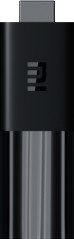
With the Xiaomi Mi TV Stick, you can turn any TV into a smart TV with Android. You can insert this compact stick in every TV with an HDMI connector. Thanks to Android TV, you can install all kind of available apps on the stick, for example, Netflix and Disney Plus. But you can also play games or cast movies to the Mi TV Stick. You can operate the smart TV stick with the remote, which also has voice recognition. This way, you can easily give instructions to the TV without using the buttons.
Sound quality
Image quality
Design
Options
Works very fast and easy to install
Cato van der Laan
12 February 2021
Automatically translated from Nederlands
When I took the Xiaomi Mi TV Stick out of the packaging, I immediately noticed that it is very made of plastic, it also gets very hot during use. Also, the power cord (which is very short) only just fit into the stick (opening of the USB mini charger is very small, so it jams a bit). The stick is very useful if you have a TV that is not smart. You can find almost all (Dutch) apps via the Google Play store. Think of Videoland, NPO, Nlziet and, for example, Ziggo Go (only if you have a fixed internet connection from Ziggo). The big disadvantage of this stick is that it crashes very quickly, for example when you close Netflix and start NLziet, it sometimes crashes completely. The only thing that helps is to remove the power cord from the stick. Playing replay TV is also not without a struggle. If I compare this with the Amazon Fire TV that I also have lying around, then the first mentioned is really a lot slower. The big advantage of the Xiaomi Mi TV Stick, however, is that it also has a built-in casting option. The built-in Google Assistant is also not very useful, you always have to press this button twice before it works.
Ruud Smit
3 March 2021
Automatically translated from Nederlands
Works perfectly and is easy to install!
Silke De vries
28 February 2021
Automatically translated from Nederlands