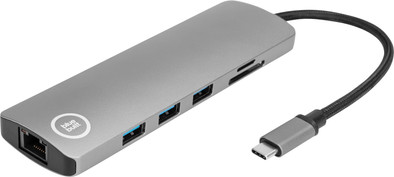
BlueBuilt USB-C 9 in 1 Laptop Docking Station
Never available again
View alternatives in the sidebar
View alternatives in the sidebar
BlueBuilt products have the best price-quality ratio because we've put them together ourselves. Based on product data, feedback from customers, and our own product knowledge. In other words, good products. We are so confident, that we'll even give you an extra long warranty. Read everything on BlueBuilt.

Product number | 877006 | |
|---|---|---|
Manufacturer code | BBDSL20 | |
Brand | BlueBuilt | |
Processing of your defect | Via Coolblue | |
Old product returned for free |
Made for laptop models | Apple MacBook, Chromebook, Microsoft Surface, Windows laptop |
|---|
Laptop docking station suitable for | Connect 1 monitor, Connect 2 monitors and a Chromebook, Connect 2 monitors and a Windows laptop | |
|---|---|---|
Extra functionalities docking station | Charge laptop via own charger, Charge phone via docking station, Connect wired network | |
Type of main connector | USB-C | |
Supported video technology on Docking Station | MST | |
Number of USB ports | 4 | |
USB function | Charge, Charging an external device, Data transfer, Device connection, Play media, Power source, Record audio | |
Type of USB port | Standard USB-A, USB-C | |
Number of female standard USB-A ports | 3 | |
Female standard USB-A port version | 3.1 | |
Power standard USB-A port | 4,5 W | |
Number of USB-C ports | 1 | |
Protocol Female USB-C port | USB electricity | |
Power USB-C port | 100 W | |
Fast charging USB-C port | ||
Total available video outputs | 1x DisplayPort, 1x HDMI | |
Number of HDMI connectors | 1 | |
Female HDMI Type A port version | 1.4 | |
Number of Ethernet ports | 1 | |
Ethernet speed | Gigabit Ethernet (1000Mbps) | |
Type of DisplayPort connector | standard DisplayPort | |
Number of Female Standard DisplayPort 1.2 ports | 1 | |
Version Female Standard DisplayPort port | 1.2 | |
Memory card reader | ||
Memory card | MicroSD, MicroSDHC, MicroSDXC, SD, SDHC, SDXC | |
Number of connectable monitors | 2 | |
Maximum image resolution 1 monitor | 4K (3840x2160) | |
Maximum refresh rate 1 monitor | 30 Hz | |
Maximum image resolution 2 monitors | Full HD (1920x1080) | |
Maximum refresh rate of 2 monitors | 60 Hz |
Cable length | 0,15 m | |
|---|---|---|
Color | Gray | |
Height | 1,5 cm | |
Width | 14 cm | |
Depth | 4,5 cm | |
Weight | 90 g |
Extra functionalities docking station | Charge laptop via own charger, Charge phone via docking station, Connect wired network | |
|---|---|---|
Type of main connector | USB-C | |
Total available video outputs | 1x DisplayPort, 1x HDMI | |
Number of connectable monitors | 2 | |
Type of USB port | Standard USB-A, USB-C | |
Cable length | 0,15 m |
According to our dock for laptops expert
With this dock, you can connect 2 extra monitors to your Windows laptop or Chromebook.
Via the Ethernet port, you can create a stable internet connection.
You can read an SD or micro SD card via the memory card reader.
With this dock, you can only connect 1 monitor at the same time to a MacBook with an M1 or M2 processor.
This dock doesn't have a 3.5mm port for earbuds, laptop speakers, or headphones.
Note: The BlueBuilt USB-C 9 in 1 laptop docking station works on all Windows laptops, MacBook models, and Chromebook models with a USB-C port that transmits a video signal. This is how you can check if your laptop has a suitable USB-C port.
Turn your home office into a productive workplace with the BlueBuilt USB-C 9-in-1 Laptop Docking Station. You can use this dock to connect up to 2 Full HD monitors to your laptop. Do you have a MacBook with an M1 or M2 processor? In that case, you can only connect 1 monitor of 4K quality. You have more than enough ports for peripherals. Thanks to its compact size and light weight, you can easily take this dock from your home office to the office. If your own laptop charger supports Power Delivery, you can connect it to the dock, so you don't have to look for a power outlet during work. In addition, you get a 5-year warranty on this BlueBuilt Docking Station.
Price-quality ratio
Durability
The BlueBuilt usb C 9 in 1 Laptop docking station is a compact, light dock that you can easily take with you in your bag if you often change workplaces. It has almost all the connections you need and it also comes with a 5-year warranty. I do think it's a shame that it doesn't charge my laptop without needing an extra cable.
First impression When I open the package, I immediately see the dock. I also find a storage bag and a quick start guide in the box. The quick start guide shows what all connections are for, with some extra explanation here and there. Connecting the dock and all your accessories looks easy. Despite the light weight, the dock feels good quality. The cable is made of extra strong nylon, which also feels strong. In any case, the first impression is great!
To work I like to use this docking station with my work laptop. This is a MacBook Pro with no more than 2 USB-C connections, which is very limited. That is why I quickly need a docking station if I want to connect something. For work I write a lot of texts and that goes just that little bit better with at least one extra monitor. Unfortunately, I myself have a MacBook with M1 chip, so connecting 2 screens to this docking station is not possible. Still, I connect one monitor via the HDMI port without any problems and I can get started right away. The dock does not get hot during use, which is sometimes the case with other docking stations. Connecting a mouse, keyboard and USB stick also goes smoothly. So nothing to complain about!
Sufficient connections I think that this BlueBuilt docking station with 3 USB A ports, a USB C port, an HDMI port and a DisplayPort connection has more than enough ports to expand your workplace. It also has ports for (micro) SD cards and an Ethernet connection for stable wired internet. I find it useful that all USB A connections are on the same side. 3 ports are also just enough for my mouse, keyboard and an external hard drive. The only thing I find a disadvantage is that the dock does not charge my laptop by itself. You really need an extra USB-C cable for that. Fortunately, the dock itself only takes up one USB-C port, so I can still use the other one to charge my laptop. This BlueBuilt docking station has become an indispensable product in my set up for work. The 5 year warranty also gives me extra confidence that I will enjoy it for a long time.
Elaine. Docking station specialist.
18 May 2022
Automatically translated from Nederlands
What you want is that if you hang your laptop on a dock, everything is taken over and works immediately (after the first setup). This dock does not. I have no picture when I plug in until I reattach all the plugs. Cumbersome and clumsy. I'm sending it back.
Eline
27 September 2021
Automatically translated from Nederlands
Nice small dock instead of such a big, clumsy thing. Does what it should
Patrick Harper
22 July 2021
Automatically translated from Nederlands
