Never available again
View alternatives in the sidebar
View alternatives in the sidebar
Product number | 912603 | |
|---|---|---|
Manufacturer code | Modern MD272P | |
Brand | MSI | |
Processing of your defect | Via Coolblue | |
Old product returned for free |
Screen size | 27 inches | |
|---|---|---|
Recommended display resolution | 1920x1080 | |
Sharpness | Full HD (1080p) | |
Aspect ratio | Standard (16:9) | |
Refresh rate | 75 Hz | |
Response time | 4 ms | |
Panel type | IPS panel | |
Brightness | 250 cd/m2 | |
Local dimming | ||
HDR support | ||
Contrast ratio | 100 | |
Touchscreen | ||
Screen reflection | Anti-glare | |
Blue light filter | ||
Flicker-free technology | ||
Color space | sRGB | |
sRGB color coverage percentage | 100 % | |
Color depth | 17 million colors (8-bit) | |
Adaptive Sync | ||
Type of adaptive sync | FreeSync | |
Resolution width | 1920 pixels | |
Resolution height | 1080 pixels | |
Anti-reflection type | Anti glare | |
Horizontal viewing angle | 178 ° |
Height | 40,1 cm | |
|---|---|---|
Width | 61,35 cm | |
Depth | 20 cm | |
Weight | 5,85 kg | |
Color | Black | |
Including stand | ||
Material | Plastic | |
Cable management | ||
Appearance | Business, Neutral | |
Curved |
Number of HDMI connectors | 1 | |
|---|---|---|
Number of Female HDMI type A 1.4 ports | 1 | |
Number of headphone jacks | 1 | |
Type of headphone connection | 3.5mm (TRS) | |
Number of USB-C ports | 1 | |
Number of USB 3.0 Female USB-C ports | 1 | |
Number of Female Standard DisplayPort 1.2a port | 1 | |
Number of female standard USB-A ports | 2 | |
Female standard USB-A port version | 2.0 | |
Number of female 3.5mm TRS Audio Jack ports | 1 | |
Type of USB port | Standard USB-A, Standard USB-B (2.0 form), USB-C | |
Number of USB ports | 4 | |
Suitable for daisy chaining | ||
Type of USB cable included | USB-A to USB-B | |
USB-C dock | ||
Maximum USB-C dock power | 65 W |
Included by default | HDMI cable, USB cable | |
|---|---|---|
Not included by default | USB-C cable |
Adjustable in height | ||
|---|---|---|
Tiltable | ||
Pivotable stand | ||
Pivot function | ||
VESA mount option | ||
VESA mount | 75x75mm |
Energy label | F | |
|---|---|---|
Energy consumption standby | 0,5 W | |
Energy consumption active | 26 W | |
Energy consumption per 1000h | 26 kWh | |
Annual energy consumption | 37,96 kWh | |
Annual energy costs | 15,18 euros |
Built-in speakers | ||
|---|---|---|
Sound system | Stereo | |
Webcam | ||
Split screen | ||
Kensington lock |
Recommended for use | Internet, email, and text processing, Office work, Watching movies in Full HD |
|---|
Sharpness | Full HD (1080p) | |
|---|---|---|
Curved | ||
Aspect ratio | Standard (16:9) | |
Refresh rate | 75 Hz | |
Response time | 4 ms | |
Panel type | IPS panel | |
Color depth | 17 million colors (8-bit) | |
Built-in speakers |
According to our monitor expert
You can organize your entire desk and charge an external battery via the 65W power USB-C port.
Thanks to the built-in KVM Switch, you can switch easily between work computers and private computers.
You can create an ergonomic working posture and prevent neck and back problems while working by adjusting the height of the monitor.
Due to the relatively low brightness of 250 nits, the screen isn't always visible in brightly lit or dark rooms.
A DisplayPort and USB-C cable aren't included in the box, purchase these separately.
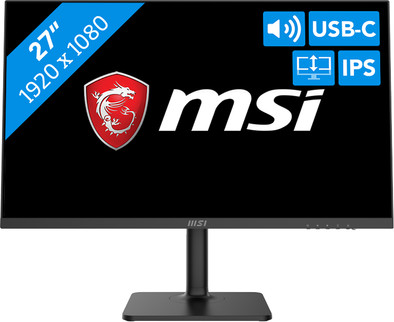
With the MSI Modern MD272P 27-inch Full HD USB-C monitor, you can organize your entire desk with just 1 cable. The USB-C port transmits image signals, charges an external device, and you can use it to transfer data. Thanks to the DisplayPort Alternative Mode, the screen is also suitable for things like daisy chaining. This way, you can increase your screen space without a lot of hassle. Or connect 2 computers to the monitor and easily switch between these with the KVM Switch. This way, you can switch from your business computer to your personal laptop for some binge watching after work. Since the monitor is adjustable, you can easily create an ergonomic working posture for you day at the (home) office. Tilt or adjust the monitor in height for the right sitting posture. Are you programming? Turn the screen 90 degrees and get started in pivot mode. Thanks to the IPS panel, you can see sharp images and colors from any viewing angle. Even when you're watching from an angle. The blue light filter allows you to comfortably work an hour overtime. This filter ensures that your eyes are less taxed during prolonged use. In addition, you don't need external speakers to play music because of the built-in speakers. Play your favorite Spotify playlist on the 2W speakers while you work.
Note: the wattage via the USB-C port is 65W, check whether this is enough for your laptop or MacBook.
Installation ease
Image quality
Price-quality ratio
Design
Affordable monitor that can be connected to my MacBook via USB-C
Herman
17 November 2021
Automatically translated from Nederlands
Very good value for money, easy to use and certainly more than adequate for professional use.
Robbe Nelissen
6 April 2022
Automatically translated from Nederlands
Product is great, many pluses.
Corian
2 November 2022
Automatically translated from Nederlands