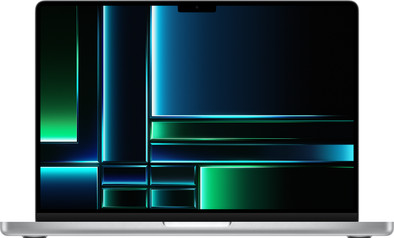
Apple MacBook Pro 14 inches (2023) M2 Pro (10-core CPU/16-core GPU) 16GB/512GB Silver QWERTY
Never available again
View alternatives in the sidebar
View alternatives in the sidebar
Product number | 922388 | |
|---|---|---|
Manufacturer code | MPHH3N/A | |
Brand | Apple | |
Processing of your defect | Via Coolblue | |
Old product returned for free |
Screen size | 14,2 inches | |
|---|---|---|
Screen quality: laptops | High-end | |
Touchscreen | ||
Panel type | Mini-LED | |
Sharpness | Liquid Retina XDR | |
Resolution width | 3024 pixels | |
Resolution height | 1964 pixels | |
Refresh rate | 120 Hz | |
Screen reflection | Glossy | |
Adaptive Sync | ||
Brightness | 1600 cd/m2 |
Processor | Apple M2 Pro | |
|---|---|---|
Processor code name | Rhodes | |
Processor cores | Deca-Core (10) | |
Speed class laptops | High-end |
Internal RAM | 16 GB | |
|---|---|---|
Memory composition | 1x 16GB | |
Memory slot 1 | 16 GB | |
Total number of RAM slots | 1 |
Total storage capacity | 512 GB | |
|---|---|---|
Storage type | SSD | |
SSD storage capacity | 512 GB |
Video card | Apple M2 Pro | |
|---|---|---|
Type of video card | Shared |
Operating system | macOS | |
|---|---|---|
Operating system language | Multiple languages can be configured |
Recommended for use | Business use, School |
|---|
Laptop model | Laptop | |
|---|---|---|
Color | Silver | |
Material | Metal | |
Metal type | Aluminum | |
Height | 1,55 cm | |
Width | 31,26 cm | |
Depth | 22,12 cm | |
Weight | 1,6 kg |
Mobile data connection | No | |
|---|---|---|
WiFi standards | Wireless A (WiFi 2), Wireless AC (WiFi 5), Wireless AX (WiFi 6), Wireless AXE (WiFi 6E), Wireless B (WiFi 1), Wireless G (WiFi 3), Wireless N (WiFi 4) | |
Bluetooth | ||
Bluetooth version | 5.3 |
USB port | ||
|---|---|---|
Number of USB ports | 3 | |
Type of USB port | USB-C | |
Protocol Female USB-C port | Thunderbolt Alternative Mode, USB | |
USB version Female USB-C port | 4.0 | |
Video output via USB-C possible | Yes | |
Number of female standard USB-A ports | 0 | |
HDMI connector | ||
Number of HDMI connectors | 1 | |
Female HDMI Type A port version | 2.1 | |
DisplayPort connector | ||
VGA connector | ||
Network connector | ||
Thunderbolt connector | ||
Headphone jack | ||
Memory card reader |
Keyboard layout | QWERTY | |
|---|---|---|
Physical keyboard layout | ISO | |
Numeric keypad | ||
Spill-resistant | ||
Backlit keyboard | ||
Mechanical keyboard | ||
Programmable keys |
Built-in microphone | ||
|---|---|---|
Number of speakers | 6 | |
Sound reproduction | Surround | |
Integrated computer speakers brand | Standard speakers |
Built-in camera | ||
|---|---|---|
Image definition webcams | Full HD (1080p) |
Battery technology | Lithium polymer | |
|---|---|---|
Power connector input type (female) | Apple MagSafe 3 |
Manufacturer's warranty | ||
|---|---|---|
Type of manufacturer's warranty | Manufacturer's carry-in warranty | |
Manufacturer's carry-in warranty | 2 years |
TPM (Trusted platform module) | ||
|---|---|---|
Kensington lock | ||
Windows Hello | ||
Fingerprint identity sensor | ||
Security class laptops | High-end |
Extra installed software | ||
|---|---|---|
ISV certification |
Screen size | 14,2 inches | |
|---|---|---|
Processor | Apple M2 Pro | |
Internal RAM | 16 GB | |
Total storage capacity | 512 GB | |
Video card | Apple M2 Pro | |
Recommended for use | Business use, School | |
Panel type | Mini-LED | |
Screen quality: laptops | High-end |
According to our laptop expert
Thanks to the Apple M2 Pro chip, you can easily work with demanding programs like Final Cut Pro.
On the 1000 nits Liquid Retina XDR screen, you can see life-like colors and the most details.
You can connect up to 2 screen so you can multitask between your work.
We recommend 1TB storage if you want to store many photos, videos, and programs.
If you edit a lot of large video files or 3D objects, we recommend the model with a 19-core GPU.
With an Apple MacBook Pro 14 inches (2023) M2 Pro (10-core CPU/16-core GPU) 16GB/512GB Silver, you can easily work in demanding programs like Final Cut Pro. The M2 Pro chip is powerful enough for that. Edit your designs as long as you want, because a fully charged MacBook Pro lasts up to 18 hours. On the 1000-nit Liquid Retina XDR display, you can view lifelike colors and the smallest details. Need more screen space? Connect up to 2 extra screens to divide your work. You won't have to worry about the security of your files. You can log in with your fingerprint via Touch ID on your MacBook without the need to enter a password.
Receive an email with a personal voucher code for 1 free year of Norton 360 Deluxe antivirus 1 day after purchase.
This 14-inch MacBook Pro with M2 Pro chip is a powerful, compact laptop that I use to perform all my heavy tasks. This way, I can easily multitask between programs like Final Cut Pro, without my MacBook getting warm. The screen is razor-sharp and the colors jump off the screen. In my eyes, this MacBook is almost perfect: only an Ethernet port is missing.
Suitable for every usage situation The sleek design is the same as its 2021 predecessor. It's the content that Apple has upgraded. My MacBook has the M2 Pro chip, 16 gigabytes of RAM and 512 gigabytes of storage. You cannot expand this composition later. Do you keep a lot of files? Then it is wise to immediately opt for more storage space. My composition is enough for me to edit videos and do all my general tasks. Do you also want to perform 3D operations or develop apps? Then choose a MacBook with an M2 Max chip. This one has even more graphical power. Furthermore, this 14-inch model fits easily in my bag and weighs only 1.6 kilograms. At the office I can easily and quickly connect 2 extra screens to create a better overview. Unfortunately, there is no Ethernet connection, so you cannot use an internet cable. Personally, I don't mind this much, because I use my docking station for this. I don't worry about the security of my files, because all my data is well secured with my own fingerprint: Touch ID.
Battery almost empty? Load up! I was positively surprised by the return of the MagSafe 3 connection. This magnetic charging cable was previously replaced by a USB-C connection, but is now back. This is especially useful when I walk away with my MacBook with the cable still plugged in. The charger releases immediately, which prevents a fall or accident. Within an hour my new MacBook was fully charged and I could get started with the installation. Transferring all my data was a breeze. After the synchronization, I worked with heavy programs for a whole day without having to charge extra.
Razor-sharp image with popping colors It's not often I've seen such a sharp screen. The colors jump off my screen and the contrast gives depth to everything you see. When I watch my favorite Netflix series, I enjoy smooth images without stutters. Also while editing my videos everything runs smoothly. Do you edit a lot of highly detailed videos? Then I recommend the 16 inch size. After all, you see more details on this screen than on the smaller 14-inch screen.
Rowan. Apple specialist.
4 May 2023
Automatically translated from Nederlands
Haven't used the computer to full "power" yet. Still in transition from windows to apple
Wim
1 August 2023
Automatically translated from Nederlands
Nice battery life, Mac OS remains a nice operating system. Super light, nice design, definitely worth the money.
Jon
28 July 2023
Automatically translated from Nederlands
