Samsung Odyssey OLED G9 LS49CG934SUXEN
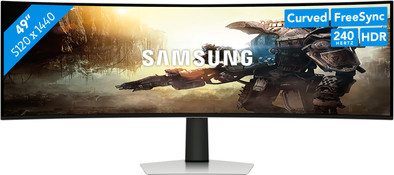
Never available again
View alternatives in the sidebar
View alternatives in the sidebar
Product number | 931392 | |
|---|---|---|
Manufacturer code | LS49CG934SUXEN | |
Brand | Samsung | |
Processing of your defect | Via Coolblue | |
Old product returned for free |
Screen size | 49 inches | |
|---|---|---|
Recommended display resolution | 5120x1440 | |
Sharpness | Quad HD (1440p) | |
Aspect ratio | Super ultrawide (32:9) | |
Refresh rate | 240 Hz | |
Response time | 0,03 ms | |
Panel type | OLED | |
Brightness | 250 cd/m2 | |
Local dimming | ||
HDR support | ||
Contrast ratio | 1000000 | |
Touchscreen | ||
Type of HDR | DisplayHDR 400 True Black, HDR10 | |
Screen reflection | Glossy | |
Blue light filter | ||
Flicker-free technology | ||
Color space | DCI-P3 | |
Color depth | 1 billion colors (10-bit) | |
Adaptive Sync | ||
Type of adaptive sync | Freesync Premium Pro | |
Resolution width | 5120 pixels | |
Resolution height | 1440 pixels | |
Horizontal viewing angle | 178 ° |
Height | 36,5 cm | |
|---|---|---|
Width | 119,4 cm | |
Depth | 18,1 cm | |
Weight | 12,9 kg | |
Color | Silver | |
Including stand | ||
Material | Plastic | |
Cable management | ||
Appearance | Gaming | |
Curved |
Number of HDMI connectors | 2 | |
|---|---|---|
Number of Female HDMI type A 2.1 ports | 1 | |
Number of Female Standard DisplayPort 1.4 ports | 1 | |
Number of female standard USB-A ports | 3 | |
Female standard USB-A port version | 3.0 | |
Type of USB port | Standard USB-A | |
Number of USB ports | 3 | |
Suitable for daisy chaining | ||
USB-C dock |
Included by default | DisplayPort cable | |
|---|---|---|
Not included by default | HDMI cable, USB-C cable |
Adjustable in height | ||
|---|---|---|
Tiltable | ||
Pivotable stand | ||
Pivot function | ||
VESA mount option | ||
VESA mount | 100x100mm |
Energy label | G | |
|---|---|---|
Energy consumption standby | 0,5 W | |
Energy consumption active | 75 W | |
Energy consumption per 1000h | 75 kWh | |
Annual energy consumption | 109,5 kWh | |
Annual energy costs | 43,8 euros |
Built-in speakers | ||
|---|---|---|
Sound system | Stereo | |
Webcam | ||
Split screen | ||
Kensington lock |
Recommended for use | Gaming, Image editing and graphic design, Internet, email, and text processing, Photo editing, Video editing, Watching movies in Full HD |
|---|
Sharpness | Quad HD (1440p) | |
|---|---|---|
Curved | ||
Aspect ratio | Super ultrawide (32:9) | |
Refresh rate | 240 Hz | |
Response time | 0,03 ms | |
Panel type | OLED | |
Color depth | 1 billion colors (10-bit) | |
Built-in speakers |
According to our monitor expert
Enjoy a huge overview while you game or work on the 49-inch super ultrawide monitor.
You experience razor-sharp images and colors, thanks to the combination of the OLED panel, Dual QHD resolution, and DisplayHDR True Black 400 support.
You can play lifelike-looking games thanks to the 240Hz refresh rate and 0.03ms response time.
For this screen, you need a laptop or desktop with 4K or 5K support.
Consoles like the PS5 and Xbox Series X don't work well in combination with this monitor, because they don't have ultrawide support.
5 stars
12
4 stars
6
3 stars
3
2 stars
0
1 star
0
The Samsung Odyssey OLED G9 LS49CG934SUXEN is a super ultrawide gaming monitor for hardcore gamers. Due to the high refresh rate and low response time, I see the fastest movements without any stuttering. All colors and contrasts also look pure. I have enough space for multiple windows and I can also fully immerse myself in scenes thanks to the curved design. The large size can of course be a disadvantage if your desk is not large enough.
Fast movements and transitions The 240Hz refresh rate and 0.03ms response time do not disappoint. Fast-moving images and transitions look smooth and I didn't see any stuttering. This means I don't have to worry about ghosting with this monitor. This is of course ideal for shooters and competitive gaming.
Good colors and contrasts Thanks to the OLED panel and the Dual QHD resolution, the image of this monitor always looks sharp. The colors are also vibrant and pure. My colleagues and I were very surprised by the bright blue of our website, which suddenly jumped off the screen. In addition, the black and white contrasts seem a lot more real than with the average monitor. Please note the burn-in risk. If an OLED screen shows the same still image for too long, it can burn into the screen. So it's good to pay attention. Fortunately, if you don't leave your monitor on for hours and turn it off properly after you're done, there's nothing to worry about.
Large curved screen The curved design makes me completely absorbed in the screen. Whether I'm playing a game, watching a stream or binge-watching series, I'm in a good place. This is because the curved screen curls around me, as it were. In combination with the large size, this really makes for a great experience. In any case, the size gives a lot of space for games and other windows. For example, I could use Discord as a second window without having to click away from my other window. The size of this Samsung Odyssey is also a possible drawback. At 49 inches, it barely fit on my desk. If your desk is large enough, this is of course no problem.
In short: this Samsung Odyssey OLED G9 is ideal for the hardcore gamer who is looking for a monitor for the best gaming experience.
Sam. Monitoren specialist.
11 November 2023
Automatically translated from Nederlands
Upgraded from a Neo G9 to an Oled G9 and a very nice upgrade. The Neo G9 was already fantastic, but this OLED takes it even further. The QL OLED screen remains very bright for an OLED and you have the benefits of super high contrast and great colors. Especially in HDR in 32:9 supported games it is a really great experience. I do advise not to let too much ambient light shine on the monitor, as the image will then look darker and grayer. Also make sure you have a high end PC as it is almost 4K in terms of pixels.
Stef
2 September 2023
Automatically translated from Nederlands
In short: fantastic. Take someone back from the early 90s, put this person in front of this screen, watch him pinch his own arm because he thinks he's dreaming and provide a bowl to catch the drool
DAVID
23 December 2023
Automatically translated from Nederlands
