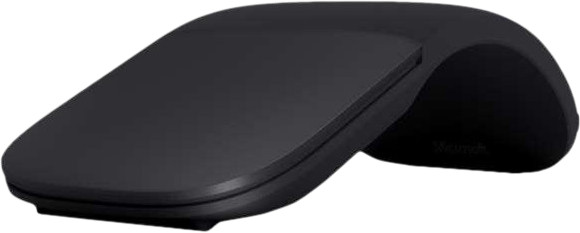
Microsoft Surface Arc Bluetooth Mouse Black

Choose your mouse
Black
Color: Black
- Be the first to know when this product is in stock

Black
Color: Black
Coolblue takes care of everything, from taking out an insurance to repairs
For almost all accidents
More coverage in case of damage than your standard warranty
No deductible
First, add your mouse to your shopping cart. On the next page, choose the Protection Plan below. You always have a 30-day return window and pay no deductible in case of damage.
2-year Protection Plan
7,99
one-time3-year Protection Plan
8,99
one-time
Product number | 937569 | |
|---|---|---|
Manufacturer code | CZV-00098 | |
Brand | Microsoft | |
Processing of your defect | Via Coolblue | |
Old product returned for free |
Mouse model | Standard | |
|---|---|---|
Input | Laser | |
Number of buttons | 2 | |
Ergonomic design | ||
Type of ergonomics | Not ergonomic | |
Left or right-handed | Left-handed, Right-handed | |
Maximum dots per inch (DPI) | 1000 dpi | |
Adjustable DPI | ||
Mouse controls | Buttons, Touch | |
Suitable for gaming | ||
Rechargeable | ||
Programmable buttons | ||
Lighting peripherals | ||
Silent mouse | ||
Mouse surface | Any surface | |
Product family | Surface |
Connection type | Wireless | |
|---|---|---|
Type of wireless connection | USB and Bluetooth | |
Nano receiver |
Plug and Play | ||
|---|---|---|
Compatible with operating system | ChromeOS, Windows |
Power supply type | Rechargeable battery | |
|---|---|---|
Rechargeable battery | ||
Battery level indicator |
Color | Black | |
|---|---|---|
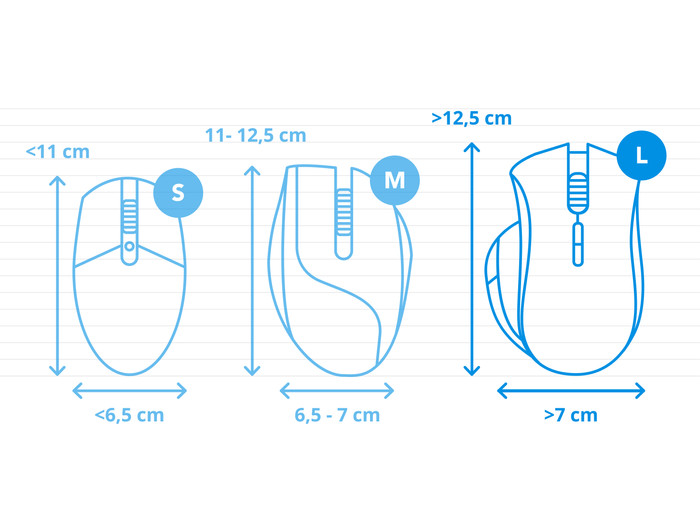
Mouse size | Large | |
Width | 5,5 cm | |
Height | 1,4 cm | |
Depth | 13,1 cm | |
Material | Plastic | |
Finish | Matte and glossy | |
Weight | 82,5 g |

Current product

77,-
79,-
73,-
114,-
81,-
Wireless
Wireless
Wireless
Wireless
Wireless
Black
Black
Black
Black
Black
Our digital expert will help you, but it can sometimes make mistakes, like humans do.
According to our mouse expert
More freedom of movement: because the mouse is wireless, you can use it anywhere.
Keep a USB port free: thanks to Bluetooth, you can connect the mouse to your computer without a USB dongle.
Works on any surface: thanks to the laser sensor, you can also use the mouse on glass or dark tables.
No ergonomic design: without an ergonomic design, you'll get hand or wrist pain more quickly.
No quiet buttons: this means you'll hear more clicking sounds while you work.
Connection options
Ergonomics
Accuracy
Size
Design
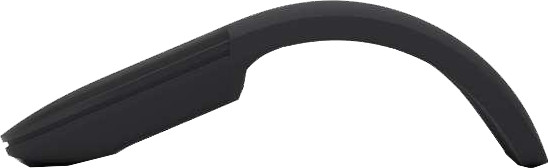
No hassle, just activate it by folding the mouse, make it clear to the Surface that it has to obey a new owner and go with that proverbial banana. Fold back flat after use to save battery and storage space. Nice thing, very compact. Works great without any hiccups. Left and right mouse buttons (which initially takes some getting used to as there is no visual separation between the two buttons), scrolling, otherwise no nonsense, so no stuff for extra-button fetishists. You just have to take a possible second mortgage on your house.
Coltrui
23 October 2018
Automatically translated from Nederlands
An expensive mouse that I bought despite the price because it is flat and easy to carry. There is an option to set a third/middle mouse button by pressing the touchpad with three fingers. That doesn't work any more than it does. The touchpad with which you can drag and drop through a page seemed useful, but is very inaccurate. Slow scrolling is not possible.
John-Pierre Cornelissen
26 September 2019
Automatically translated from Nederlands
I recommend this product because it is fully Windows 10 compatible. It fits well in the hand and is accurate. In addition, the design is also beautiful.
Lawrence Vasseur
19 July 2020
Automatically translated from Nederlands