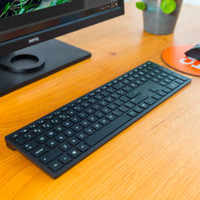
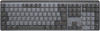
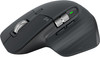
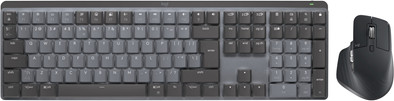
Logitech MX Mechanical Wireless Keyboard + Logitech MX Master 3S

Never available again
View alternatives in the sidebar
View alternatives in the sidebar
How large is a mouse exactly? It's often difficult to see on a photo. That's why we thought of the thumb rule below.
Choose a mouse that takes up more than half of the surface of the dimensions of your hand. You can find the dimensions of the mouse under the specifications.
Your hands are often 2 times longer from your wrist to the tip of your middle finger than that it's wide from your little finger to the knuckle of your thumb. The closer the length and width a mouse come to 60% of the length and width of your hands, the more likely it is that the mouse feels comfortable in your hand.

Product number | 908468 | |
|---|---|---|
Manufacturer code | 920-010757 | |
Brand | Logitech | |
Processing of your defect | Via Coolblue | |
Old product returned for free |
Keyboard layout | QWERTY | |
|---|---|---|
Geographic keyboard layout | US layout | |
Physical keyboard layout | ISO | |
Typing comfort | Mid-range | |
Backlit keyboard | ||
Spill-resistant | ||
Color lighting | White | |
Number of colors lighting | 1 | |
Brightness of backlight adjustable | ||
Programmable keys | ||
Multimedia shortcuts | ||
Flat keys | ||
Suitable for gaming | ||
Mechanical keyboard | ||
Mechanical key type | Tactile Quiet | |
Type of keycaps | Low |
Connection type | Wireless | |
|---|---|---|
Type of wireless connection | USB and Bluetooth | |
Bluetooth version | 5.0 | |
Nano receiver | ||
Type of USB port | USB-C |
Keyboard composition | Keyboard, Numpad | |
|---|---|---|
Type of ergonomics | Not ergonomic | |
Ergonomic design | ||
Height | 2,6 cm | |
Width | 43,4 cm | |
Depth | 13,2 cm | |
Wrist rest | ||
Color | Black | |
Weight | 828 g |
Gaming keyboard suitable for activity type | On the go and LAN parties | |
|---|---|---|
Gaming keyboard suitable for game type | Strategic games |
Power supply type | Rechargeable battery |
|---|
Product number | 908518 | |
|---|---|---|
Manufacturer code | 910-006559 | |
Brand | Logitech | |
Processing of your defect | Via Coolblue | |
Old product returned for free |
Mouse model | Standard | |
|---|---|---|
Input | Laser | |
Number of buttons | 7 | |
Ergonomic design | ||
Left or right-handed | Right-handed | |
Maximum dots per inch (DPI) | 8000 dpi | |
Adjustable DPI | ||
Mouse controls | Buttons, Scroll wheel | |
Suitable for gaming | ||
Scroll fast | ||
Rechargeable | ||
Programmable buttons | ||
Number of programmable buttons | 3 | |
Lighting peripherals | ||
Silent mouse | ||
Horizontal scrolling | ||
Mouse surface | Any surface | |
Product family | MX |
Connection type | Wireless | |
|---|---|---|
Type of wireless connection | Bluetooth | |
Bluetooth version | 5.0 | |
Nano receiver | ||
Number of devices that can be paired | 1 - 3 | |
Type of USB port | USB-C |
Plug and Play | ||
|---|---|---|
Compatible with operating system | ChromeOS, Windows, macOS |
Power supply type | Rechargeable battery, USB port PC/laptop | |
|---|---|---|
Battery level indicator | ||
Replaceable battery | ||
Battery included |
Color | Black | |
|---|---|---|
Mouse size | Medium | |
Width | 8,4 cm | |
Height | 5,1 cm | |
Depth | 12,49 cm | |
Material | Plastic | |
Finish | Matte | |
Weight | 144 g |
According to our keyboard expert
With this Logitech MX bundle, you can get to work on your laptop or desktop right away.
You can connect the keyboard via Bluetooth or the USB receiver and use it for up to 3 devices at the same time via Logi Options+.
The keyboard has mechanical keys, which register every keystroke faster.
To use the keyboard and mouse optimally, you need external Logitech software.
This mouse is only suitable for right-handed users.
Work extra accurately and productively with the Logitech MX Mechanical Wireless Keyboard + Logitech MX Master 3S bundle. The Logitech MX Mechanical has mechanical keys, so all the keystrokes are registered with the highest precision. This is faster than a regular keyboard. You also receive nice feedback from your keyboard, so you can hear and feel that you've pressed the key. You can also easily enter formulas and numbers via the numeric keypad. The Logitech MX Master 3S has multiple thumb buttons, a horizontal scroll wheel, and the well-known MagSpeed scroll wheel. The mouse also has a DPI of 8000, so you can efficiently and accurately navigate through all your pages. You can use both the mouse and keyboard with up to 3 devices at the same time and quickly switch at the touch of a button.
5 stars
26
4 stars
11
3 stars
6
2 stars
0
1 star
1
Installation ease
Ergonomics
High-quality keyboard. I think it is too small, there is also a mini version, but logitech still chooses to keep this keyboard small, which does not benefit your arm position. There are problems when you switch working in virtual desktop environment. That is really problematic. In addition, logitech does not use a print screen button, but a macro functionality. It doesn't work with third-party software like Snagit. Then you have to reassign the key and connect an extra keyboard to register the print screen button... (luckily you can also use the Windows onscreen keyboard). But this is not a gaming keyboard and this kind of error is not part of such an expensive keyboard, which will mainly be used for business.
Constant
7 April 2023
Automatically translated from Nederlands
Maybe I could have gotten used to the ISO layout, but the travel was too heavy for me. I'd rather have a keyboard that feels "right" right away, rather than having to adapt to Logitech's caverns.
Bas
7 July 2022
Automatically translated from Nederlands
After 1 week, hope it lasts a long time.
Michel
16 November 2022
Automatically translated from Nederlands