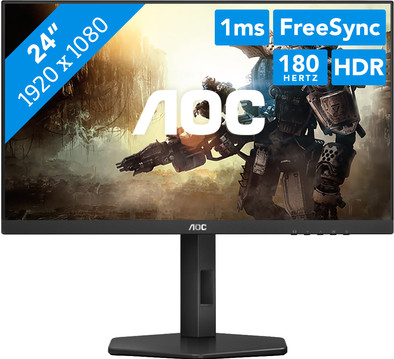
Never available again
View alternatives in the sidebar
View alternatives in the sidebar
Product number | 944738 | |
|---|---|---|
Manufacturer code | 24G4X | |
Brand | AOC | |
Processing of your defect | Via Coolblue | |
Old product returned for free |
Screen size | 24 inches | |
|---|---|---|
Recommended display resolution | 1920x1080 | |
Sharpness | Full HD (1080p) | |
Aspect ratio | Standard (16:9) | |
Refresh rate | 180 Hz | |
Response time | 1 ms | |
Panel type | IPS panel | |
Brightness | 250 cd/m2 | |
Local dimming | ||
HDR support | ||
Contrast ratio | 1300 | |
Touchscreen | ||
Type of HDR | HDR10 | |
Screen reflection | Anti-glare | |
Blue light filter | ||
Flicker-free technology | ||
Color space | sRGB | |
sRGB color coverage percentage | 130,4 % | |
Color depth | 17 million colors (8-bit) | |
Adaptive Sync | ||
Type of adaptive sync | FreeSync, G-Sync Compatible | |
Resolution width | 1920 pixels | |
Resolution height | 1080 pixels | |
Anti-reflection type | Anti glare | |
Horizontal viewing angle | 178 ° |
Height | 32,5 cm | |
|---|---|---|
Width | 54 cm | |
Depth | 5,1 cm | |
Weight | 4,41 kg | |
Color | Black | |
Including stand | ||
Material | Metal, Plastic | |
Cable management | ||
Appearance | Gaming | |
Curved |
Number of HDMI connectors | 2 | |
|---|---|---|
Number of Female HDMI type A 2.0 ports | 2 | |
Number of headphone jacks | 1 | |
Type of headphone connection | 3.5mm (TRS) | |
Number of Female Standard DisplayPort 1.4 ports | 1 | |
Number of female 3.5mm TRS Audio Jack ports | 1 | |
Number of Female RJ-45 ports | 0 | |
Suitable for daisy chaining |
Included by default | DisplayPort cable, HDMI cable |
|---|
Adjustable in height | ||
|---|---|---|
Tiltable | ||
Pivotable stand | ||
Pivot function | ||
VESA mount option | ||
VESA mount | 100x100mm |
Energy label | E | |
|---|---|---|
Energy consumption standby | 0,5 W | |
Energy consumption active | 21 W | |
Energy consumption per 1000h | 18 kWh | |
Annual energy consumption | 26,28 kWh | |
Annual energy costs | 10,51 euros |
Built-in speakers | ||
|---|---|---|
Sound system | Stereo | |
Webcam | ||
Split screen | ||
Kensington lock |
Recommended for use | Gaming, Internet, email, and text processing, Watching movies in Full HD |
|---|
Sharpness | Full HD (1080p) | |
|---|---|---|
Curved | ||
Aspect ratio | Standard (16:9) | |
Refresh rate | 180 Hz | |
Response time | 1 ms | |
Panel type | IPS panel | |
Color depth | 17 million colors (8-bit) | |
Built-in speakers |
According to our monitor expert
With a 180Hz refresh rate, you can play fast-paced games smoothly.
The IPS panel lets you enjoy bright images from any viewing angle.
Your monitor and video card work smoothly together thanks to G Sync Compatible support.
You can’t see every detail clearly with Full HD quality.
To get the maximum refresh rate of 180 hertz, you can connect the monitor with DisplayPort.
5 stars
1
4 stars
2
3 stars
2
2 stars
0
1 star
0
Installation ease
Image quality
Price-quality ratio
Design
I bought this monitor for use of the indoor cycling app ROUVY, it fits perfectly on my Posa 2 tripod from ELITE and since it weighs less than 5 kg, this tripod can carry this monitor without any problem and remains very stable on it, I put a few thick elastic bands around it so it certainly cannot fall off the plateau of the tripod. Since it is a gaming monitor with a fast response time and high refresh rate and has HDMI 2.0, it is also ideal for use of my indoor cycling app ROUVY and I can use it smoothly without image glitches. Just connect my 4K Apple TV box with HDMI cable and it immediately recognizes my Apple TV on which the ROUVY app is installed. Excellent, just what I needed. Now I can at least see and read the layout of ROUVY clearly when I'm on the bike because with the small laptop screen I can never properly read the letters of the altimeters, speed, distance and wattage
For those who are looking for a monitor for indoor cycling apps such as ROUVY and ZWIFT and find it too expensive to buy an extra TV for this, this is ideal. Yes, my TV is in the living room and my indoor smart trainer is one floor up in my multi-purpose room. You just have to install your app on Apple TV and then connect it to this monitor via HDMI and you can go 4K Apple TV box has Bluetooth 5.0 so ideal for connecting to your smart trainer in my case Wahoo Kikr Core Please note that only a maximum of two Bluetooth devices can be connected to Apple TV and the remote control is already one, so you can only connect one more So you cannot connect a Bluetooth headset or Bluetooth speaker at the same time as your smart trainer otherwise it will not work
Paul
27 February 2025
Automatically translated from Nederlands
Unfortunately, the image quality is far from 24G2 from 2020.
Gontran
4 May 2024
Da die Preis-Leistung und die Spieltauglichkeit (180HZ, 1ms) und die Höhenverstellung haben mich dazu bewogen ihn zu kaufen. Nach dem Anschluss war ich von den Socken von der Bildqualität, ohne Einstellung. Das Einzige, was ich zu bemängeln habe, ist die nicht so gute Lesbarkeit der Beschriftung für die Einstellknöpfe auf dem unteren Panel, sie könnten etwas größer und heller sein, das war das Einzige, dass bei meinem alten Samsung. Ich würde den AOC 24G4X jederzeit wieder kaufen, da ich mir auch einige andere vorher und nachher angeschaut habe.
Joachim
9 August 2024