Apple MacBook Air 15 inches (2024) M3 (8-core CPU/10-core GPU) 8GB/256GB Starlight QWERTY

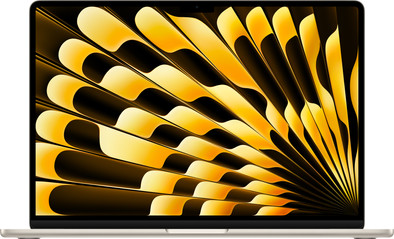
Never available again
View alternatives in the sidebar
View alternatives in the sidebar
Product number | 945312 | |
|---|---|---|
Manufacturer code | MRYR3N/A | |
Brand | Apple | |
Processing of your defect | Via Coolblue | |
Old product returned for free |
Screen size | 15,3 inches | |
|---|---|---|
Screen quality: laptops | High-end | |
Touchscreen | ||
Panel type | IPS panel | |
Sharpness | Liquid Retina | |
Resolution width | 2880 pixels | |
Resolution height | 1864 pixels | |
Refresh rate | 60 Hz | |
Screen reflection | Glossy | |
Brightness | 500 cd/m2 |
Processor | Apple M3 | |
|---|---|---|
Processor cores | Octa-Core (8) | |
Speed class laptops | High-end |
Internal RAM | 8 GB | |
|---|---|---|
Memory composition | 1x 8GB | |
Total number of RAM slots | 1 |
Total storage capacity | 256 GB | |
|---|---|---|
Storage type | SSD | |
SSD storage capacity | 256 GB | |
Hard drive type | NVMe |
Video card | Apple M3 | |
|---|---|---|
Type of video card | Shared |
Operating system | macOS | |
|---|---|---|
Operating system language | Multiple languages can be configured |
Recommended for use | Business use, Internet, email, and text processing, School, Streaming movies and series |
|---|
Build quality laptops | Mid-range | |
|---|---|---|
Laptop model | Laptop | |
Color | Gold | |
Material | Metal | |
Metal type | Aluminum | |
Height | 1,15 cm | |
Width | 34,04 cm | |
Depth | 23,76 cm | |
Weight | 1,51 kg |
Mobile data connection | No | |
|---|---|---|
WiFi standards | Wireless A (WiFi 2), Wireless AC (WiFi 5), Wireless AX (WiFi 6), Wireless B (WiFi 1), Wireless G (WiFi 3), Wireless N (WiFi 4) | |
Bluetooth | ||
Bluetooth version | 5.3 |
USB port | ||
|---|---|---|
Number of USB ports | 2 | |
Type of USB port | USB-C | |
Protocol Female USB-C port | Thunderbolt Alternative Mode | |
Video output via USB-C possible | Yes | |
HDMI connector | ||
DisplayPort connector | ||
VGA connector | ||
Network connector | ||
Thunderbolt connector | ||
Headphone jack | ||
Memory card reader |
Keyboard layout | QWERTY | |
|---|---|---|
Physical keyboard layout | ISO | |
Numeric keypad | ||
Spill-resistant | ||
Backlit keyboard | ||
Mechanical keyboard | ||
Programmable keys |
Built-in microphone | ||
|---|---|---|
Number of speakers | 6 | |
Sound reproduction | 360 degrees, Stereo | |
Integrated computer speakers brand | Dolby Atmos |
Built-in camera | ||
|---|---|---|
Image definition webcams | Full HD (1080p) |
Battery technology | Lithium polymer | |
|---|---|---|
Power connector input type (female) | Apple MagSafe 3, USB Type C | |
Charger included |
Manufacturer's warranty | ||
|---|---|---|
Type of manufacturer's warranty | Manufacturer's carry-in warranty | |
Manufacturer's carry-in warranty | 2 years |
TPM (Trusted platform module) | ||
|---|---|---|
Kensington lock | ||
Windows Hello | ||
Fingerprint identity sensor | ||
Security class laptops | High-end |
Extra installed software | ||
|---|---|---|
ISV certification |
Screen size | 15,3 inches | |
|---|---|---|
Processor | Apple M3 | |
Internal RAM | 8 GB | |
Total storage capacity | 256 GB | |
Video card | Apple M3 | |
Recommended for use | Business use, Internet, email, and text processing, School, Streaming movies and series | |
Panel type | IPS panel | |
Screen quality: laptops | High-end |
According to our laptop expert
Thanks to the Apple M3 chip, you work smoothly and fast in programs like iMovie and Adobe Photoshop.
You can connect 2 external screens to a closed MacBook, which allows you to multitask even better.
You can see more details on the larger 15-inch screen without your MacBook Air weighing more.
We recommend at least 512GB of storage if you store a lot of photos and programs.
Because this MacBook only has USB-C ports, you need a docking station sooner.
With the Apple MacBook Air 15 inches (2024) M3 (8-core CPU/10-core GPU) 8GB/256GB Starlight, you can work in programs like iMovie and Adobe Photoshop without slowing down. In addition to editing photos and videos, you can perform all your daily tasks. This model has 10 graphic cores, which allows you to perform graphic tasks smoothly. You can connect 2 external screens to a closed MacBook. This allows you to open multiple apps and programs and work with a clearer overview. With WiFi 6E, you enjoy a more stable network and work online without slowing down. Want to edit complex video files? Thanks to the 15-inch Liquid Retina display, you can enjoy 1 billion colors and clear details. The screen is larger, but it still doesn't weigh much. You can still easily take the 1.51kg MacBook with you. You don't have to worry about charging in between, because a fully charged MacBook Air lasts up to 18 hours or more.
5 stars
4
4 stars
2
3 stars
0
2 stars
0
1 star
0
The 15-inch Apple MacBook Air M3 (2024) is the lightest 15-inch laptop I've ever owned. I take it with me everywhere, because it fits in my bag. It is fast and energy efficient for image editing. Of course I also watch my favorite films and series on my MacBook. The razor-sharp Liquid Retina screen and the 6 Dolby Atmos speakers complete my movie experience. In short, a nice laptop for intensive use. I do think it is a shame that the anti-slip rubbers on the bottom do not work on every surface.
From surfing the internet to video editing: the MacBook Air can do it all I'm never bored with this MacBook Air. For example, I can score my new outfit online with Klarna, I am always up to date with the latest news through the widgets on my desktop and I can perform graphical edits smoothly. For example, I like to make a recap video after my holiday. I easily edit these in iMovie. I edit my photo files in Adobe Photoshop, which I then immediately share on Instagram. In the evening I play a game with my friends via Discord. The MacBook Air is also suitable for this: thanks to the 10 graphics cores and Ray Tracing technology, I can play light games from the App Store smoothly and the images look realistic.
A powerful display Thanks to the sharp 15-inch Liquid Retina screen, I never miss a detail when I edit my creations. I also keep a good overview in large spreadsheets when I keep track of my administration. Of course I also use my MacBook for work. If I have to multitask a lot, I can easily connect 2 external screens. My MacBook has to be closed for this, which I think is a shame. I prefer to have the beautiful Liquid Retina screen of my Air there. This is possible, but you only connect a maximum of 1 screen.
Few ports, but many connections With the MagSafe charging port, 2 USB C ports and the mini jack connection, the MacBook Air does not have much space for peripherals. Personally, I don't mind this so much. Nowadays you naturally connect many accessories via Bluetooth. Thanks to Bluetooth 5.4, the quality of my wireless headphones is better and I experience less delay when I connect devices such as my keyboard and mouse to my MacBook.
Rowan. Apple specialist.
30 April 2024
Automatically translated from Nederlands
Meets expectations in all respects.
Ruud
17 June 2024
Automatically translated from Nederlands
I've had this laptop for 2 months now and I couldn't be happier with it, it's great to use. I switched from the 13 inch pro from 2019.
Quinta
25 May 2024
Automatically translated from Nederlands