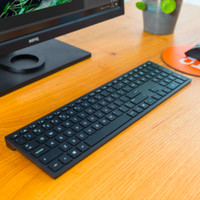
Apple Magic Keyboard with numeric keypad and Touch ID (2024) Black


Magic Keyboard with numeric keypad and Touch ID
pleasant to use
Miriam
24 October 2026
Automatically translated from Nederlands
Very nice keyboard. I previously had the wired keyboard with the numeric keypad from a long time ago. This keyboard is a nice wireless replacement. It's great that it has Touch ID for easily entering passwords, etc. The only drawback is that the keyboard is quite flat, and there are no adjustable feet or anything like that. It's comfortable to type on, but it would have been nice to be able to prop it up a bit more. The battery seems excellent, with a 10-15% decrease in two weeks. Charging is quick and easy with a USB-C cable (finally Apple!)
Jeroen
23 February 2026
Automatically translated from Nederlands
My laptop sits on a stand a little further than my arm's length. This made the Touch ID difficult to reach. Now that it's integrated into the keyboard, I have that convenience as well.
Lieuwe de Haan
14 February 2026
Automatically translated from Nederlands
Connection type | Wireless | |
|---|---|---|
Backlit keyboard | ||
Keyboard composition | Keyboard | |
Ergonomic design | ||
Mechanical keyboard | ||
Physical keyboard layout | ISO | |
Geographic keyboard layout | NL layout | |
Suitable for gaming |
According to our keyboard expert
With Touch ID, you can log in to your iMac without entering a password.
On the numeric keypad, you can quickly enter numbers and formulas.
You connect this wireless keyboard easily via Bluetooth.
This keyboard is only suitable for Mac models with Apple silicon.
Note: this keyboard is only suitable for Mac with Apple silicon and macOS 11.4 or higher.
With the wireless Apple Magic Keyboard with Touch ID (2024), you can type comfortably. This stylish keyboard has low profile keys, so it feels light while typing. Do you often work with numbers and formulas? On the numeric keypad, you can enter numbers quickly. With Touch ID, you can log in to your Mac with your fingerprint without entering a password. Additionally, you can easily switch users because everybody logs into their own profile with their own fingerprint. Thanks to the low weight and compact size, you can easily take this keyboard with you. You can easily connect the Magic Keyboard to your Mac or iPad via Bluetooth. When you use your device again later, this keyboard reconnects automatically. You don't have to worry about charging in between. The battery lasts more than a months with a single battery charge.
This is an original Apple accessory.
Product number | 956763 | |
|---|---|---|
Manufacturer code | MXK83N/A | |
Brand | Apple | |
Processing of your defect | Via Coolblue | |
Old product returned for free |
Keyboard layout | QWERTY | |
|---|---|---|
Geographic keyboard layout | NL layout | |
Physical keyboard layout | ISO | |
Typing comfort | Basic | |
Backlit keyboard | ||
Spill-resistant | ||
Programmable keys | ||
Multimedia shortcuts | ||
Flat keys | ||
Suitable for gaming | ||
Mechanical keyboard |
Connection type | Wireless | |
|---|---|---|
Type of wireless connection | Bluetooth | |
Nano receiver | ||
Type of USB port | USB-C |
Keyboard size | 100% (Complete) | |
|---|---|---|
Keyboard composition | Keyboard | |
Type of ergonomics | Not ergonomic | |
Ergonomic design | ||
Height | 1,09 cm | |
Width | 41,87 cm | |
Depth | 11,49 cm | |
Wrist rest | ||
Color | Black | |
Weight | 369 g |
Gaming keyboard suitable for activity type | On the go and LAN parties | |
|---|---|---|
Gaming keyboard suitable for game type | All-round games |
Power supply type | Rechargeable battery |
|---|
Coolblue takes care of everything, from taking out an insurance to repairs
For almost all accidents
More coverage in case of damage than your standard warranty
No deductible
First, add your keyboard to your shopping cart. On the next page, choose the Protection Plan below. You always have a 30-day return window and pay no deductible in case of damage.
2-year Protection Plan
18,99
one-time3-year Protection Plan
29,99
one-time
232,-
232,-
Current product

Wireless
Wireless
Keyboard
Keyboard
232,-
202,-
In stock
In stock