Iiyama ProLite XUB2797QSN-B2
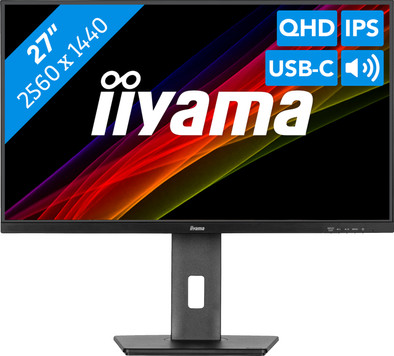
Never available again
View alternatives in the sidebar
View alternatives in the sidebar
Product number | 958021 | |
|---|---|---|
Manufacturer code | XUB2797QSN-B2 | |
Brand | Iiyama | |
Processing of your defect | Via Coolblue | |
Old product returned for free |
Screen size | 27 inches | |
|---|---|---|
Recommended display resolution | 2560x1440 | |
Sharpness | Quad HD (1440p) | |
Aspect ratio | Standard (16:9) | |
Refresh rate | 100 Hz | |
Response time | 1 ms | |
Panel type | IPS panel | |
Brightness | 300 cd/m2 | |
Local dimming | ||
HDR support | ||
Contrast ratio | 1300 | |
Touchscreen | ||
Screen reflection | Anti-glare | |
Blue light filter | ||
Flicker-free technology | ||
Color space | sRGB | |
sRGB color coverage percentage | 99 % | |
Color depth | Less than 17 million colors (less than 8-bit) | |
Adaptive Sync | ||
Resolution width | 2560 pixels | |
Resolution height | 1440 pixels | |
Anti-reflection type | Matte | |
Horizontal viewing angle | 178 ° |
Height | 40,05 cm | |
|---|---|---|
Width | 61,35 cm | |
Depth | 20,95 cm | |
Weight | 6,1 kg | |
Color | Black | |
Including stand | ||
Material | Plastic | |
Cable management | ||
Appearance | Business, Neutral | |
Curved |
Number of HDMI connectors | 1 | |
|---|---|---|
Number of Female HDMI type A 2.0 ports | 1 | |
Number of headphone jacks | 1 | |
Type of headphone connection | 3.5mm (TRS) | |
Number of USB-C ports | 1 | |
Number of Female Standard DisplayPort 1.4 ports | 1 | |
Number of female standard USB-A ports | 4 | |
Female standard USB-A port version | 3.0 | |
Number of female 3.5mm TRS Audio Jack ports | 1 | |
Number of female standard VGA ports | 0 | |
Type of USB port | Standard USB-A, USB-C | |
Number of USB ports | 4 | |
Suitable for daisy chaining | ||
USB-C dock | ||
Maximum USB-C dock power | 65 W |
Included by default | DisplayPort cable, HDMI cable, USB-C cable |
|---|
Adjustable in height | ||
|---|---|---|
Tiltable | ||
Pivotable stand | ||
Pivot function | ||
VESA mount option | ||
VESA mount | 100x100mm |
Energy label | E | |
|---|---|---|
Energy consumption standby | 0,5 W | |
Energy consumption active | 26 W | |
Energy consumption per 1000h | 22 kWh | |
Annual energy consumption | 32,12 kWh | |
Annual energy costs | 12,85 euros |
Built-in speakers | ||
|---|---|---|
Sound system | Stereo | |
Webcam | ||
Split screen | ||
Kensington lock |
Recommended for use | Image editing and graphic design, Internet, email, and text processing, Office work, Photo editing, Video editing, Watching movies in Full HD |
|---|
Our digital expert will help you, but it can sometimes make mistakes, like humans do.
According to our monitor expert
Sharp image: you can see graphs and text clearly thanks to the Quad HD resolution.
See bright colors: you can see bright colors, even when you’re sitting at an angle to the screen thanks to the IPS panel.
Charge your laptop: you can charge your laptop via the monitor thanks to the USB-C dock with 65W of power.
No webcam: you'll always need a separate webcam for video calling.
No Thunderbolt: you use separate cables for image, data, and power.
5 stars
23
4 stars
6
3 stars
1
2 stars
0
1 star
0
Installation ease
Image quality
Price-quality ratio
Design
Yes, definitely recommended for gamers too, nice sharp image and fast responses.
Harno
3 February 2025
Automatically translated from Nederlands
I bought this monitor to declutter my overcrowded desk. My goal was a clean setup with as few cables as possible. This was perfectly achieved thanks to the USB-C port.
The biggest advantages:
A small learning experience that made the purchase even better: Initially, I had some issues with a stuttering keyboard on my laptop's login screen, and the battery wouldn't charge past 81%. It seemed like a glitch, but it turned out to be a simple setting in the monitor itself. I changed the USB setting from USB 2.0 to USB 3.0, and all the problems were immediately resolved. This proved to be the key to smooth communication between the monitor and the laptop. It also unintentionally solved other issues, such as a somewhat sluggish mouse and unstable video quality in Teams.
I highly recommend this monitor. The image quality, the numerous connection options, and the ability to completely transform your workspace with a single cable make this an excellent investment.
Irshaad
17 September 2025
Automatically translated from Nederlands
Very quiet and nice image. Tidy up desk nicely. Supplied usb-c cable is of good length. All necessary cables are included
Av
6 January 2025
Automatically translated from Nederlands