Lenovo Yoga Tab Plus 256GB WiFi Blue with Stylus and Keyboard Cover QWERTY
Never available again
View alternatives in the sidebar
View alternatives in the sidebar
Product number | 958696 | |
|---|---|---|
Manufacturer code | ZAEG0018NL | |
Brand | Lenovo | |
Processing of your defect | Via Coolblue | |
Old product returned for free |
Tablet size | Large | |
|---|---|---|
Depth | 0,67 cm | |
Width | 29,1 cm | |
Height | 18,8 cm | |
Color | Blue | |
Material | Metal |
Child mode available | ||
|---|---|---|
Children's tablet | ||
Samsung Enterprise Edition |
Screen quality | Good | |
|---|---|---|
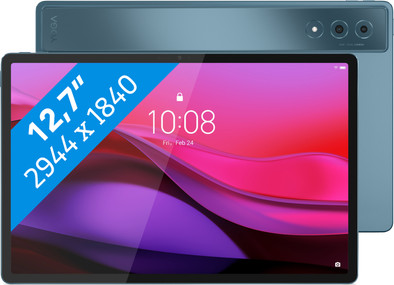
Screen size | 12,7 inches | |
Sharpness | 3K | |
Resolution height | 1840 pixels | |
Resolution width | 2944 pixels | |
Pixel density | 273 ppi | |
Brightness | 900 cd/m2 | |
HDR support | ||
Scratch resistant | ||
Panel type | IPS panel | |
Horizontal aspect ratio | 16 | |
Vertical aspect ratio | 10 | |
Refresh rate | 144 Hz |
Built-in WiFi | ||
|---|---|---|
WiFi standards | Wireless A (WiFi 2), Wireless AC (WiFi 5), Wireless AX (WiFi 6), Wireless AXE (WiFi 6E), Wireless B (WiFi 1), Wireless BE (WiFi 7), Wireless G (WiFi 3), Wireless N (WiFi 4) | |
Internet connection options | WiFi only | |
SIM card slot | ||
Bluetooth | ||
Bluetooth version | 5.4 | |
Headphone jack | ||
USB port | ||
Type of USB port | USB-C | |
Lightning connector | ||
Suitable for Samsung DeX |
Year introduced | 2025 | |
|---|---|---|
Introduction month | January | |
Access to Google Play Store | ||
Operating system | Android | |
Android version when introduced | Android 14 | |
Latest Android version | ||
Expected number of remaining Android updates | 2 | |
Expected frequency security updates | Each quarter | |
Expected date of last security update | January 2029 |
Total storage capacity | 256 GB | |
|---|---|---|
Memory card reader | ||
Internal RAM | 16 GB |
Speed class | Good | |
|---|---|---|
Processor | Qualcomm Snapdragon 8 Gen 3 | |
Processor cores | Octa-Core (8) | |
Clock speed | 2,3 GHz | |
Turbo speed | 3,3 GHz |
Autofocus | ||
|---|---|---|
Front Camera | ||
Number of megapixels front camera | 13 MP | |
Second rear camera | ||
Rear camera 2 lens type | Macro lens |
Battery/battery capacity | 10,2 Ah | |
|---|---|---|
Suitable for fast charging | ||
Suitable for fast charging type | Quick Charge 4+ | |
Power wired fast charging | 45 W |
Built-in speakers | ||
|---|---|---|
Sound reproduction | Stereo | |
Number of speakers | 6 |
Accelerometer | ||
|---|---|---|
GPS sensor | ||
Light sensor | ||
Fingerprint identity sensor | ||
Facial recognition |
Water-resistant | ||
|---|---|---|
Shockproof |
Our digital expert will help you, but it can sometimes make mistakes, like humans do.
According to our tablet expert
You don't have any problems with demanding tasks like 3D games and photo editing with this tablet.
You can watch your favorite movies and series on the good 12.7-inch screen.
On this large tablet, you can work comfortably on your documents.
This heavy tablet is less easy to take with you on the go.
The Lenovo Yoga Tab Plus is a fast tablet that I can comfortably use to work and watch my favorite shows. The tablet is a bit heavy, which makes it harder to take with me on the go.
I like the Lenovo Yoga Tab Plus's screen. The colors are vibrant. When I'm watching a show or reading a magazine, I feel like the colors really come alive. I love reading magazines on my tablet, and this one makes it even better. Documents like PDFs are also easy to read and extra clear thanks to the large screen. I can easily open multiple apps side by side on the screen. For example, I can take notes while video calling.
I can switch seamlessly between various demanding apps. I also find apps load very quickly when I open them. I work on various documents and multitask easily without stuttering. Even demanding games run smoothly on the Yoga Tab Plus. Large games load quickly and the gameplay is smooth. I hardly notice I'm playing them on a tablet.
What I really appreciate about the Yoga Tab Plus is that it comes with accessories. I received a keyboard cover and stylus in the box. I find the keyboard cover easy to attach. With the keyboard cover, the tablet becomes a small laptop, allowing me to easily take notes anywhere. I also find the stylus very user-friendly. When taking notes, it really feels like I'm writing on paper. I also operate my tablet smoothly with the stylus.
Dounia. Tablet specialist.
17 July 2025
Automatically translated from Nederlands
I was really looking forward to this tablet. I searched for a long time based on screen size, speed, memory, etc., and finally settled on this Lenovo. But they've changed all sorts of things in the Android interface, so there's a menu bar at the bottom of the screen. Other apps I run don't take this into account, so I can't use the bottom bar. When I insert the keyboard, I get the message... "Can I switch now because an update is running?" (but it's not running). PC mode is funny, but that's not what I bought a tablet for. Connecting to various Bluetooth devices isn't working (devices are all disconnected, but they're still not detected). After 40 years in IT, I've experienced TRA (Technology Related Anger) again. And then I realized, it might be a nice device, but it's not for me. Lenovo has put a kind of Apple-like user interface with all sorts of options (that I wasn't looking for) on Android, and that wasn't what I was looking for. Such a shame. I was really looking forward to it. It's going back.
Lilian
24 December 2025
Automatically translated from Nederlands
everything is tasty fast
walter
7 February 2025
Automatically translated from Nederlands