Saitek Flight Simulation X52 Pro

Never available again
View alternatives in the sidebar
View alternatives in the sidebar
Product number | 99526 | |
|---|---|---|
Manufacturer code | 945-000003 | |
Brand | Logitech G | |
Processing of your defect | Via Coolblue | |
Old product returned for free |
Type of controller | Joystick | |
|---|---|---|
Force feedback |
Computer platform | PC (Windows) | |
|---|---|---|
recommended for Virtual reality |
Cable length | 1,8 m | |
|---|---|---|
Connection type | Wired |
Power supply type | USB port PC/laptop |
|---|
Color | Black, Gray | |
|---|---|---|
Weight | 2,3 kg | |
Height | 27,8 cm | |
Depth | 17 cm | |
Width | 17 cm |
Type of controller | Joystick | |
|---|---|---|
Computer platform | PC (Windows) | |
Color | Black, Gray |
According to our flight stick expert
You can program the buttons via Saitek configuration software.
The useful mini analog sticks offer 6 degrees of freedom (6DoF), which is useful in space simulators.
Thanks to the included throttle, you have precise control over the speed of your virtual aircraft.
While flying, you won't always have time to look at the display.
The flight stick can be complicated for the beginner pilot.
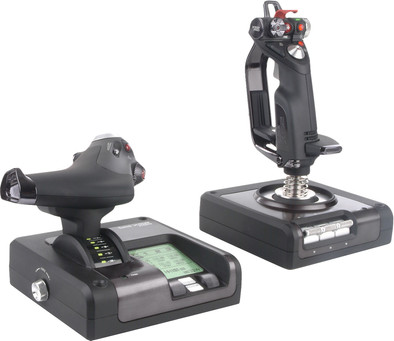
The Saitek Flight Simulation X52 Pro is designed for space and flight pilots, and is even more solid than the regular X52. With the Saitek Smart Technology (SST) software, you can compile a profile full of preset buttons for each game. You can create your own profile for each device and request it at any time. The Saitek X52 has even more aluminum parts: wear-resistant buttons that come in handy in every flight sim game. The Pro now also has double throttling, so that you can adjust the stick resistance even more precisely. One unit even has an illuminated Multi Function Display that regularly shows game data.
5 stars
20
4 stars
18
3 stars
3
2 stars
1
1 star
1
Reliability
User friendliness
Design
Options
A very good joystick + throttle where you also have many buttons that you can set. I set all this myself in Prepar3D and in FSUIPC. Compared to my previous joystick (MadCatz F.L.Y. 5), it also flies much nicer and I feel I have much better control over my plane.
Thanks to the Saitek X52 Pro I also fly much less with Autopilot after take-off and on finals (PMDG 737NGX + 777X, Aerosoft Airbus X).
A disadvantage is that it is sometimes difficult to use reverse thrust, as a temporary solution I have set a button that activates reverse thrust.
What I also regret is that I couldn't get the MFD working completely with Prepar3D, so I don't have the option to set the radio frequencies via the MFD.
Furthermore, you can also set all colors as desired with a certain driver and you even have the option to use 3 different profiles with a switch, each profile also has its own color (which is also adjustable). Unfortunately I was not able to use this much because I only fly in Prepar3D.
If you're looking for a new Joystick with throttle and lots of buttons to adjust, I definitely recommend the Saitek X52 Pro!
Dave Roverts
27 December 2016
Automatically translated from Nederlands
Previously I had a Microsoft Sidewinder joystick. Once used, it becomes clear what a mess the first one was. Your landing abilities will improve immediately with this thing. Still, I would have liked a longer USB cable, because in combination with a PC on the right it is not long enough. The programming possibilities and modes are almost unlimited. Unfortunately, it takes some time and effort to get all buttons and functions to function as desired. The throttle is also equipped with 2 threshold points that would be better absent for use in FSX. Is only interesting if, for example, an afterburner has to be controlled.
Gunther
3 January 2015
Automatically translated from Nederlands
"Why did you choose this product?" I wanted to have a joystick for combat flight sims. A must for me was that it was a HOTAS Joystick type: "Hands On Throttle And Stick." This means that you no longer have to use your keyboard while flying. I also wanted the set to be expandable with, for example, foot pedals.
R.D. van Horssen
22 August 2013
Automatically translated from Nederlands