Written by Bob
Edited on
12 March 2024
·
16:00
How do you choose a Samsung tablet charger?
You need a Samsung tablet charger to charge your battery, but the fastest chargers are no longer included by default. Nowadays, Samsung doesn't include the fastest charger anymore. Since 2020, Samsung only includes slower chargers. New models don't include a charger at all, like the Tab S8 and Tab S9. We're happy to help you choose a charger to charge your Samsung tablet much faster than with a standard charger.

Choose a Samsung tablet charger
Does it take long to charge your tablet? Choose a fast charger for your Samsung tablet and charge it extra fast. When you choose a Samsung tablet charger, ask yourself the following questions:
- Which Samsung tablet do you have?
- Do you want to charge extra fast?
- Do you have any old chargers?
Before you can choose the right charger for your Samsung tablet, you have to know which tablet you have. If you don't, we're happy to help you with that.
Compare suitable Samsung chargers
- 18W fast charger without cable
Fastest charger for the A series, Active series, and S series up to and including the S6 from 2019.
Charge your battery in about 3 hours
Not the fastest charger for the S9, S8, and S7
From
20,99
- 25W fast charger without cable
Faster charger for the S9, S8, and S7 series
Charge your battery in about 2 hours
Without cable
From
28,99
- 45W fast charger with cable
Fastest charger for the S9, S8, and S7 series
Charge your battery in about 1.5 hours
With special 45W fast charging cable
From
44,99


Which fast charger do you need?
Which fast charger is the best choice, differs per tablet. Every fast charger with at least 15W of power charger your Samsung tablet quickly. This could be a Samsung fast charger, or one from a different brand. If you don't use a fast charger, it can take 2 to up to 9 hours longer, depending on the size of your tablet. You can charge the Tab S7 and S8 series even faster with the special Samsung 25W or 45W fast charger. You can see how long it takes in the table.
it takes this long to charge up to 100%
| Included charger | 15W fast charger | 25W fast charger | 45W fast charger | |
|---|---|---|---|---|
| Tab S9 / S8 Ultra | Nothing included | 3.5 hours | 2 hours | 1.5 hours |
| Tab S9 / S8 Plus | Nothing included | 3 hours | 2 hours | 1.5 hours |
| Tab S9 / S8 | Nothing included | 2.5 hours | 2 hours | 1.5 hours |
| Tab S7 FE / S7 Plus | 3 hours | 3 hours | 2 hours | 1.5 hours |
| Tab S7 | 2.5 hours | 2.5 hours | 2 hours | 1.5 hours |
| Tab A8 / Tab A7 | 4 hours | 2 hours | n.a. | n.a. |
| Tab A7 Lite | 3.5 hours | 2 hours | n.a. | n.a. |
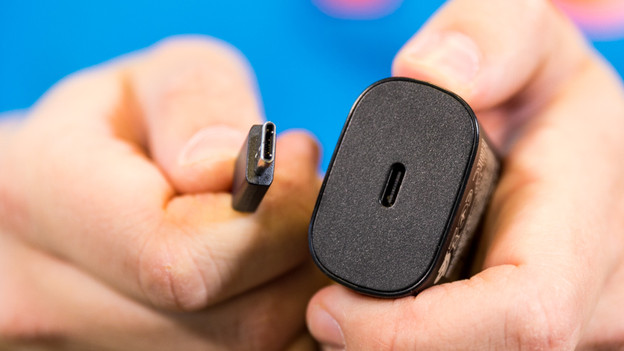
Can you use old cables and chargers?
If you have USB-C cables lying around, those will also work with your new tablet. Old charger are also suitable. Keep in mind that your old charger isn't usually the fastest option. Without fast charging, it takes hours to charge it. You should also keep in mind that the Tab S9 and S8 series include a USB-C to USB-C cable. This cable is only suitable for charger with an oval USB-C port, not for older charger with a rectangular USB-A port.
Article by Bob
Charger Expert.