
Written by Donato
Edited on
30 January 2023
·
15:43
How do you reset your LG TV to factory settings?
In this article, you can read how to reset your LG television to factory settings. That's useful if you have problems with your TV, or if you want to erase all data and settings. Note: after you reset, you'll lose all your settings.
Overview per brand
Don't have an LG television? Click the button below for an explanation on how to reset to factory settings per brand.
No image
Don't get an image on your TV? In that case, you can't follow these steps. Click the button below for more help if you don't see an image on your TV.
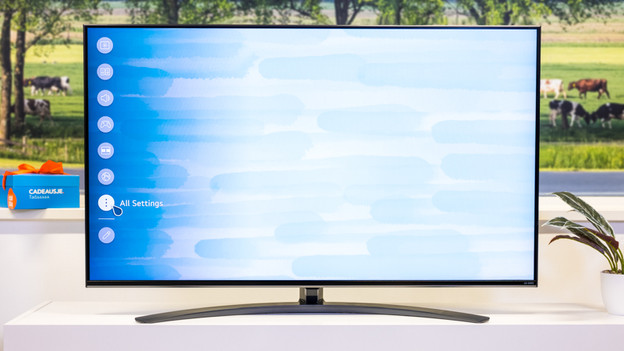
Step 2: open 'All settings'
Select the option All settings in the list of options and press the OK button. That's the button in the middle of the arrow buttons.
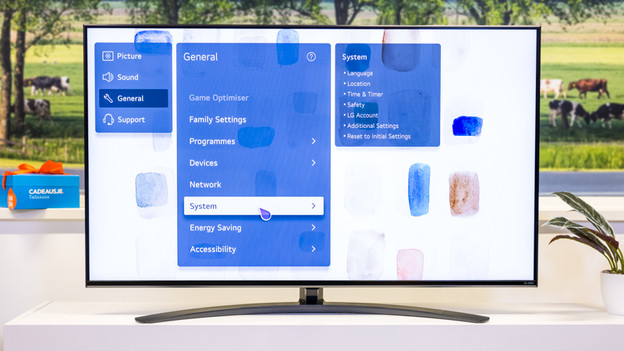
Step 3: navigate to General
Select the options General. Select the option 'System'.
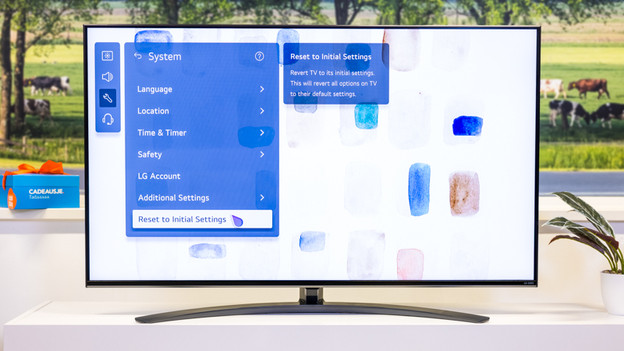
Step 4: go to Reset to Initial Settings
Go down until you see the Revert to factory settings option. The television will now ask you if you're sure you want to reset all of the settings. Select Confirm. Enter your password.
You're done!
The television will repair itself and shut down when it's done. Turn the television back on to re-calibrate your settings.
Article by Donato
Television Expert.
