Written by Laurence
Edited on
17 April 2024
·
07:21
What's the Samsung One Connect Box?
If you want to keep peripherals and cables of your TV setup neatly out of sigh, a Samsung TV with a One Connect Box is for you. This accessory contains the connectors for all your devices, so you can keep the amount of cables connecting to the TV to a minimum. In this article, we'll explain what the One Connect Box is and what you can use it for.
Connectors for all devices
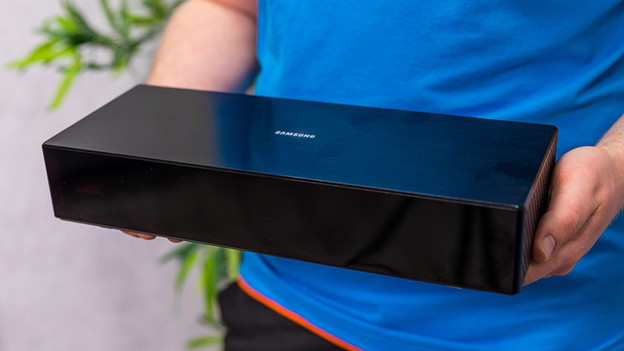
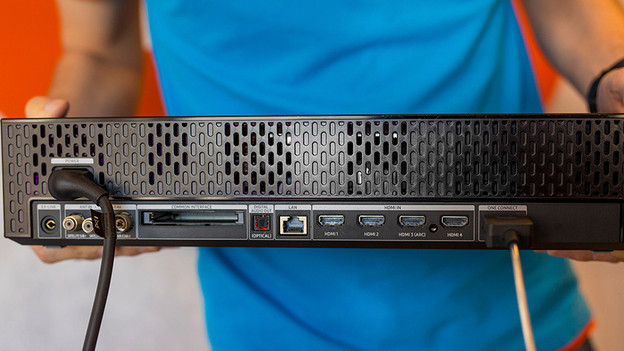
The One Connect Box is a separate box that has all important TV connectors. So it has multiple HDMI connectors for your console, soundbar, and the digital decoder from your TV provider. But also think of inputs for network cables, USB flash drives, and optical cables. And thanks to the compact size and modern design, you can easily blend the One Connect Box in your TV setup.
One transparent cable
Once you've connected the One Connect Box to all your peripherals, you connect it to your TV with a single transparent 'Invisible Cable'. This cable usually 5m long, but there are also 15m versions. With this, you can place the One Connect Box as well as your peripherals neatly out of sight in a closed cabinet or TV cabinet. If you want to connect another device, you won't have to crawl behind the TV. This is particularly useful if your TV is mounted tightly on the wall.
Connectors of the One Connect Box
The front of the One Connect Box
The Invisible Cable



Included with Samsung TVs
You'll find the One Connect Box as an accessory in the box of a number of Samsung QLED TV models. Some variants even have a connector for your power cable. This is useful, as it allows you to send power from the grid via the Invisible Cable to your TV. Do note: only TVs that include the One Connect Box by default have a suitable connector for this accessory. So you can't connect the Box to other Samsung TVs.